







Question: please help and show work! excel sheet listed below. thank you!! 5 7 8 3. In C12:C20, use MATCH function to find the relative position
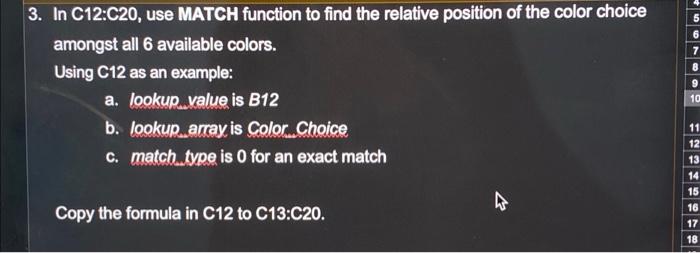
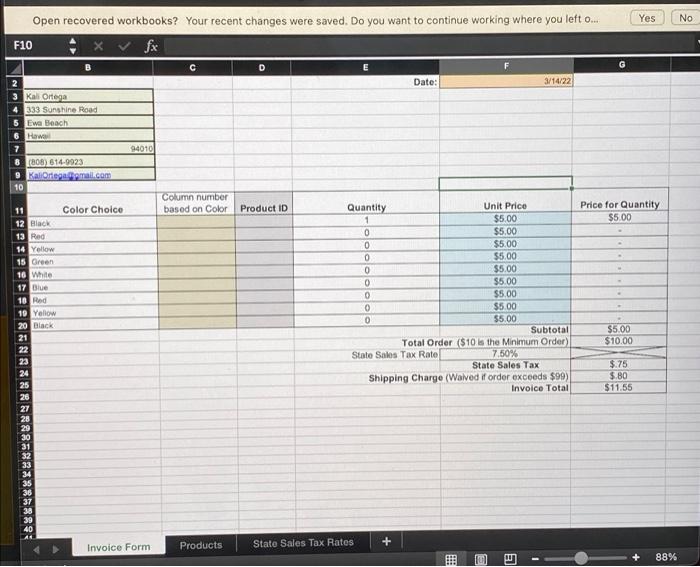
5 7 8 3. In C12:C20, use MATCH function to find the relative position of the color choice amongst all 6 available colors. Using C12 as an example: a. lookup value is B12 b. lookup, array, is Color..Choice c. match type is 0 for an exact match 9 10 11 12 13 14 15 16 17 18 Copy the formula in C12 to C13:C20. --- Yes No Open recovered workbooks? Your recent changes were saved. Do you want to continue working where you left ou F10 x fx Date: 3/14/22 3 Kal Ortega 333 Sunshine Road 5 Ewa Beach 6 How 7 8 (808) 614.9923 9 Kal Ortega domail.com 10 94010 Column number based on Color Color Choice Product ID Price for Quantity $5.00 11 12 Black 13 Red 14 Yellow 15 Green 10 White 17 Blue 10 Red 19 Yellow 20 Black 21 22 23 24 25 26 27 28 29 30 Quantity Unit Price 1 $5.00 0 $5.00 0 $5.00 0 $5.00 0 $5.00 0 $5.00 0 $5.00 0 $5.00 0 $5.00 Subtotal Total Order ($10 is the Minimum Order) State Sales Tax Rate 7.50% State Sales Tax Shipping Charge (Waived if order exceeds $99) Invoice Total $5.00 $10.00 $.75 $.80 $11.55 33 68*9*&*&%EBUN 35 36 37 38 39 40 Products Invoice Form + State Sales Tax Rates 00 88%
Step by Step Solution
There are 3 Steps involved in it

Get step-by-step solutions from verified subject matter experts
 Study Help