







Question: please help Assignment Learning Objectives: (a) Develop a proforma project income statement using an Excel spreadsheet (b) Compute net project cash flows, NPV, IRR and
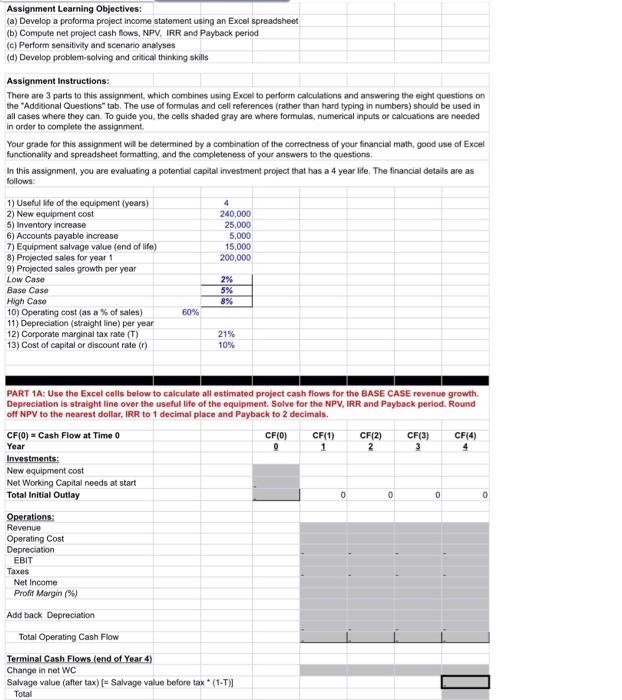
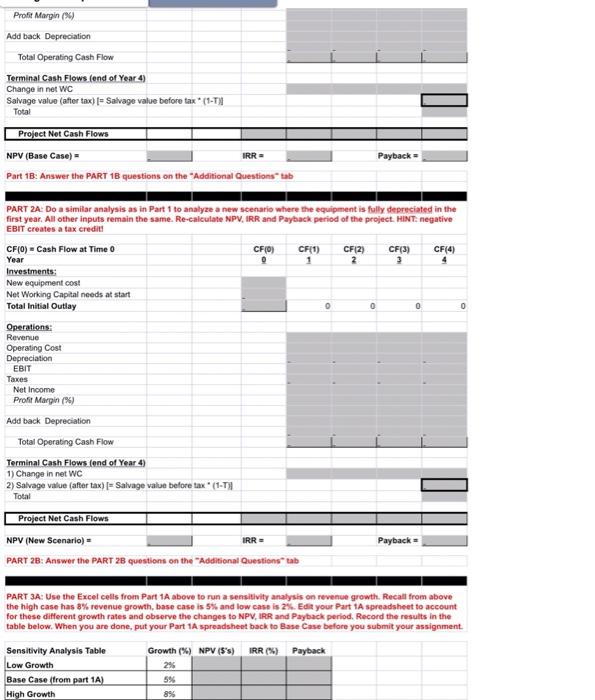
Assignment Learning Objectives: (a) Develop a proforma project income statement using an Excel spreadsheet (b) Compute net project cash flows, NPV, IRR and Payback period (c) Perform sensitivity and scenario analyses (d) Develop problem-solving and eritical thinking skills Assignment Instructions: There are 3 parts to this assignment, which combines using Excol to perform calculations and answering the eight questions on the "Additional Questions" tab. The use of formulas and cell references (rather than hard typing in numbers) should be used in all cases where they can. To guide you, the cells shaded gray are where formulas, numerical inputs or calcuations are needed in order to complete the assignment. Your grade for this assignment will be determined by a combination of the correctness of your financial math, good use of Excel functionality and spreadsheet formatting, and the completeness of your answers to the questions, In this assignment, you are evaluating a potential capital investment project that has a 4 year life, The financial details are as follows: PART 1A: Use the Excel colls below to calculate all estimated project cash flows for the BASE CASE revenue growth. Depreciation is straight line over the useful life of the equipment. Solve for the NPV, IRR and Payback period. Round off NPV to the nearest dollar, IRR to 1 decimal place and Payback to 2 decimals. Profit Margin (*) Add back Depreciation Total Operating Cash Flow Terminal Cash Flows (end of Year 4) Change in net WC Salvage value (after tax) I= Salvage value before tax * (1-T)] Total Project Not Cash Flows NPV ( Base Case )= IRR=Payback= Part 18: Answer the PART 18 questions on the "Additional Questions" tab PART 2A: Do a similar analysis as in Part 1 to analyze a new scenario where the equipment is fully depreciated in the first year. All other inputs remain the same. Re-calculate NPV, IRR and Payback period of the project. HiNTE negative EBIT creates a tax eredits CF (0)= Cash Flow at Time 0 Year Investments: New equipment cost Net Working Capital needs at start Total Initial Outlay Qperations: Revenue Operating Cost Depreciation EBIT Taxes Net income Profit Margin (\$) Add back. Depreciation Total Operating Cash Flow Terminal Cash Flows (end of Year 4) 1) Change in net WC 2) Salvage value (after tax) [= Salvage value belore tax *(1-T)] Total Project Net Cash Flows NPV ( New Scenario )= IRR=Payback= PART 2B: Answer the PART 2B questions on the "Additional Questions' tab PART 3A: Use the Excel cells from Part 1A above to run a sensitivily analysis on revenue growth. Recall from above the high case has 8% revenue growth, base case is 5% and low case is 2%. Edit your Part 14 spreadsheet to acceunt for these different growth rates and observe the changes to NPV, IRR and Payback period. Record the results in the table below. When you are done, put your Part 1A spreadsheet back to Base Case before you submit your assignment. Assignment Learning Objectives: (a) Develop a proforma project income statement using an Excel spreadsheet (b) Compute net project cash flows, NPV, IRR and Payback period (c) Perform sensitivity and scenario analyses (d) Develop problem-solving and eritical thinking skills Assignment Instructions: There are 3 parts to this assignment, which combines using Excol to perform calculations and answering the eight questions on the "Additional Questions" tab. The use of formulas and cell references (rather than hard typing in numbers) should be used in all cases where they can. To guide you, the cells shaded gray are where formulas, numerical inputs or calcuations are needed in order to complete the assignment. Your grade for this assignment will be determined by a combination of the correctness of your financial math, good use of Excel functionality and spreadsheet formatting, and the completeness of your answers to the questions, In this assignment, you are evaluating a potential capital investment project that has a 4 year life, The financial details are as follows: PART 1A: Use the Excel colls below to calculate all estimated project cash flows for the BASE CASE revenue growth. Depreciation is straight line over the useful life of the equipment. Solve for the NPV, IRR and Payback period. Round off NPV to the nearest dollar, IRR to 1 decimal place and Payback to 2 decimals. Profit Margin (*) Add back Depreciation Total Operating Cash Flow Terminal Cash Flows (end of Year 4) Change in net WC Salvage value (after tax) I= Salvage value before tax * (1-T)] Total Project Not Cash Flows NPV ( Base Case )= IRR=Payback= Part 18: Answer the PART 18 questions on the "Additional Questions" tab PART 2A: Do a similar analysis as in Part 1 to analyze a new scenario where the equipment is fully depreciated in the first year. All other inputs remain the same. Re-calculate NPV, IRR and Payback period of the project. HiNTE negative EBIT creates a tax eredits CF (0)= Cash Flow at Time 0 Year Investments: New equipment cost Net Working Capital needs at start Total Initial Outlay Qperations: Revenue Operating Cost Depreciation EBIT Taxes Net income Profit Margin (\$) Add back. Depreciation Total Operating Cash Flow Terminal Cash Flows (end of Year 4) 1) Change in net WC 2) Salvage value (after tax) [= Salvage value belore tax *(1-T)] Total Project Net Cash Flows NPV ( New Scenario )= IRR=Payback= PART 2B: Answer the PART 2B questions on the "Additional Questions' tab PART 3A: Use the Excel cells from Part 1A above to run a sensitivily analysis on revenue growth. Recall from above the high case has 8% revenue growth, base case is 5% and low case is 2%. Edit your Part 14 spreadsheet to acceunt for these different growth rates and observe the changes to NPV, IRR and Payback period. Record the results in the table below. When you are done, put your Part 1A spreadsheet back to Base Case before you submit your assignment
Step by Step Solution
There are 3 Steps involved in it

Get step-by-step solutions from verified subject matter experts
 Study Help