







Question: Please help calculate in Excel Table with step by step and showing formulas. Thanks In the green cells calculate Commissions as follows: COMMISSIONS = 5%
Please help calculate in Excel Table with step by step and showing formulas. Thanks
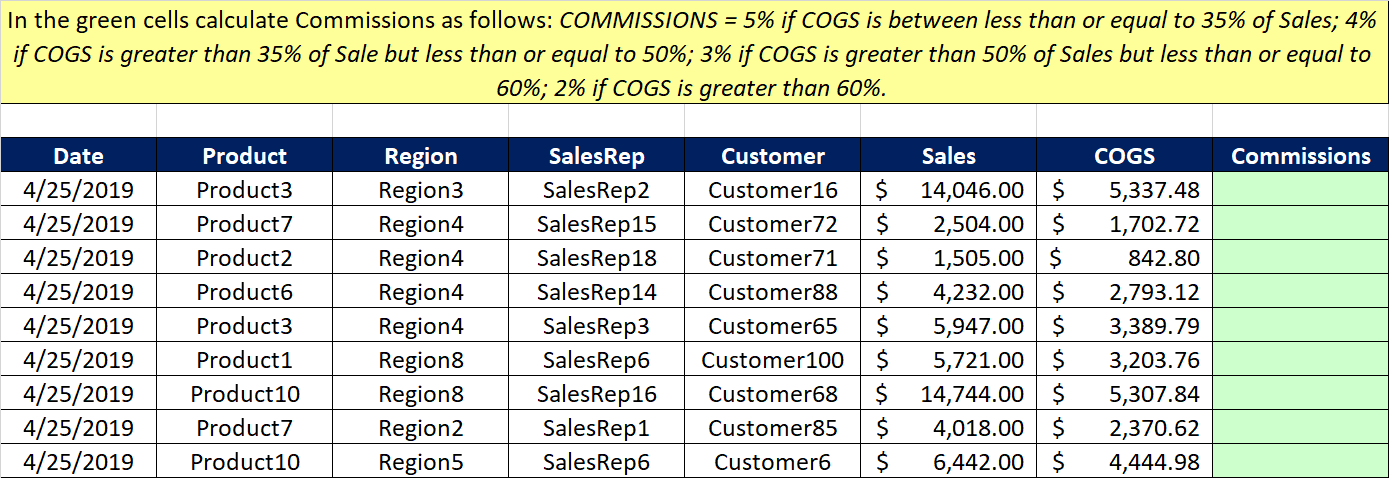
In the green cells calculate Commissions as follows: COMMISSIONS = 5% if COGS is between less than or equal to 35% of Sales; 4% if COGS is greater than 35% of Sale but less than or equal to 50%; 3% if COGS is greater than 50% of Sales but less than or equal to 60%; 2% if COGS is greater than 60%. Date Product Region SalesRep Customer Sales COGS 4/25/2019 Commissions Product3 Region3 SalesRep2 Customer16 $ 14,046.00 $ 5,337.48 4/25/2019 Product7 Region4 SalesRep15 Customer72 $ 2,504.00 1,702.72 4/25/2019 Product2 Region4 SalesRep18 Customer71 $ 1,505.00 842.80 4/25/2019 Product6 Region4 SalesRep14 Customer88 4,232.00 $ 2,793.12 4/25/2019 Product3 Region4 SalesRep3 Customer65 $ 5,947.00 $ 3,389.79 4/25/2019 Product1 Region8 SalesRep6 Customer100 $ 5,721.00 $ 3,203.76 4/25/2019 Product10 Region8 SalesRep16 Customer68 14,744.00 4/25/2019 5,307.84 Product7 Region2 SalesRep1 Customer85 S 4,018.00 $ 2,370.62 4/25/2019 Product10 Region5 SalesRep6 Customer6 $ 6,442.00 $ 4,444.98
Step by Step Solution
There are 3 Steps involved in it

Get step-by-step solutions from verified subject matter experts
 Study Help