







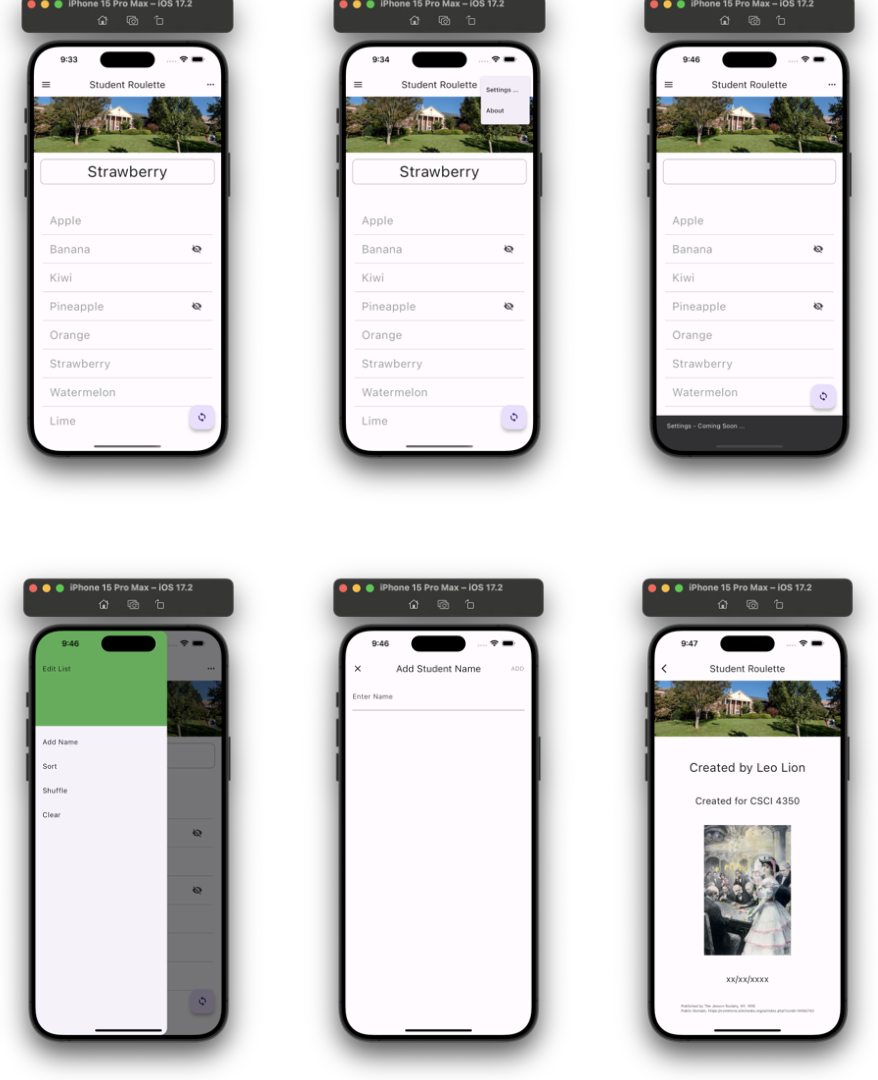
Question: Please help fix my dart / flutter app. it is supposed to look just like the picture. I keep getting an error for downloading the
Please help fix my dartflutter app. it is supposed to look just like the picture. I keep getting an error for downloading the uri shared prefernces. The code is provided below please edit it to get it to look like the pictures. Thank you so much. import 'package:fluttermaterialdart';
import 'dart:math';
import 'package:sharedpreferencessharedpreferences.dart';
void main
runAppMyApp;
class MyApp extends StatelessWidget
@override
Widget buildBuildContext context
return MaterialApp
title: 'Random Student Picker',
theme: ThemeData
primarySwatch: Colors.blue,
home: RandomStudentPicker
;
class RandomStudentPicker extends StatefulWidget
@override
RandomStudentPickerState createStateRandomStudentPickerState;
class RandomStudentPickerState extends State
final List students ;
final List hiddenStudents ;
String selectedStudent ;
@override
void initState
super.initState;
loadStudents;
Future loadStudents async
SharedPreferences prefs await SharedPreferences.getInstance;
setState
students.addAllprefsgetStringListstudents;
hiddenStudents.addAllprefsgetStringListhiddenStudents;
;
Future saveStudents async
SharedPreferences prefs await SharedPreferences.getInstance;
await prefs.setStringListstudents students;
await prefs.setStringListhiddenStudents hiddenStudents;
void pickRandomStudent
setState
final List visibleStudents
students.wherestudenthiddenStudents.containsstudenttoList;
if visibleStudentsisNotEmpty
final Random random Random;
selectedStudent visibleStudentsrandomnextIntvisibleStudentslength;
printSelected Student: $selectedStudent';
else
printNo visible students available';
;
void toggleVisibilityString student
setState
if hiddenStudentscontainsstudent
hiddenStudents.removestudent;
else
hiddenStudents.addstudent;
saveStudents;
;
void addNameString name
setState
students.addname;
saveStudents;
;
void deleteStudentString student
setState
students.removestudent;
hiddenStudents.removestudent; Remove from hidden list as well
saveStudents;
;
@override
Widget buildBuildContext context
return Scaffold
appBar: AppBar
title: TextRandom Student Picker'
actions:
IconButton
icon: IconIconssettings
onPressed:
ScaffoldMessenger.ofcontextshowSnackBar
SnackBar
content: TextSettings will be coming soon'
;
IconButton
icon: IconIconsinfo
onPressed:
Navigate to about screen
Navigator.push
context,
MaterialPageRoutebuilder: context AboutScreen
;
body: ListView.builder
itemCount: students.length,
itemBuilder: context index
final student studentsindex;
return Dismissible
key: Keystudent
onDismissed: direction
deleteStudentstudent;
background: Container
color: Colors.red,
child: IconIconsdelete
alignment: Alignment.centerRight,
child: ListTile
title: Textstudent
onTap:
toggleVisibilitystudent;
leading: hiddenStudents.containsstudent
IconIconsvisibilityoff
: null,
;
floatingActionButton: FloatingActionButton
onPressed: pickRandomStudent,
tooltip: 'Pick Random Student',
child: IconIconssync
;
class AboutScreen extends StatelessWidget
@override
Widget buildBuildContext context
return Scaffold
appBar: AppBar
title: TextAbout
body: Center
child: Column
mainAxisAlignment: MainAxisAlignment.center,
children:
Text
'CSCI
style: TextStylefontSize:
Image.asset
'assetsimagespiedmontcollegebanner.jpg
width:
height:
Text
Step by Step Solution
There are 3 Steps involved in it
1 Expert Approved Answer
Step: 1 Unlock

Question Has Been Solved by an Expert!
Get step-by-step solutions from verified subject matter experts
Step: 2 Unlock
Step: 3 Unlock
 Study Help