





Question: PLEASE HELP Home Comments V Paste Dictate Editor V V 1 1 3 4 6 7 8 9 11 5 1 13 14 15 16

PLEASE HELP
PLEASE HELP Home Comments V Paste Dictate Editor

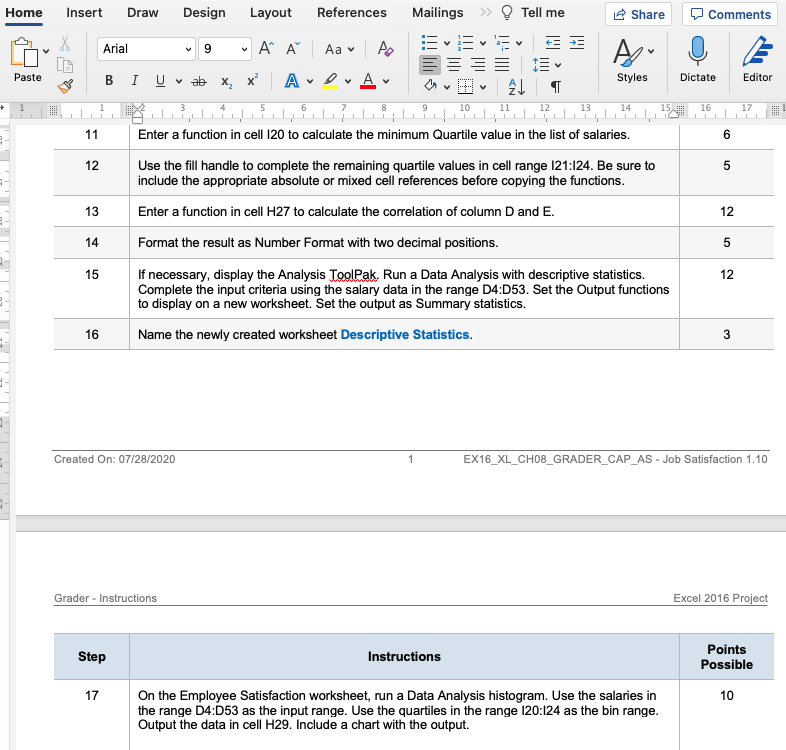
Home Comments V Paste Dictate Editor V V 1 1 3 4 6 7 8 9 11 5 1 13 14 15 16 17 11 6 12 5 Insert Draw Design Layout References Mailings >> Tell me Share X Arial 9 AF Aa v to ES ab X | A Styles AL 12 LL LLP,1,10 ! Enter a function in cell 120 to calculate the minimum Quartile value in the list of salaries. Use the fill handle to complete the remaining quartile values in cell range 121:124. Be sure to include the appropriate absolute or mixed cell references before copying the functions. 13 Enter a function in cell H27 to calculate the correlation of column D and E. 14 Format the result as Number Format with two decimal positions. 15 If necessary, display the Analysis ToolPak. Run a Data Analysis with descriptive statistics. Complete the input criteria using the salary data in the range D4D53. Set the Output functions to display on a new worksheet Set the output as Summary statistics. 16 Name the newly created worksheet Descriptive Statistics. 12 5 12 3 Created On: 07/28/2020 1 EX16_XL_CH08_GRADER_CAP_AS - Job Satisfaction 1.10 Grader - Instructions Excel 2016 Project Step Instructions Points Possible 17 10 On the Employee Satisfaction worksheet, run a Data Analysis histogram. Use the salaries in the range D4:053 as the input range. Use the quartiles in the range 120:124 as the bin range. Output the data in cell H29. Include a chart with the output. Home Comments V Paste Dictate Editor V V 1 1 3 4 6 7 8 9 11 5 1 13 14 15 16 17 11 6 12 5 Insert Draw Design Layout References Mailings >> Tell me Share X Arial 9 AF Aa v to ES ab X | A Styles AL 12 LL LLP,1,10 ! Enter a function in cell 120 to calculate the minimum Quartile value in the list of salaries. Use the fill handle to complete the remaining quartile values in cell range 121:124. Be sure to include the appropriate absolute or mixed cell references before copying the functions. 13 Enter a function in cell H27 to calculate the correlation of column D and E. 14 Format the result as Number Format with two decimal positions. 15 If necessary, display the Analysis ToolPak. Run a Data Analysis with descriptive statistics. Complete the input criteria using the salary data in the range D4D53. Set the Output functions to display on a new worksheet Set the output as Summary statistics. 16 Name the newly created worksheet Descriptive Statistics. 12 5 12 3 Created On: 07/28/2020 1 EX16_XL_CH08_GRADER_CAP_AS - Job Satisfaction 1.10 Grader - Instructions Excel 2016 Project Step Instructions Points Possible 17 10 On the Employee Satisfaction worksheet, run a Data Analysis histogram. Use the salaries in the range D4:053 as the input range. Use the quartiles in the range 120:124 as the bin range. Output the data in cell H29. Include a chart with the output

Step by Step Solution

There are 3 Steps involved in it

1 Expert Approved Answer
Step: 1 Unlock blur-text-image

Question Has Been Solved by an Expert!

Get step-by-step solutions from verified subject matter experts

Step: 2 Unlock
Step: 3 Unlock

Students Have Also Explored These Related General Management Questions!