







Question: Please help, I am not able to get my expected output! . js file: use strict; var canvas; var gl; var numPositions = 1 2
Please help, I am not able to get my expected output!
js file:
"use strict";
var canvas;
var gl;
var numPositions ;
var positions ;
var colors ;
var xAxis ;
var yAxis ;
var zAxis ;
var axis ;
var theta ;
var thetaLoc;
window.onload function init
canvas document.getElementByIdglcanvas";
gl canvas.getContextwebgl;
if gl alertWebGL isn't available";
colorPyramid;
glviewport canvas.width, canvas.height;
glclearColor;
glenableglDEPTHTEST;
Load shaders and initialize attribute buffers
var program initShadersgl "vertexshader", "fragmentshader";
gluseProgramprogram;
var cBuffer glcreateBuffer;
glbindBufferglARRAYBUFFER, cBuffer;
glbufferDataglARRAYBUFFER, flattencolors glSTATICDRAW;
var colorLoc glgetAttribLocation program, "aColor" ;
glvertexAttribPointer colorLoc, glFLOAT, false, ;
glenableVertexAttribArray colorLoc ;
var vBuffer glcreateBuffer;
glbindBufferglARRAYBUFFER, vBuffer;
glbufferDataglARRAYBUFFER, flattenpositions glSTATICDRAW;
var positionLoc glgetAttribLocationprogram "aPosition";
glvertexAttribPointerpositionLoc glFLOAT, false, ;
glenableVertexAttribArraypositionLoc;
thetaLoc glgetUniformLocationprogram "uTheta";
event listeners for buttons
document.getElementById "xButton" onclick function
axis xAxis;
;
document.getElementById "yButton" onclick function
axis yAxis;
;
document.getElementById "zButton" onclick function
axis zAxis;
;
render;
function colorPyramid
triple; i think the issue is here
triple;
triple;
triple;
function triplea b c
var vertices
vec
vec
vec
vec
;
var vertexColors
vec black
vec red
vec magenta
vec cyan
;
We need to parition the quad into two triangles in order for
WebGL to be able to render it In this case, we create two
triangles from the quad indices
vertex color assigned by the index of the vertex
var indices a b c;
for var i ; i indices.length; i
positions.push verticesindicesi;
colorspush vertexColorsindicesi;
for solid colored faces use
colors.pushvertexColorsa;
function render
glclear glCOLORBUFFERBIT glDEPTHBUFFERBIT;
thetaaxis;
gluniformfvthetaLoc theta;
gldrawArraysglTRIANGLES, numPositions;
requestAnimationFramerender;
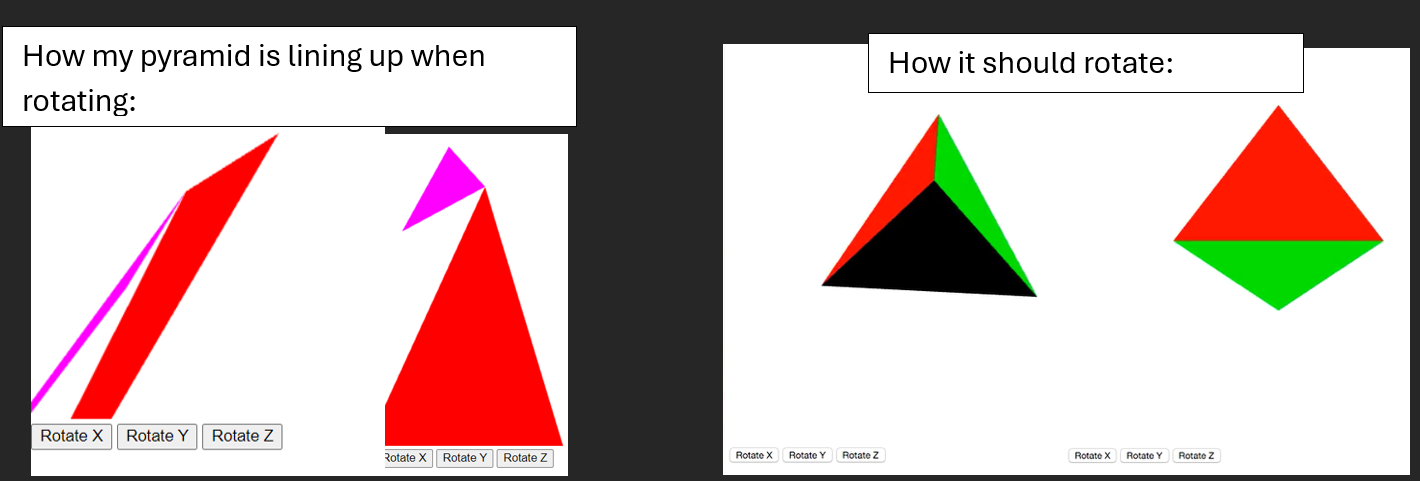
How it should rotate:
Step by Step Solution
There are 3 Steps involved in it
1 Expert Approved Answer
Step: 1 Unlock

Question Has Been Solved by an Expert!
Get step-by-step solutions from verified subject matter experts
Step: 2 Unlock
Step: 3 Unlock
 Study Help