







Question: Please help! I am working on a WPF project which involves binding to an XML file. The thing I need help with is taking the
Please help! I am working on a WPF project which involves binding to an XML file. The thing I need help with is taking the user input and saving it to the XML file.
Here is what the screen looks like. I am using a datatemplate to show all the info in a scroll viewer. The thing I dont understand is how to save the information from the second abilty since I am only referenceing so many textboxes?
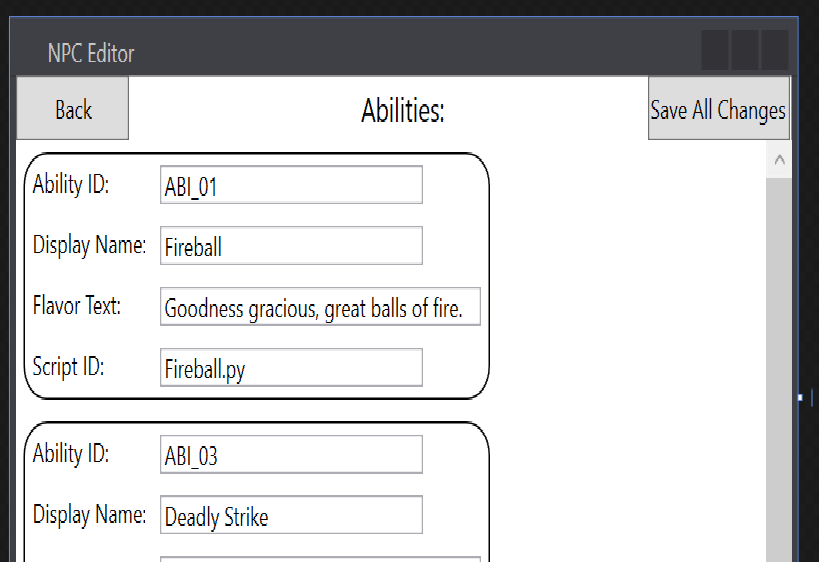
How exactly would I take the user input for each box in all abilities not just the first ability?
Here is my code which is not much just setting up the xml document.
private void saveNPCButton_Click(object sender, RoutedEventArgs e) { XmlDocument myXML = new XmlDocument(); XmlDataProvider xmlDP = (XmlDataProvider)FindResource("XDP"); myXML.Load("GameData.xml"); xmlDP.Document = myXML; xmlDP.XPath = "Data"; }
How would I be able to save everything to the xml file?
Here is my XML:
NPC Editor Abilities: Back Ability ID ABI 01 Display Name: Fireball Flavor Text: Goodness gracious, great balls of fire Script ID Fireball py Ability ID ABI 03 Display Name: Deadly Strike Save All Changes NPC Editor Abilities: Back Ability ID ABI 01 Display Name: Fireball Flavor Text: Goodness gracious, great balls of fire Script ID Fireball py Ability ID ABI 03 Display Name: Deadly Strike Save All Changes
Step by Step Solution
There are 3 Steps involved in it

Get step-by-step solutions from verified subject matter experts
 Study Help