



Question: Please help! I'm a but confused. 1. Duplicate the Loan Calculator model below in your Excel worksheet. 2. Formulae for cells F4 to F7 are
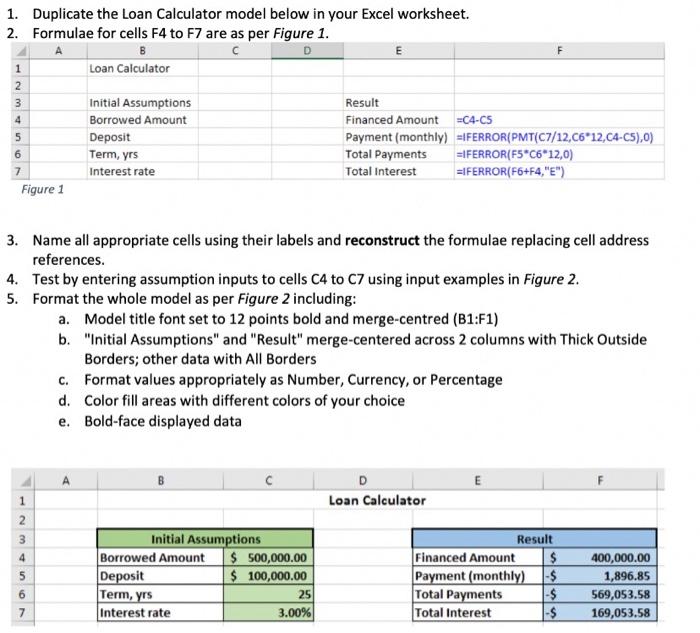
1. Duplicate the Loan Calculator model below in your Excel worksheet. 2. Formulae for cells F4 to F7 are as per Figure 1 . Figure 1 3. Name all appropriate cells using their labels and reconstruct the formulae replacing cell address references. 4. Test by entering assumption inputs to cells C4 to C7 using input examples in Figure 2 . 5. Format the whole model as per Figure 2 including: a. Model title font set to 12 points bold and merge-centred (B1:F1) b. "Initial Assumptions" and "Result" merge-centered across 2 columns with Thick Outside Borders; other data with All Borders c. Format values appropriately as Number, Currency, or Percentage d. Color fill areas with different colors of your choice e. Bold-face displayed data
Step by Step Solution
There are 3 Steps involved in it

Get step-by-step solutions from verified subject matter experts