







Question: Please Help in SQL . Give the top 2 and bottom 2 parts supplied based on their total shipped quantity. Your result will include part#,
-
Please Help in SQL .
-
Give the top 2 and bottom 2 parts supplied based on their total shipped quantity. Your result will include part#, Total_QTY, Top_2, Bottom_2
-
Give the supplier#, supplier_name that supplies the maximum total quantity for all parts.
-
Give the name of the supplier whose supplies red parts and whose weight > 10. Your result will include supplier number and supplier name
-
Give unique pair of part numbers that are from the same city
-
Give the supplier number and part numbers that are located in the same city
-
Give the part name and number that has the minimum shipped quantity
-
Give how many parts each supplier has and the total qty each part has.
-
What is the total number of shipped parts for each part color part. Your result will include: Color, total_QTY_Shipped
-
Give the total quantity of all the blue parts or yellow parts
-
Give the suppliers that are not from the city from which smith is.
-
How many parts are shipped using the following Ranges. Range between 0-100, Range between 101-300, Range between 301 to 500, Range > 501. Your result will include: Range, number of parts
-
Give the top and bottom suppliers based on the quantity they supply.
-
Give the top 3 parts that weigh the most.
-
Give all the parts that are not from London and whose color is not blue
-
Give the total quantity supplied by each supplier and supplier name
-
Give the name of the supplier that does not supply a red part.
-
Give the name of parts from supplier from Paris with qty>100 and part is from Paris
-
Give the total weight of all the red parts
-
Give the names of the suppliers that are from the same city
-
Give the supplier name that supplies the minimum quantity of parts
-
Give the total quantity present for each part
-
Give the part name that has the maximum quantity
-
Give the suppliers and parts that come from the London
-
Give the total qty for all the parts
-
Give the max number of parts supplied by a supplier
-
Give the name of parts from supplier from London with qty>100 and part is from London
-
Give the name of the supplier that supplies both red part and weight is 14.
-
Rank suppliers on the total quantity and number of parts
-
Give the subtotals of the total part weights of the all the parts supplied by a supplier and give the final total weight.
-
What is the percentage of total shipments from each supplier
-
For each part color, list the top two suppliers with highest qty shipped.
-
What is the top one third of shipments. List supplier number and qty.
-
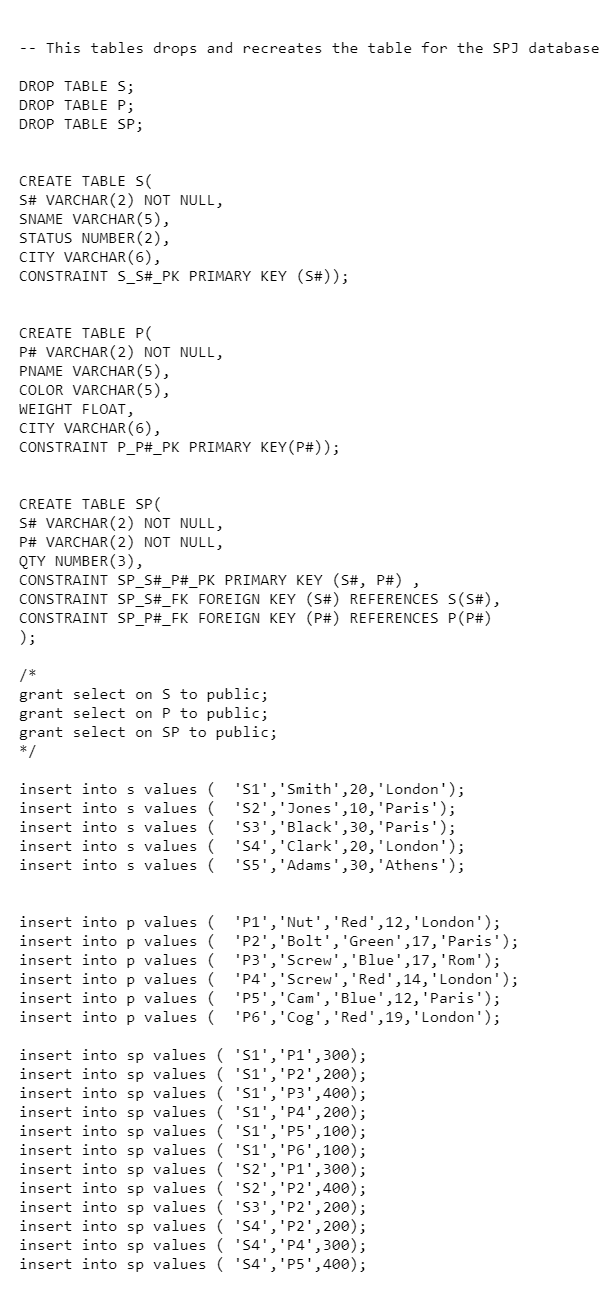
-- This tables drops and recreates the table for the SPJ database DROP TABLE S; DROP TABLE P; DROP TABLE SP; CREATE TABLE SC S# VARCHAR(2) NOT NULL, SNAME VARCHAR(5), STATUS NUMBER(2), CITY VARCHAR(6), CONSTRAINT S_S#_PK PRIMARY KEY (S#)); CREATE TABLE PC P# VARCHAR(2) NOT NULL, PNAME VARCHAR(5), COLOR VARCHAR(5), WEIGHT FLOAT, CITY VARCHAR(6), CONSTRAINT P_P#_PK PRIMARY KEY(P#); CREATE TABLE SP S# VARCHAR(2) NOT NULL, P# VARCHAR(2) NOT NULL, QTY NUMBER(3), CONSTRAINT SP_S#_P#_PK PRIMARY KEY (S#, P#), CONSTRAINT SP_S#_FK FOREIGN KEY (S#) REFERENCES S(S#), CONSTRAINT SP_P#_FK FOREIGN KEY (P#) REFERENCES P(P#) ); grant select on S to public; grant select on P to public; grant select on SP to public; insert into s values( '51','Smith',20, 'London'); insert into s values( 'S2', 'Jones',10,'Paris'); insert into s values ( '53', 'Black',30,'Paris'); insert into s values( '54', 'Clark',20, 'London'); insert into s values 'S5', 'Adams', 30, 'Athens'); insert into p values( 'Pi', 'Nut', 'Red', 12, 'London'); insert into p values( 'P2', 'Bolt', 'Green',17, 'Paris'); insert into p values ( 'P3', 'Screw', 'Blue',17, 'Rom'); insert into p values( 'P4', 'Screw', 'Red', 14, 'London'); insert into p values( 'P5', 'Cam', 'Blue',12, 'Paris'); insert into p values ( 'P6','Cog', 'Red', 19, 'London'); insert into sp values ( 'Si', 'P1',300); insert into sp values ('51','P2',200); insert into sp values ( '51','P3',400); insert into sp values ( '51','P4',200); insert into sp values ( '51','P5',100); insert into sp values ('51','P6',100); insert into sp values ( '52','Pi',300); insert into sp values ( '52', '22',400); insert into sp values ( '53','P2',200); insert into sp values ( '54', 'P2',200); insert into sp values ( 'S4', 'P4', 300); insert into sp values ( '54', '25',400); -- This tables drops and recreates the table for the SPJ database DROP TABLE S; DROP TABLE P; DROP TABLE SP; CREATE TABLE SC S# VARCHAR(2) NOT NULL, SNAME VARCHAR(5), STATUS NUMBER(2), CITY VARCHAR(6), CONSTRAINT S_S#_PK PRIMARY KEY (S#)); CREATE TABLE PC P# VARCHAR(2) NOT NULL, PNAME VARCHAR(5), COLOR VARCHAR(5), WEIGHT FLOAT, CITY VARCHAR(6), CONSTRAINT P_P#_PK PRIMARY KEY(P#); CREATE TABLE SP S# VARCHAR(2) NOT NULL, P# VARCHAR(2) NOT NULL, QTY NUMBER(3), CONSTRAINT SP_S#_P#_PK PRIMARY KEY (S#, P#), CONSTRAINT SP_S#_FK FOREIGN KEY (S#) REFERENCES S(S#), CONSTRAINT SP_P#_FK FOREIGN KEY (P#) REFERENCES P(P#) ); grant select on S to public; grant select on P to public; grant select on SP to public; insert into s values( '51','Smith',20, 'London'); insert into s values( 'S2', 'Jones',10,'Paris'); insert into s values ( '53', 'Black',30,'Paris'); insert into s values( '54', 'Clark',20, 'London'); insert into s values 'S5', 'Adams', 30, 'Athens'); insert into p values( 'Pi', 'Nut', 'Red', 12, 'London'); insert into p values( 'P2', 'Bolt', 'Green',17, 'Paris'); insert into p values ( 'P3', 'Screw', 'Blue',17, 'Rom'); insert into p values( 'P4', 'Screw', 'Red', 14, 'London'); insert into p values( 'P5', 'Cam', 'Blue',12, 'Paris'); insert into p values ( 'P6','Cog', 'Red', 19, 'London'); insert into sp values ( 'Si', 'P1',300); insert into sp values ('51','P2',200); insert into sp values ( '51','P3',400); insert into sp values ( '51','P4',200); insert into sp values ( '51','P5',100); insert into sp values ('51','P6',100); insert into sp values ( '52','Pi',300); insert into sp values ( '52', '22',400); insert into sp values ( '53','P2',200); insert into sp values ( '54', 'P2',200); insert into sp values ( 'S4', 'P4', 300); insert into sp values ( '54', '25',400)
Step by Step Solution
There are 3 Steps involved in it

Get step-by-step solutions from verified subject matter experts
 Study Help