







Question: Please help me answer this assigment correctly! Please explain and show what type of formulas you used to get an answer! Please and Thank you!
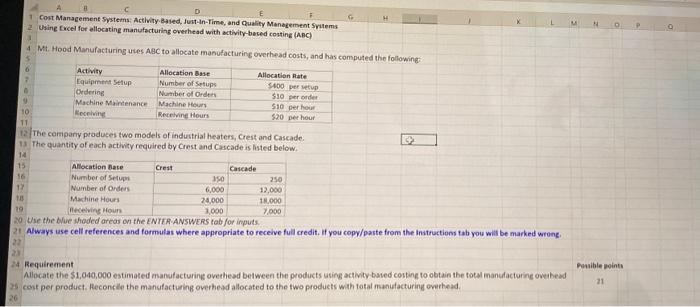
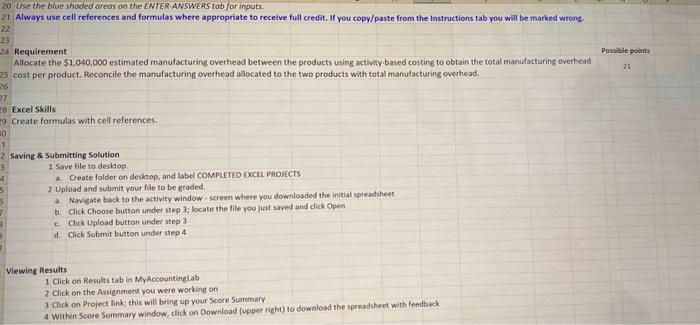
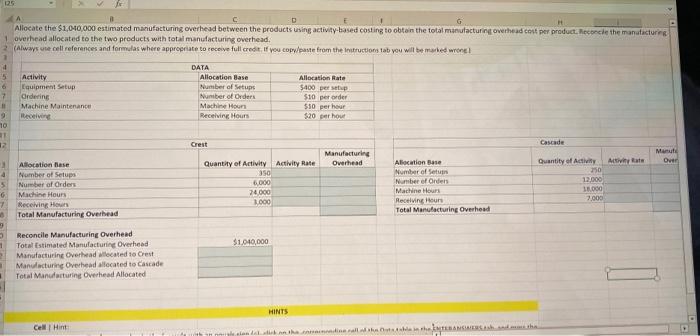
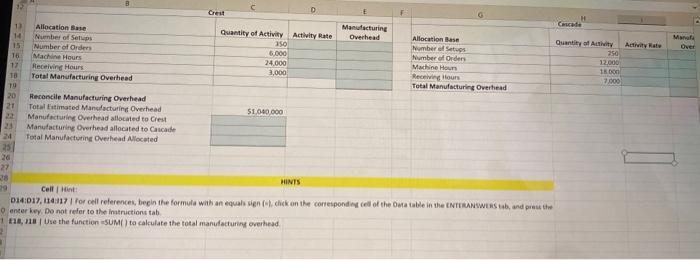
Usine fucel for ellocating manufecturing overhead with activity-besed costing (ABC) Mt. Hood Manufacturing uses AgC to allocate manufacturing overhead costs, and has computed the followingt The company praduces two models of induitrial heaters, Crest and Cascade. The quantity of each activity required by Crest and Cascade is listed below. Whe the bive theded areas on the ENTEA ANSWE tab for inputs. Always ase cell references and formulas where appropriate to receive full credit. If you copy/paste from the instructions tab you witi be marked wrong. Requirement Allocate the $1,040,000 estimated manufacturing ovethead between the products uting activity based costing to obtain the total inanufacturing oveibead cose per product. Reconclle the manufacturing overhead allocated to the two products with total manislacturing overhead. Requirement Allocate the $1,040,000 estimated manufacturing overhead between the products using activity-based costing to obtain the totat manufacturing overhead Possale points cost per product. feconcile the manulacturing overhead allocated to the two products with total manufacturing overhead. Excel Skills Create formulas with cell references: Saving 8 submitting Solution 1 Sove file to deskiop a. Create folder on desktop, and label COMPLETED Excru PROIECTS 2 Upload and submit your flle to be graded. a. Navigate buck to the activity window - screen where you downlosded the initial spreadsheet b. Click Choose button under sep 3; locate the file you just saved and click Open c. Click Upload button under step 3 d. Cick Submit button under step 4 Viewing Results 1 Click on Results tab in MyAccountinglab 2 click on the Assignment you were working on 3 Click on Project link this will bring up your Score Surntnary 4 Within Score Summary window, click on Download (upper right) to download the spreadsheet with feedbeck averhead allocated to the two preducts with total manufacturing overhead. HiNTs Cell i Hint mser N7. ve mot nerer to the matructions tab . 8. 118 | Use the function =sUM( ) ta calculate the total manulacturing crerhead
Step by Step Solution
There are 3 Steps involved in it

Get step-by-step solutions from verified subject matter experts
 Study Help