







Question: Please help me answer this in java only with detailed explanation: Thank you. 8) Finally, in your main method, print the forward and mirrored image
Please help me answer this in java only with detailed explanation:
Thank you.
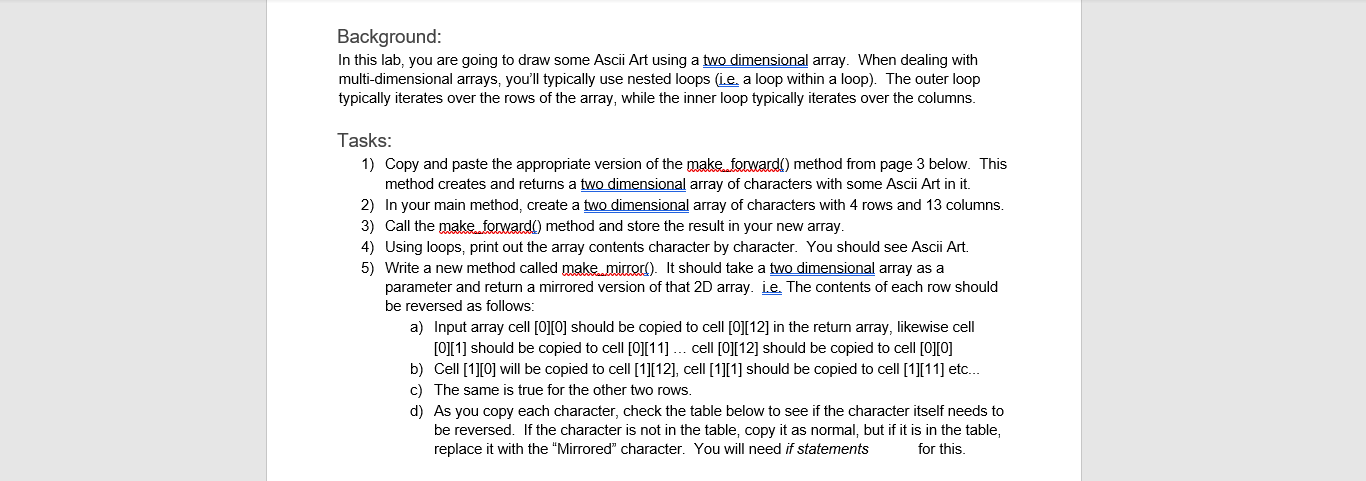
8) Finally, in your main method, print the forward and mirrored image on the same lines, so that they face each other as if having a head on collisionsee below

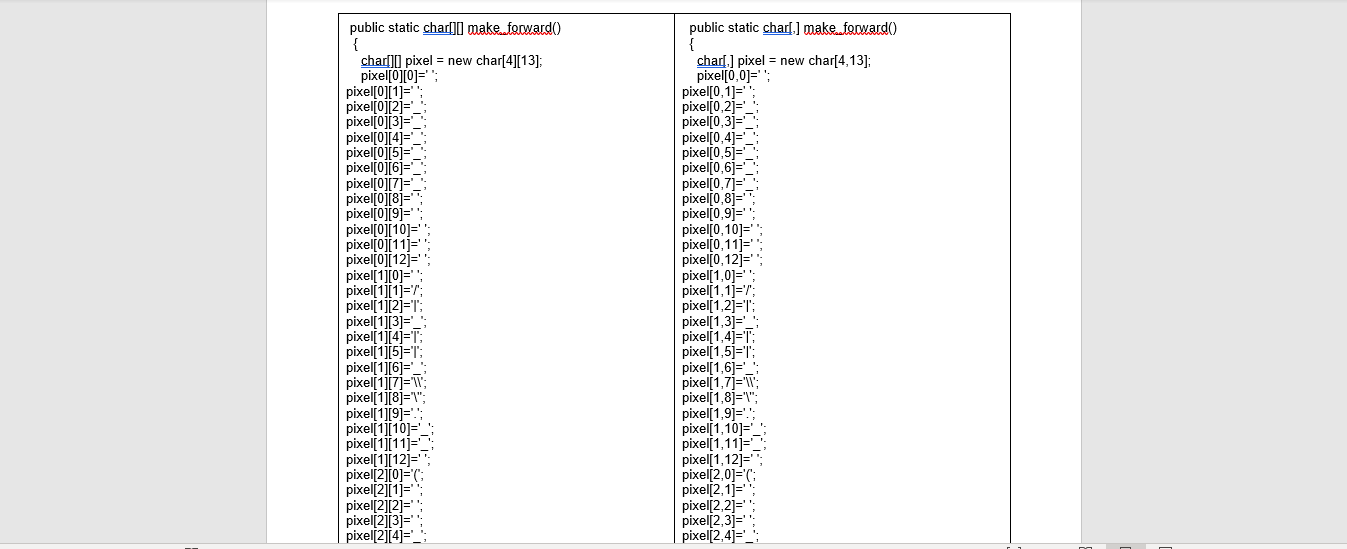
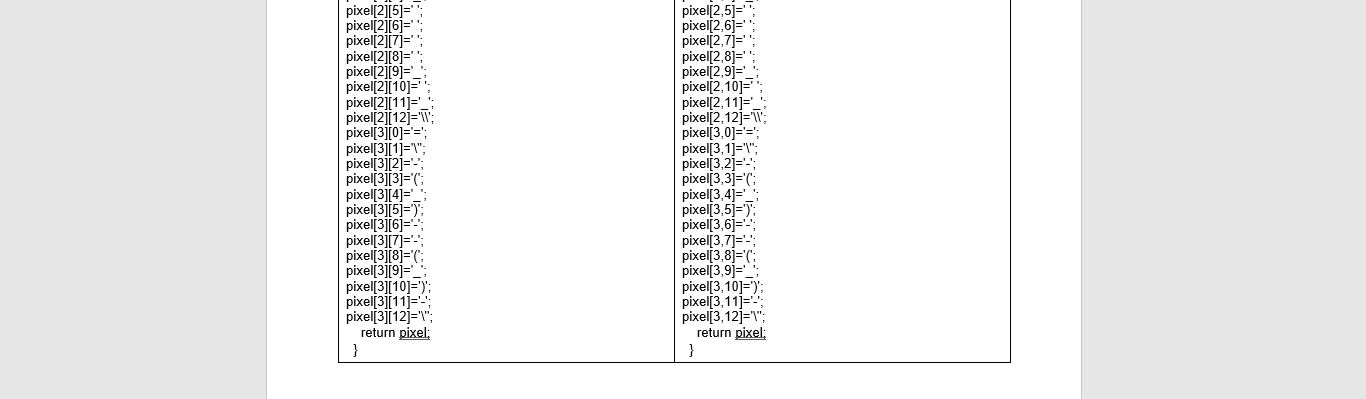
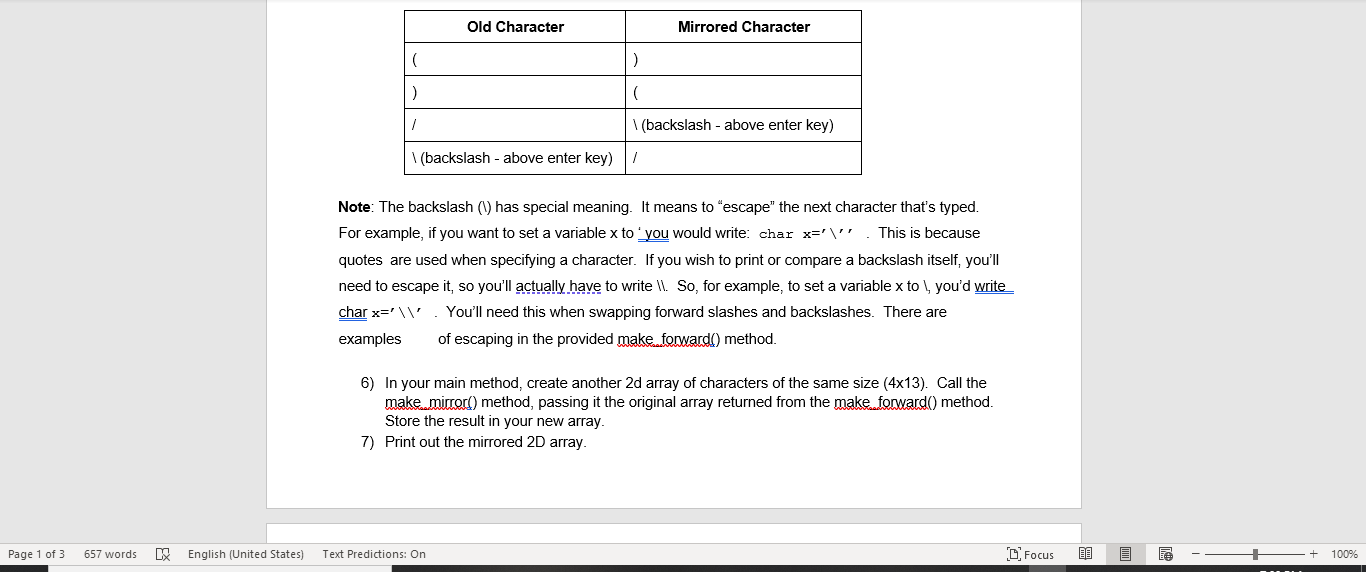
Background: In this lab, you are going to draw some Ascii Art using a two dimensional array. When dealing with multi-dimensional arrays, you'll typically use nested loops (ie a loop within a loop). The outer loop typically iterates over the rows of the array, while the inner loop typically iterates over the columns. Tasks: 1) Copy and paste the appropriate version of the make forwardi) method from page 3 below. This method creates and returns a two dimensional array of characters with some Ascii Art in it. 2) In your main method, create a two dimensional array of characters with 4 rows and 13 columns. 3) Call the make forward() method and store the result in your new array. 4) Using loops, print out the array contents character by character. You should see Ascii Art. 5) Write a new method called make micord). It should take a two dimensional array as a parameter and return a mirrored version of that 2D array. i.e. The contents of each row should be reversed as follows: a) Input array cell [0][O] should be copied to cell [0][12] in the return array, likewise cell [0][1] should be copied to cell [0][11] ... cell [0][12] should be copied to cell [0][0] b) Cell [1][O] will be copied to cell [1][12], cell [1][1] should be copied to cell [1][11] etc... c) The same is true for the other two rows. d) As you copy each character, check the table below to see if the character itself needs to be reversed. If the character is not in the table, copy it as normal, but if it is in the table, replace it with the "Mirrored" character. You will need if statements for this Old Character Mirrored Character > 1 (backslash - above enter key) (backslash - above enter key) Note: The backslash (1) has special meaning. It means to escape" the next character that's typed. For example, if you want to set a variable x to you would write: char x='". This is because quotes are used when specifying a character. If you wish to print or compare a backslash itself, you'll need to escape it, so you'll actually have to write \l. So, for example, to set a variable x to you'd write char x=' You'll need this when swapping forward slashes and backslashes. There are examples of escaping in the provided make forward() method. 6) In your main method, create another 2d array of characters of the same size (4x13). Call the make micord) method, passing it the original array returned from the make forward() method. Store the result in your new array. 7) Print out the mirrored 2D array. Page 1 of 3 657 words LX English (United States) Text Predictions: On C Focus 13 100% make forward() code for Java and C# on next page: Java C# public static charf,] make.focwardo { char.] pixel = new char[4,13]; pixel[0,0]=; pixel[0,1]= pixel[0,2= pixel(0,33 = pixel(0,4= pixel(0,51 pixel(0,6) pixel[0,7) pixel[0,8= pixel[0,9j= pixel[0, 10= public static char[]make..focwardo { char[][pixel = new char[4][13]; pixel[0][0]="); pixel[0][1]=' pixelfoj[2= pixel[0][3]= pixel[0][4= pixellojisi pixello16= pixel[0]7= pixello 1817 pixelf0 19= pixel[0][10]=1 pixel[0][111= pixeloj[121= pixel(10=''; pixell 11121=1 pixel[1][33= pixell 1][41=T; pixel[1][5]='T pixel(11[6= pixel(117= pixel[1][8]=""; pixel[1][9]= pixel[1][10]= pixel[1][11]= pixel[1][12]=""; pixel[2][0]=0; pixel[2][1=; pixel[2][2]= pixel[2][3]=' pixel[2][4]= pixel[1][1]=r; pixel[0,11j= pixel 0,12= pixel(1,0]=''; pixel[1,1]=r; pixel(1,2)=1 pixel(1,3= : pixel(1,4='T: pixel(1,5)=": pixel(1,6]=> pixel(1,7)=' pixel(1,8)="": pixel(1,9]= pixel 1,10= pixel[1,11) pixel[1,12)=; pixel(2,09=C pixel(2,12= pixel[2,2= pixel(2,3)= pixel(2,4)='_; pixel[2.5=; pixel[2.6]=; pixel(2.7]=; pixel[2.8]=''; pixel[2][5]='); pixel[2][6]=' pixel(2017= pixel[2][8]= pixel(21191= pixel[2][10]= pixel[2][11]= pixel(21[12]=' pixel[3][0='=; pixel[3][1]=""; pixel[3][2]=- pixel[3][3]=C pixel[3][4= pixel[31151=' pixel 31[6= pixel[3][7]=- pixel[3][8]='C pixel[3][9]= pixel[3][10]='); pixel3111=- pixel[3][12]=""; return pixel; } pixel(2,93= pixel(2,103 pixel(2,11 pixel(2,12)= pixel[3,0]='='; pixel(3,1)=""; pixell 3.21 pixel(3,3)='C pixel3,4=1 pixel(3,5='3 pixel(3,6)= pixel[3,7]=' pixel[3,81='G pixel(3,91= pixel[3,10]=> pixel3.11=- pixel(3,12=""; return pixel; }
Step by Step Solution
There are 3 Steps involved in it

Get step-by-step solutions from verified subject matter experts
 Study Help