



Question: Please help me connect the right cables to the right location on the motherboard. Computer case cables I need to connect to the motherboard: a
Please help me connect the right cables to the right location on the motherboard.
Computer case cables I need to connect to the motherboard:
a Power switch;
b Power LED pin
c HDD LED
d Speaker
e Fan front
f Fan rear
g USB Black cable
h Front panel audio
i USB
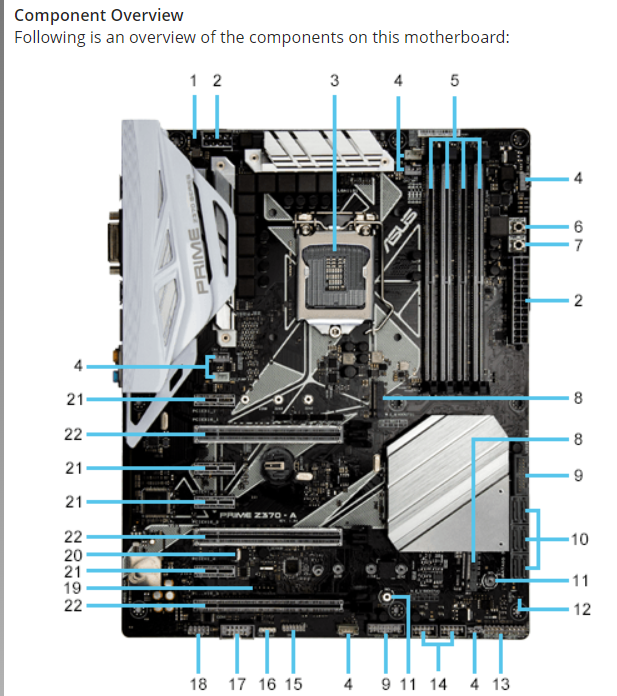
Components Location on the Motherboard:
CPU Over Voltage jumper pin CPUOV
ATX power connectors pin EATXPWR, pin EATXV
LGA CPU socket
CPU, CPU optional, M pump, extension, and chassis fan connectors pin CPU FANpin CPUOPT pin MFAN, pin AIO PUMPpin EXT FANpir CHA FAN CHAFAN
DDR DIMM slots left to right: DIMM BDIMM B DIMM A DIMMA
MemOK! button
Poweron button
M sockets MSocket M Socket
USB Gen connector pin UG UG
Intel Serial ATA Gbs connectors top to bottom, left to right: SATA SATA SATA SATA SATA SATA
D Mount
Clear RTC RAM jumper pin CLRTC
System panel connectors pin PANEL See diagram below
USB connectors pin USB USB
TPM connector pin TPM
RGB header pin RGBHEADER
Serial port connector pin COM
Front panel audio connector pin AAFP
Thunderbolt header pin TBHEADER
Thermal sensor connector pin T SENSOR
PCI Express x slots top to bottom : PCIEX PCIEX PCIEX PCIEX
PCI Express x slots top to bottom : PCIEX PCIEXPCIEX
Cable options:
a Connector, Power Supply, pin
b Connector, Power Supply, pin processor
c Connector, Power Supply, pin CPU
d Connector, SATA, pin
e Connector, SATA, pin
f Connector, SATA, pin
g Connector, SATA, pin
h Connector, Power Supply, pin IDE
i Connector, Power Supply, pin IDE
j Connector, Power Supply, Floppy
k Connector, Power Supply, pin PCIe
l Connector, Power Supply, pin PCIe
Step by Step Solution
There are 3 Steps involved in it
1 Expert Approved Answer
Step: 1 Unlock

Question Has Been Solved by an Expert!
Get step-by-step solutions from verified subject matter experts
Step: 2 Unlock
Step: 3 Unlock