







Question: Please Help me finishing code this assignment. I receive errors when I click on View, Insert, or Update buttons . Clear is the only button
Please Help me finishing code this assignment. I receive errors when I click on View, Insert, or Update buttons. Clear is the only button that works correctly. Please fix the code so all four buttons works as described in the instructions below. I am crunched for time and desperately need Chegg's help more than ever. Thanks. My code can be found below. Please do not send me back code that throw errors. I really need to to be right.
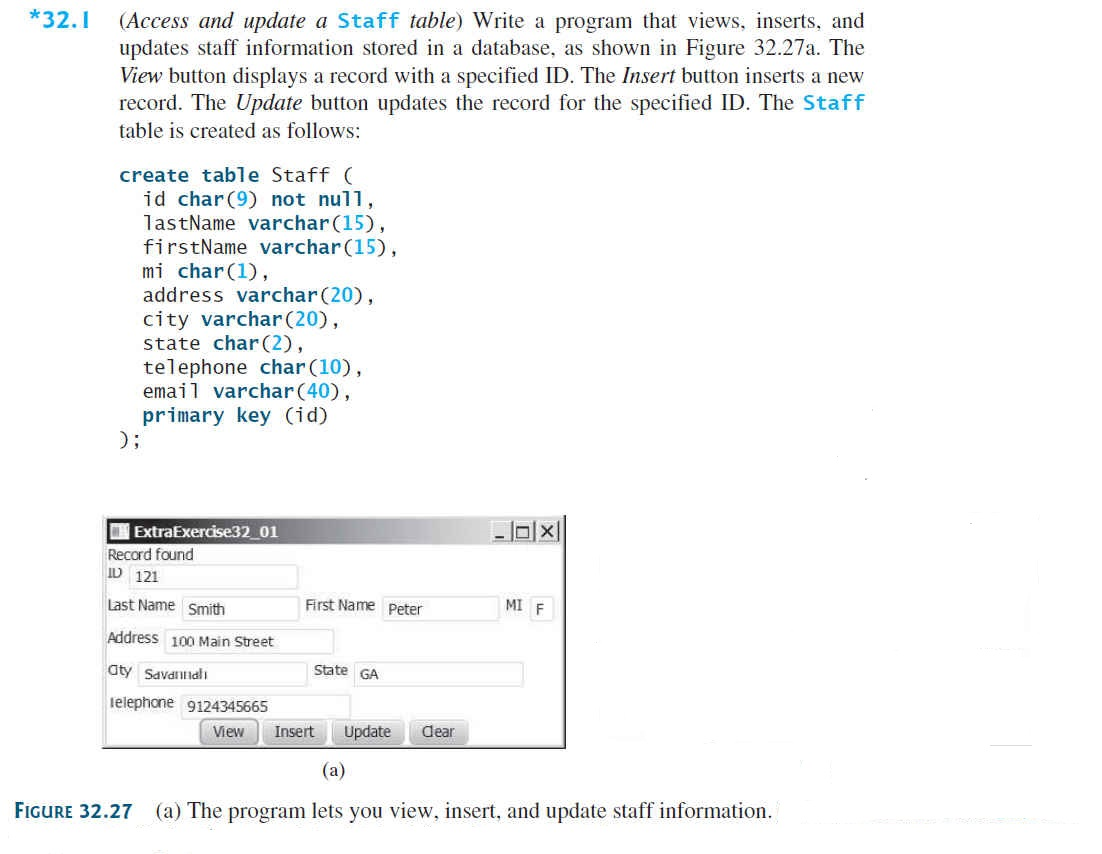
My code is below, please fix the View, Insert, and Update so they work successfully as describe in the instructions above, without throwing any errors. Thanks.
import javax.swing.*; import java.awt.*; import java.awt.event.*; import java.sql.*; //Class declartion public class main extends JApplet { //Declaring variables private JTextField JID = new JTextField(9); private JTextField JLName = new JTextField(9); private JTextField JFName = new JTextField(9); private JTextField JMI = new JTextField(3); private JTextField JAddress = new JTextField(9); private JTextField JCity = new JTextField(9); private JTextField JState = new JTextField(9); private JTextField JPh = new JTextField(9); private JTextField JEmail = new JTextField(15); private JButton JView = new JButton("View"); private JButton JInsert = new JButton("Insert"); private JButton jbtUpdate = new JButton("Update"); private JButton JClear = new JButton("Clear"); private Statement st; private PreparedStatement ps; private Connection conn; @Override public void init() { try { Class.forName("sun.jdbc.odbc.JdbcOdbcDriver"); System.out.println("Loaded"); conn = DriverManager.getConnection("jdbc:odbc:files"); System.out.println("Connected"); conn.setAutoCommit(true); st = conn.createStatement(); st.executeUpdate("CREATE TABLE Staff( ID char(9) not null, lastName varchar(15),firstName varchar(15), mi char(1), address varchar(20), city varchar(20), state char(2), telephone char(10), email varchar(40), primary key(id)"); } catch(Exception e) {} JPanel jPanel1 = new JPanel(); jPanel1.add(new JLabel("ID")); jPanel1.add(JID); jPanel1.add(new JLabel("Last Name")); jPanel1.add(JLName); jPanel1.add(new JLabel("First Name")); jPanel1.add(JFName); jPanel1.add(new JLabel("mi")); jPanel1.add(JMI); jPanel1.add(new JLabel("Address")); jPanel1.add(JAddress); jPanel1.add(new JLabel("City")); jPanel1.add(JCity); jPanel1.add(new JLabel("State")); jPanel1.add(JState); jPanel1.add(new JLabel("Telephone")); jPanel1.add(JPh); jPanel1.add(new JLabel("Email")); jPanel1.add(JEmail); jPanel1.add(JView); jPanel1.add(JInsert); jPanel1.add(jbtUpdate); jPanel1.add(JClear); add(jPanel1, BorderLayout.CENTER); JView.addActionListener(new ActionListener() { public void actionPerformed(ActionEvent e) { String lastName = "", firstName= "", mi= "", address= "", city= "", state= "", ph= "", email= ""; int id = Integer.parseInt(JID.getText().toString()); System.out.println("ID chosen: " + id); try { String query = "SELECT lastName, firstName, mi, address, city, state, telephone, email FROM Staff WHERE id =" + id; ResultSet rs = st.executeQuery(query); while(rs.next()) { lastName = rs.getString(1); firstName = rs.getString(2); mi = rs.getString(3); address = rs.getString(4); city = rs.getString(5); state = rs.getString(6); ph = rs.getString(7); email = rs.getString(8); }
JLName.setText(lastName); JFName.setText(firstName); JMI.setText(mi); JAddress.setText(address); JCity.setText(city); JState.setText(state); JPh.setText(ph); JEmail.setText(email); }
catch(SQLException ex) {ex.printStackTrace();} } });
JInsert.addActionListener(new ActionListener() { public void actionPerformed(ActionEvent e) { int id = Integer.parseInt(JID.getText().toString()); String lastName = JLName.getText(); String firstName = JFName.getText(); String mi = JMI.getText(); String add = JAddress.getText(); String city = JCity.getText(); String state = JState.getText(); int ph = Integer.parseInt(JPh.getText().toString()); String email = JEmail.getText(); try { String query = "Insert into Staff (ID, lastName, firstName, mi, address, city, state, telephone, email) values(?, ?, ?, ?, ?, ?, ?, ?, ?)"; ps = conn.prepareStatement(query); ps.setInt(1 , id ); ps.setString(2 , lastName); ps.setString(3 , firstName); ps.setString(4 , mi); ps.setString(5 , add); ps.setString(6 , city); ps.setString(7 , state); ps.setInt(8 , ph); ps.setString(9 , email); ps.execute(); System.out.println("Executed!"); } catch(Exception ea) {ea.printStackTrace();} } });
jbtUpdate.addActionListener(new ActionListener() { public void actionPerformed(ActionEvent e) {
try { int id = Integer.parseInt(JID.getText().toString()); String lastName = JLName.getText(); String firstName = JFName.getText(); String mi = JMI.getText(); String add = JAddress.getText(); String city = JCity.getText(); String state = JState.getText(); int ph = Integer.parseInt(JPh.getText().toString()); String email = JEmail.getText();
String query = "UPDATE Staff SET lastName = ?, firstName = ?, mi = ? , address = ?" + ", city = ?, state = ?, telephone = ?, email = ? WHERE ID = ?";
ps = conn.prepareStatement(query);
ps.setString(1 , lastName); ps.setString(2 , firstName); ps.setString(3 , mi); ps.setString(4 , add); ps.setString(5 , city); ps.setString(6 , state); ps.setInt(7 , ph); ps.setString(8 , email); ps.setInt(9, id);
ps.executeUpdate();
System.out.println("Executed!"); }
catch(Exception es){es.printStackTrace();} } });
JClear.addActionListener(new ActionListener() { public void actionPerformed(ActionEvent e) { JID.setText(""); JLName.setText(""); JFName.setText(""); JMI.setText(""); JAddress.setText(""); JCity.setText(""); JState.setText(""); JPh.setText(""); JEmail.setText("");
try {
st.execute( " Delete "); st.execute(" TruncateStaff"); } catch(Exception et) {} } });
} }
Step by Step Solution
There are 3 Steps involved in it

Get step-by-step solutions from verified subject matter experts
 Study Help