







Question: please help me fix these 2 incorrect answers / steps . in # 1 1 , in the project budgets worksheet, the budget field in
please help me fix these incorrect answerssteps in # in the project budgets worksheet, the budget field in the PivotTable should be summaruzed using the average calculation. i have apparently done something wrong here. in # in the project types by year worksheet, the project types field in the PivotTable should be filtered by a value filter to display the top items by the sum of final cost. i have done this step as I know how but for some reason it is still wrong. i have attached the problem with the corrective feedback, and also my worksheets. can you please show me step by step instructions for this? thank you?!
B
Camille also wants to include the average budget for each project type as the last column in the PivotTable.
Add this information to the PivotTable as follows:
a Add the Budget field to the Values area of the PivotTable, making it the last field in the Values area.
b Use the Averaqe calculation to summarize the Budaet field data.
Add values to a Pivotiable.
Summarize field values in a PivotTable.
In the Project Budgets worksheet, the Budget field in the PivotTable should be summarized using
the Average calculation.
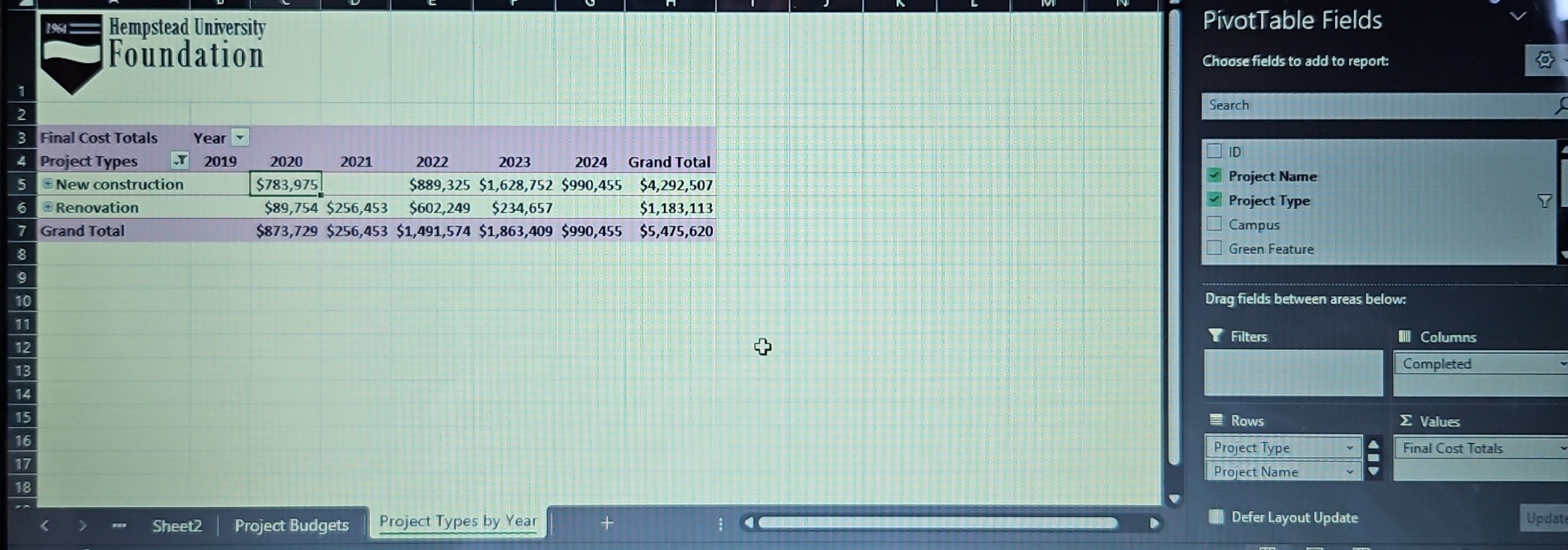
Go to the Project Types by Year worksheet. The PivotTable on this worksheet lists the final costs of the building projects by year and type. Camille wants to show the names of each project and display the information about the two project types with the highest total final cost.
Provide this information for Camille as follows:
a Expand the Project Type field to show the names of each project.
b Apply a Value Filter to the Prolect Tvpe field that displays the top items by the sum of final cost.
Add a record to a table.
Filter a Pivotiable.
In the Project Types by rear worksheet, the Project Types field in the Pivotiable should be
filtered by a value filter to display the top two items by the sum of final cost.
Cost by Campus
Sheet
Project Budgets
Project Types by Year
tableProject Type,Count of IDFinal Cost Totals,Budget Totals,Sum of Difference,Sum of Difference,Average of BudgetExpansion$$$$
Step by Step Solution
There are 3 Steps involved in it
1 Expert Approved Answer
Step: 1 Unlock

Question Has Been Solved by an Expert!
Get step-by-step solutions from verified subject matter experts
Step: 2 Unlock
Step: 3 Unlock
 Study Help