







Question: Please help me Im having trouble with the second button click event. I use Visual Basic Windows Forms App (.Net Framework). This is the assignment:
Please help me Im having trouble with the second button click event. I use Visual Basic Windows Forms App (.Net Framework).
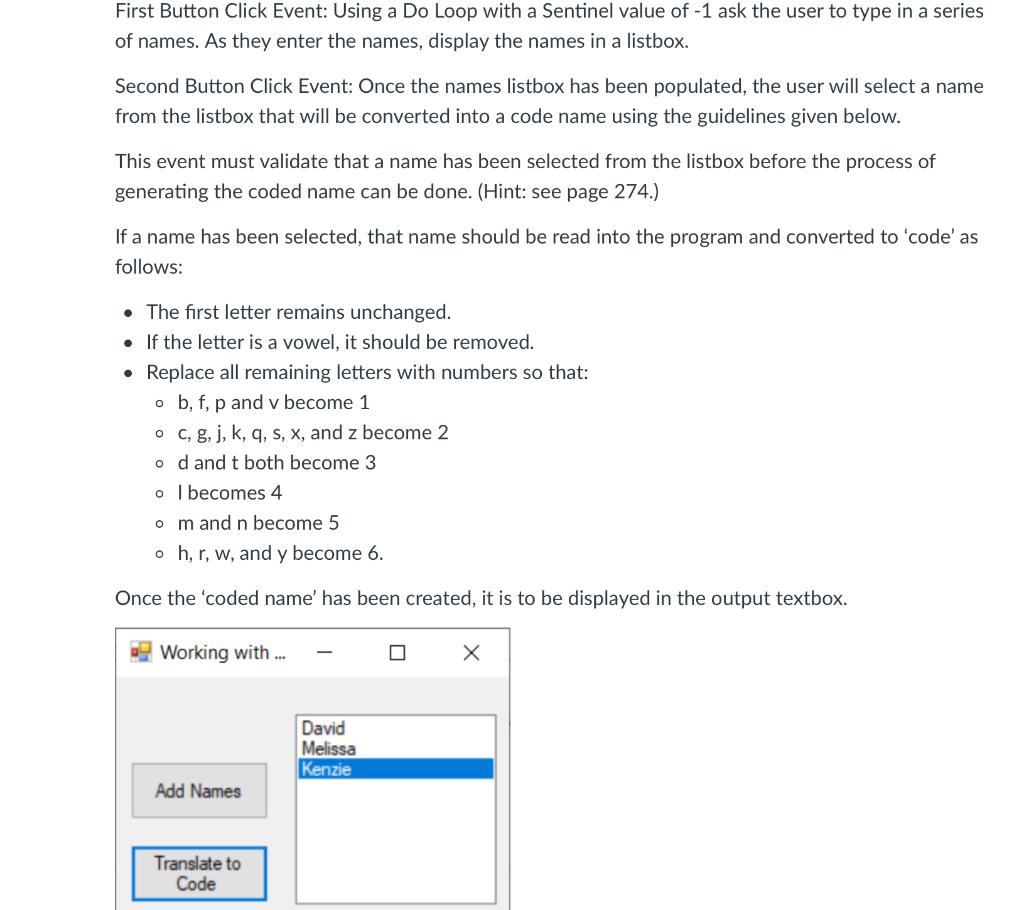
This is the assignment:
 this is my code for the first button procedure:
Public Class FrmNames
Dim names As String
Private Sub btnNames_Click(sender As Object, e As EventArgs) Handles BtnNames.Click
Do Until names = -1
names = InputBox(Enter Name)
If names -1 Then
End If
lstNames.Items.Add(names)
Loop
End Sub
First Button Click Event: Using a Do Loop with a Sentinel value of -1 ask the user to type in a series of names. As they enter the names, display the names in a listbox. Second Button Click Event: Once the names listbox has been populated, the user will select a name from the listbox that will be converted into a code name using the guidelines given below. This event must validate that a name has been selected from the listbox before the process of generating the coded name can be done. (Hint: see page 274.) If a name has been selected, that name should be read into the program and converted to 'code'as follows: The first letter remains unchanged. . If the letter is a vowel, it should be removed. Replace all remaining letters with numbers so that: ob, f, p and v become 1 oc, g, j, k, q, s, x, and z become 2 od and t both become 3 o I becomes 4 om and n become 5 oh, r, w, and y become 6. Once the 'coded name' has been created, it is to be displayed in the output textbox. Working with ... David Melissa Kenzie Add Names Translate to Code
Step by Step Solution
There are 3 Steps involved in it

Get step-by-step solutions from verified subject matter experts
 Study Help