







Question: Please help me Java experts, I could really use it! I need help creating a simple JavaFX GUI calculator that follows these strict instructions! Overall,
Please help me Java experts, I could really use it! I need help creating a simple JavaFX GUI calculator that follows these strict instructions!
Overall, please just keep it simple and make sure it follows the instructions, don't go beyond the scope of what is required to make it more complicated! Thank you in advance and I appreciate the work of all of you Chegg experts.
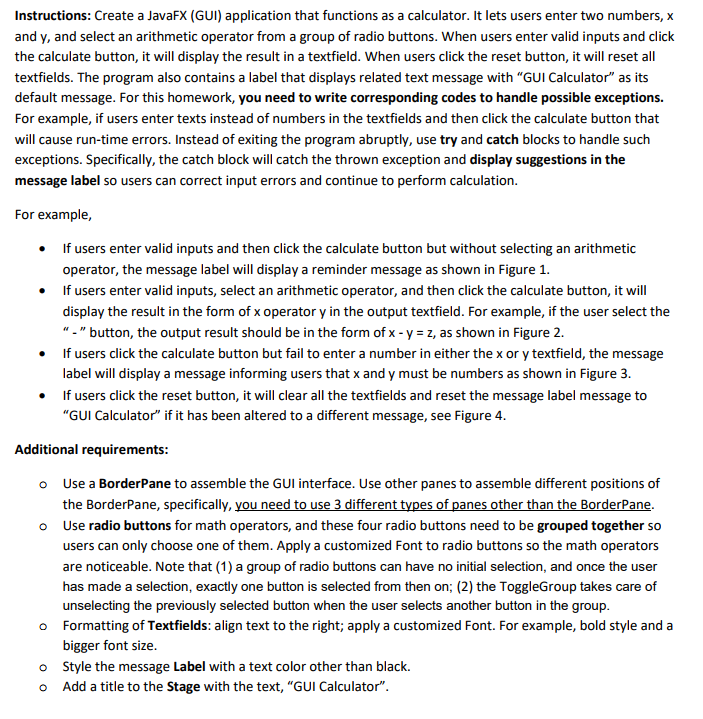
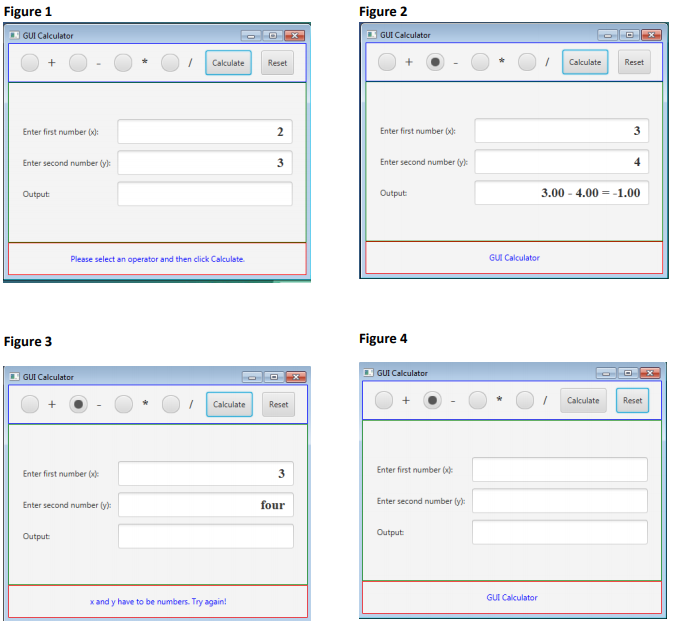
Instructions: Create a JavaFX (GUI) application that functions as a calculator. It lets users enter two numbers, x and y, and select an arithmetic operator from a group of radio buttons. When users enter valid inputs and click the calculate button, it will display the result in a textfield. When users click the reset button, it will reset all textfields. The program also contains a label that displays related text message with "GUI Calculator" as its default message. For this homework, you need to write corresponding codes to handle possible exceptions. For example, if users enter texts instead of numbers in the textfields and then click the calculate button that will cause run-time errors. Instead of exiting the program abruptly, use try and catch blocks to handle such exceptions. Specifically, the catch block will catch the thrown exception and display suggestions in the message label so users can correct input errors and continue to perform calculation For example, If users enter valid inputs and then click the calculate button but without selecting an arithmetic operator, the message label will display a reminder message as shown in Figure 1. If users enter valid inputs, select an arithmetic operator, and then click the calculate button, it will display the result in the form of x operator y in the output textfield. For example, if the user select the "-" button, the output result should be in the form of x-y z, as shown in Figure 2. If users click the calculate button but fail to enter a number in either the x or y textfield, the message label will display a message informing users that x and y must be numbers as shown in Figure 3 If users click the reset button, it will clear all the textfields and reset the message label message to "GUI Calculator" if it has been altered to a different message, see Figure 4 . . . . Additional requirements Use a BorderPane to assemble the GUI interface. Use other panes to assemble different positions of the BorderPane, specifically, you need to use 3 different types of panes other than the BorderPane Use radio buttons for math operators, and these four radio buttons need to be grouped together so users can only choose one of them. Apply a customized Font to radio buttons so the math operators are noticeable. Note that (1) a group of radio buttons can have no initial selection, and once the user has made a selection, exactly one button is selected from then on; (2) the ToggleGroup takes care of unselecting the previously selected button when the user selects another button in the group Formatting of Textfields: align text to the right; apply a customized Font. For example, bold style and a bigger font size o o o o Style the message Label with a text color other than black. o Add a title to the Stage with the text, "GUI Calculator
Step by Step Solution
There are 3 Steps involved in it

Get step-by-step solutions from verified subject matter experts
 Study Help