







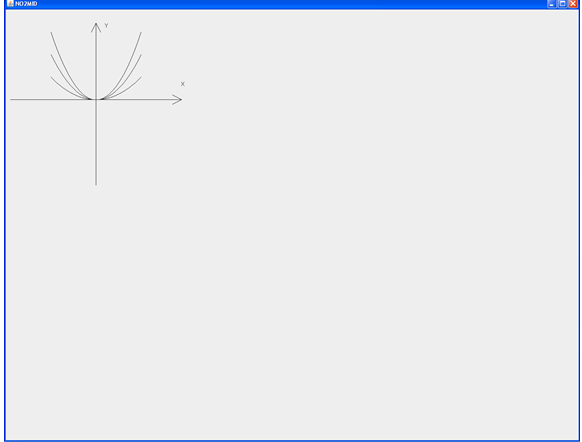
Question: Please help me make my code look like the image below, I can only get the one curve to work. Thank you for your help!!!
Please help me make my code look like the image below, I can only get the one curve to work. Thank you for your help!!!
import java.awt.*; import javax.swing.*;
public class U extends JFrame{ public U(){ getContentPane().setLayout(new BorderLayout()); getContentPane().add(new DrawXSquare(), BorderLayout.CENTER);
}
public static void main(String[] args){ U frame = new U(); frame.setSize(400,400); frame.setTitle("U"); frame.setDefaultCloseOperation(JFrame.EXIT_ON_CLOSE); frame.setLocationRelativeTo(null); frame.setVisible(true); } class DrawXSquare extends JPanel{ double f(double x){ return x*x; } public void drawFunction(){ repaint(); } protected void paintComponent (Graphics g){ super.paintComponent(g); g.drawLine(10, 200, 390, 200); g.drawLine(200, 30, 200, 390);
g.drawLine(390, 200, 370, 190); g.drawLine(390, 200, 370, 210); g.drawLine(200, 30, 190, 50); g.drawLine(200, 30, 210, 50);
g.drawString("x", 390, 170); g.drawString("y", 220, 40);
Polygon p = new Polygon(); double scaleFactor = 0.01; for (int x = -100; x
NO/MD -OX
Step by Step Solution
There are 3 Steps involved in it

Get step-by-step solutions from verified subject matter experts
 Study Help