







Question: Please help me solve file DAC's Classification and Evaluation according to the pictured instructions. #Step 1 : # Import libraries # In this section, you
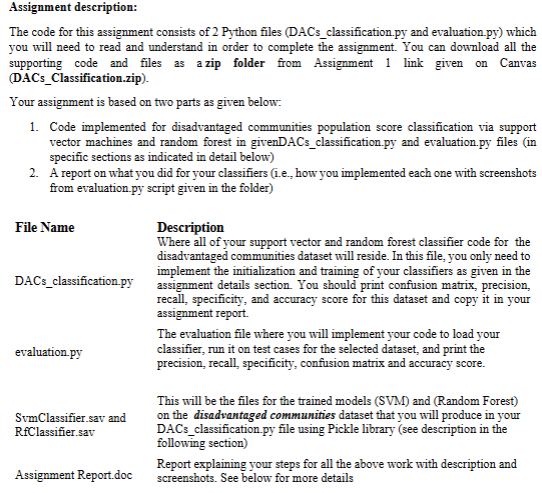
Please help me solve file DAC's Classification and Evaluation according to the pictured instructions.
#Step :
# Import libraries
# In this section, you can use a search engine to look for the functions that will help you implement the following steps
#Step :
# Load dataset and show basic statistics
# Show dataset size dimensions
# Show what column names exist for the attributes in the dataset
# Show the distribution of the target class CES Percentile Range column
# Show the percentage distribution of the target class CES Percentile Range column
# Step :
#Clean the dataset you can eitherhandle the missing values in the dataset
# with the mean of the columns attributes or remove rows the have missing values.
# Step :
#Encode the Categorical Variables Using OrdinalEncoder from the categoryencoders library to encode categorical variables as ordinal integers
# Step :
# Separate predictor variables from the target variable attributes X and target variable y as we did in the class
# Create train and test splits for model development. Use the and split ratio
# Use stratifying stratifyy to ensure class balance in traintest splits
# Name them as Xtrain, Xtest, ytrain, and ytest
# Name them as Xtrain, Xtest, ytrain, and ytest
Xtrain # Remove this line after implementing train test split
Xtest # Remove this line after implementing train test split
# Do not do steps for the Ramdom Forest Model
# Step :
# Standardize the features Import StandardScaler here
# Step :
# Below is the code to convert Xtrain and Xtest into data frames for the next steps
cols Xtrain.columns
Xtrain pdDataFrameXtrain, columnscols # pd is the imported pandas lirary Import pandas as pd
Xtest pdDataFrameXtest, columnscols # pd is the imported pandas lirary Import pandas as pd
# Step Build and train the SVM classifier
# Train SVM with the following parameters. use the parameters with the highest accuracy for the model
# RBF kernel
# CHigher value of C means fewer outliers
# gamma Linear
# Test the above developed SVC on unseen pulsar dataset samples
# compute and print accuracy score
# Save your SVC model whatever name you have given your model as sav to upload with your submission
# You can use the library pickle to save and load your model for this assignment
# Optional: You can print test results of your model here if you want. Otherwise implement them in evaluation.py file
# Get and print confusion matrix
cm
# Below are the metrics for computing classification accuracy, precision, recall and specificity
TP cm
TN cm
FP cm
FN cm
# Compute Precision and use the following line to print it
precision # Change this line to implement Precision formula
printPrecision : :fformatprecision
# Compute Recall and use the following line to print it
recall # Change this line to implement Recall formula
printRecall or Sensitivity : :fformatrecall
# Compute Specificity and use the following line to print it
specificity # Change this line to implement Specificity formula
printSpecificity : :fformatspecificity
# Step : Build and train the Random Forest classifier
# Train Random Forest with the following parameters.
# nestimators randomstate
# Test the above developed Random Forest model on unseen DACs dataset samples
# compute and print accuracy score
# Save your Random Forest model whatever name you have given your model as sav to upload with your submission
# You can use the library pickle to save and load your model for this assignment
# Optional: You can print test results of your model here if you want. Otherwise implement them in evaluation.py file
# Get and print confusion matrix
cm
# Below are the metrics for computing classification accuracy, precision, recall and specificity
TP cm
TN cm
FP cm
FN cm
# Compute Classification Accuracy and use the following line to print it
classificationaccuracy
printClassification accuracy : :fformatclassificationaccuracy
# Compute Precision and use the following line to print it
precision # Change this line to implement Precision formula
printPrecision : :fformatprecision
# Compute Recall and use the following line to print it
recall # Change this line to implement Recall formula
printRecall or Sensitivity : :fformatrecall
# Compute Specificity and use the following line to print it
specificity # Change this line to implement Specificity formula
printSpecificity : :fformatspecificity
Evaluation file in picture
Assignment brief in picture
Step by Step Solution
There are 3 Steps involved in it
1 Expert Approved Answer
Step: 1 Unlock

Question Has Been Solved by an Expert!
Get step-by-step solutions from verified subject matter experts
Step: 2 Unlock
Step: 3 Unlock
 Study Help