







Question: Please help me solve. It seems like when I inspect the website the div names are the same and I can't select the specific table
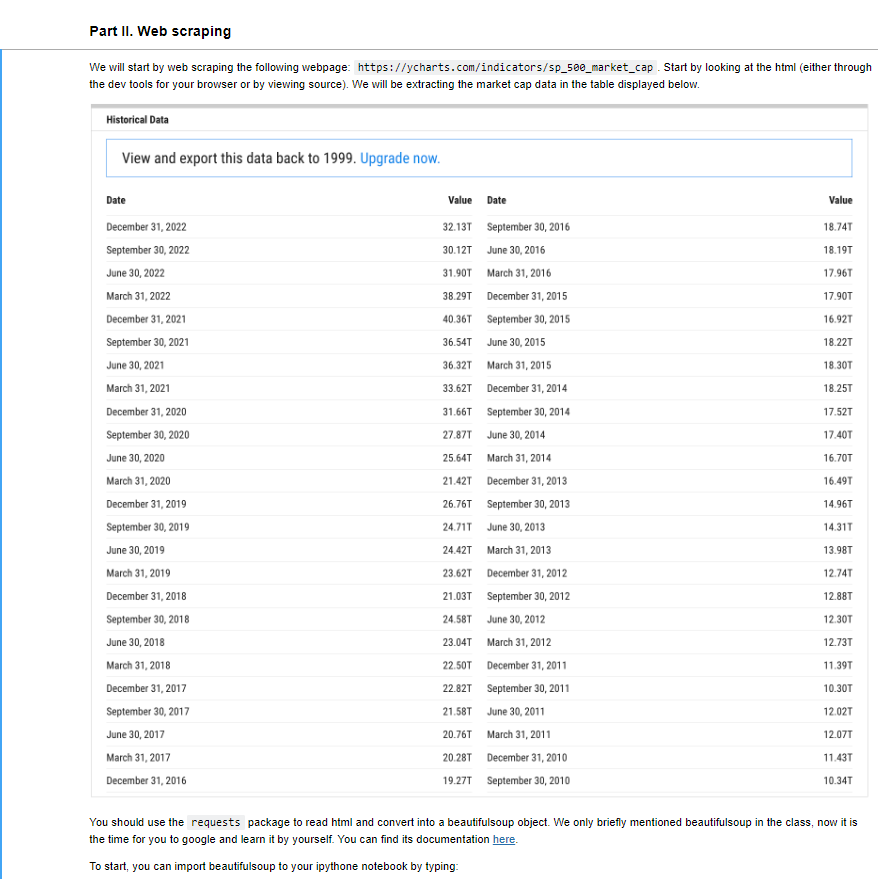
 Please help me solve. It seems like when I inspect the website the div names are the same and I can't select the specific table from the website.
We will start by web scraping the following webpage: https://ycharts.com/indicators/sp_500_market_cap .Start by looking at the html (either througl the dev tools for your browser or by viewing source). We will be extracting the market cap data in the table displayed below. Historical Data View and export this data back to 1999. Upgrade now. You should use the requests package to read html and convert into a beautifulsoup object. We only briefly mentioned beautifulsoup in the class, now it is the time for you to google and learn it by yourself. You can find its documentation here. To start, you can import beautifulsoup to your ipythone notebook by typing: Exercise 2. Find the table displayed above, using the find_all method. Then print the html for this table using print(table_found.prettify()) if is the BeautifulSoup object corresponding to the table of interest. Some of you may find that there is a "paywall" if you request too many times. I have also included the html file for you in sp_560_market_cap. htm1. If the request does not work for that reason you can read it in with the following with open('sp_500_market_cap.html', 'r') as file_ob: req_text =file_obread()
Step by Step Solution
There are 3 Steps involved in it

Get step-by-step solutions from verified subject matter experts
 Study Help