







Question: Please help me to solve I need your help Please help me I will support you and make comments and like for your answer
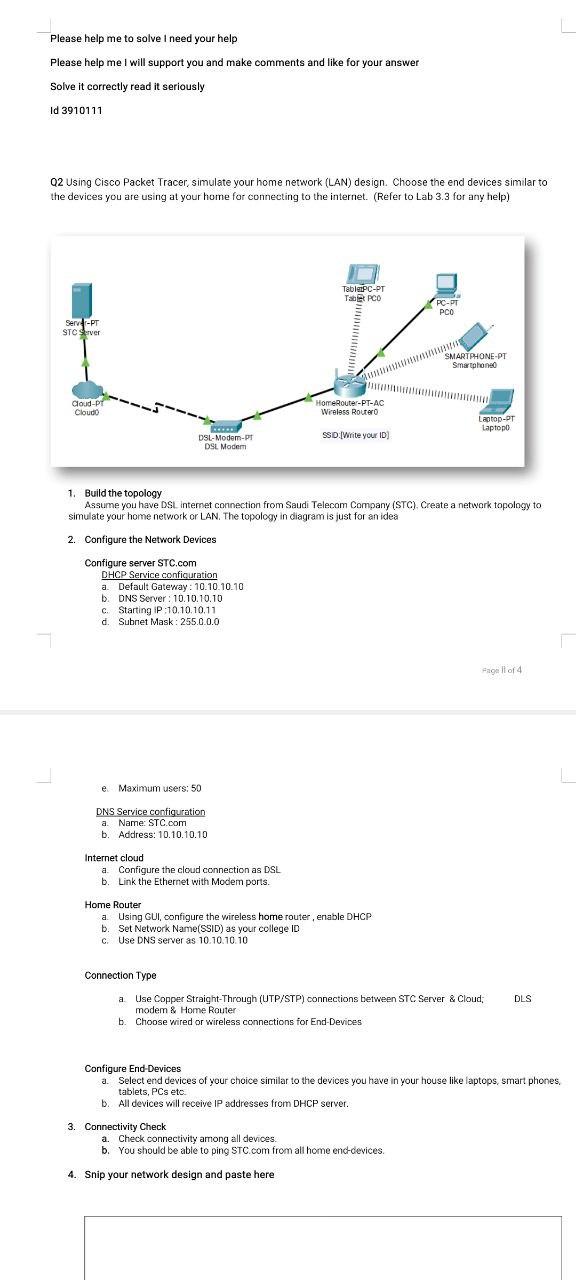
Please help me to solve I need your help Please help me I will support you and make comments and like for your answer Solve it correctly read it seriously Id 3910111 Q2 Using Cisco Packet Tracer, simulate your home network (LAN) design. Choose the end devices similar to the devices you are using at your home for connecting to the internet. (Refer to Lab 3.3 for any help) Server-PT STC Server Cloud-PT Cloud Configure server STC.com *** DSL-Modem-Pr DSL Modem DHCP Service configuration a. Default Gateway: 10.10.10.10 b. DNS Server: 10.10.10.10 c. Starting IP:10.10.10.11 d. Subnet Mask: 255.0.0.0 e. Maximum users: 50 DNS Service configuration a. Name: STC.com b. Address: 10.10.10.10 Internet cloud 1. Build the topology Assume you have DSL internet connection from Saudi Telecom Company (STC). Create a network topology to simulate your home network or LAN. The topology in diagram is just for an idea 2. Configure the Network Devices a. Configure the cloud connection as DSL b. Link the Ethernet with Modem ports. TabletPC-PT Tab PCO HomeRouter-PT-AC Wireless Router SSID [Write your ID) Home Router a. Using GUI, configure the wireless home router, enable DHCP Set Network Name(SSID) as your college ID c. Use DNS server as 10.10.10.10 3. Connectivity Check PC-PT PCO 4. Snip your network design and paste here SMARTPHONE-PT Smartphone0 a. Check connectivity among all devices. b. You should be able to ping STC.com from all home end-devices. Laptop-PT Laptopo Connection Type a. Use Copper Straight-Through (UTP/STP) connections between STC Server & Cloud; modem & Home Router b. Choose wired or wireless connections for End-Devices Page 1 of 4 Configure End-Devices a. Select end devices of your choice similar to the devices you have in your house like laptops, smart phones, tablets, PCs etc. b. All devices will receive IP addresses from DHCP server. DLS
Step by Step Solution
3.42 Rating (165 Votes )
There are 3 Steps involved in it
Using Cisco Packet Tracer simulate your home network LANdesignChoose the end devices similar to the devices you using at your home for connecting to the internet Build a Simple Network in the Logical ... View full answer

Get step-by-step solutions from verified subject matter experts
 Study Help