



Question: Please help me understand this past exercise I had to do last year. The step by step explanation. Problem Description A programming company you are
Please help me understand this past exercise I had to do last year. The step by step explanation.
Problem Description
"A programming company you are working for is developing a software for bulk food retailer and has designed simple UML
class diagrams for a variety of food items. You have been provided with a detailed UML class diagram for class Potato, as
well as pseudocodes and flowcharts for sample class Potato methods, then you have to create a workingclass Potato as a
Java program using a provided testing harness pseudocode."
Please see the InLab Exercise companion file for the UML diagram of class Potato, as well as the provided pseudocodes,
and flowcharts.
Task Java Program: Translate the Algorithm into Java
Create an InLab Exercise project in Eclipse and add the two incomplete classes, Exercise and Potato. Please see
the starter Java files Exercisejava and Potato.java.
Follow the provided UML class diagram, pseudocode and flowcharts and to complete the code for class Potato.
Follow the provided pseudocode and flowchart to complete the body of main method in class Exercise which will
test your class Potato.
When completing the code for the two classes Exercise and Potato, follow all the TODO items.
Follow Java coding conventions as demonstrated in the lecture materials.
Ensure that your program outputs your full name as see in ACSIS as part of the program output.
Comment your source code: comment at the top of each file with your full name, classheader comment for each class
you create, and constructor and method header comments for every constructor and method you create.
Task Compile and Test Your Program
Compile and run your program.
Take a screen shot of your running program, your name must be visible as part of the program output.
Use a program test plan table in your MS Word document to first verify that your program works as expected using
some test values. Then also test with incorrect data with your program and document what happens. For example,
entering text instead of a number or entering negative numbers for either weight or cost per kilogram.
Place your screen shot and program test plan table into your MS Word document and upload this along side your java
files
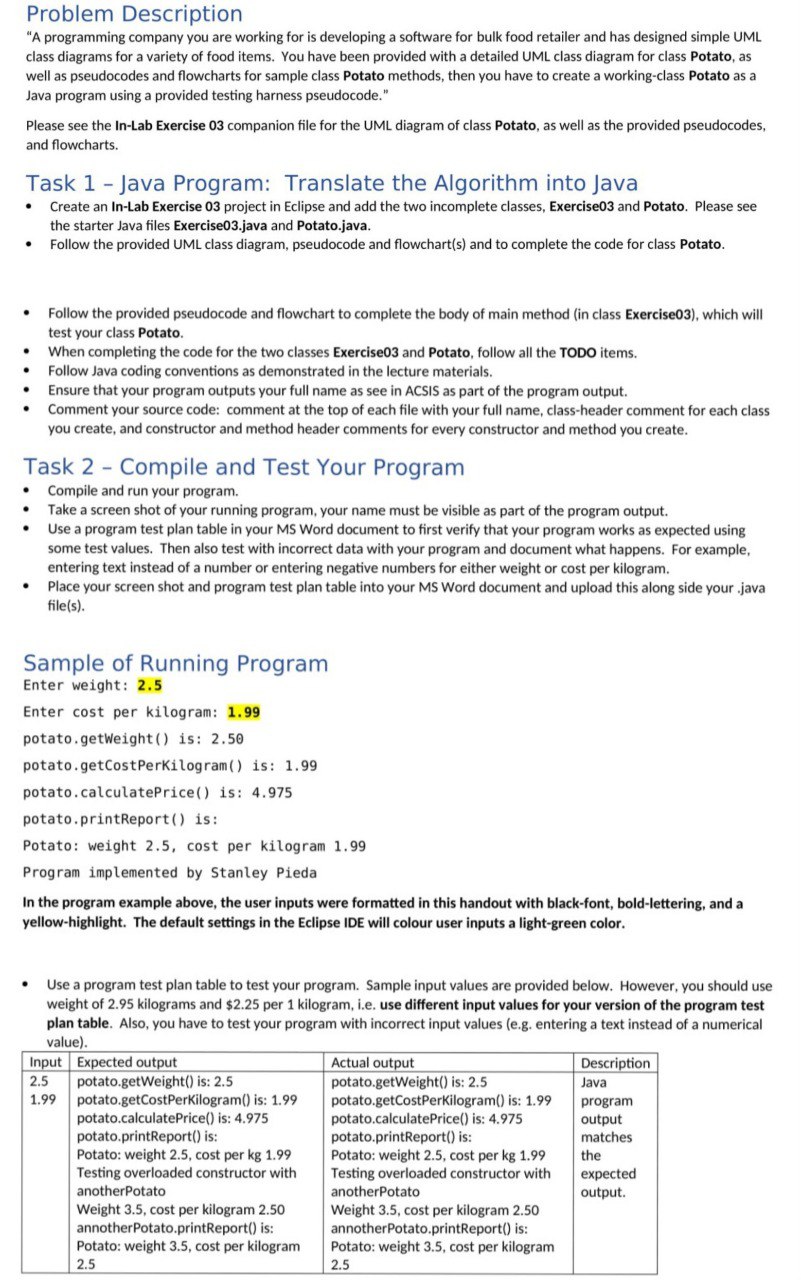
Sample of Running Program
Enter weight:
Enter cost per kilogram:
potato.getWeight is:
potato.getCostPerKilogram is:
potato.calculatePrice is:
potato.printReport is:
Potato: weight cost per kilogram
Program implemented by Stanley Pieda
In the program example above, the user inputs were formatted in this handout with blackfont, boldlettering, and a
yellowhighlight. The default settings in the Eclipse IDE will colour user inputs a lightgreen color.
Use a program test plan table to test your program. Sample input values are provided below. However, you should use
weight of kilograms and $ per kilogram, ie use different input values for your version of the program test
plan table. Also, you have to test your program with incorrect input values eg entering a text instead of a numerical
value
Step by Step Solution
There are 3 Steps involved in it
1 Expert Approved Answer
Step: 1 Unlock

Question Has Been Solved by an Expert!
Get step-by-step solutions from verified subject matter experts
Step: 2 Unlock
Step: 3 Unlock