







Question: Please help me understand what i am doing wrong in the empty cells: Several statistics refer to outliers. In this problem, an outlier is a
Please help me understand what i am doing wrong in the empty cells:
Several statistics refer to outliers. In this problem, an outlier is a value that is greater than or equal to the 90th percentile value. To calculate the percentile, use the PERCENTILE.INC() function, not the deprecated PERCENTILE() function. You can use this function to establish a threshold of acceptance (the formula result is the value under which 90% of data points are found when arranged in increasing order).
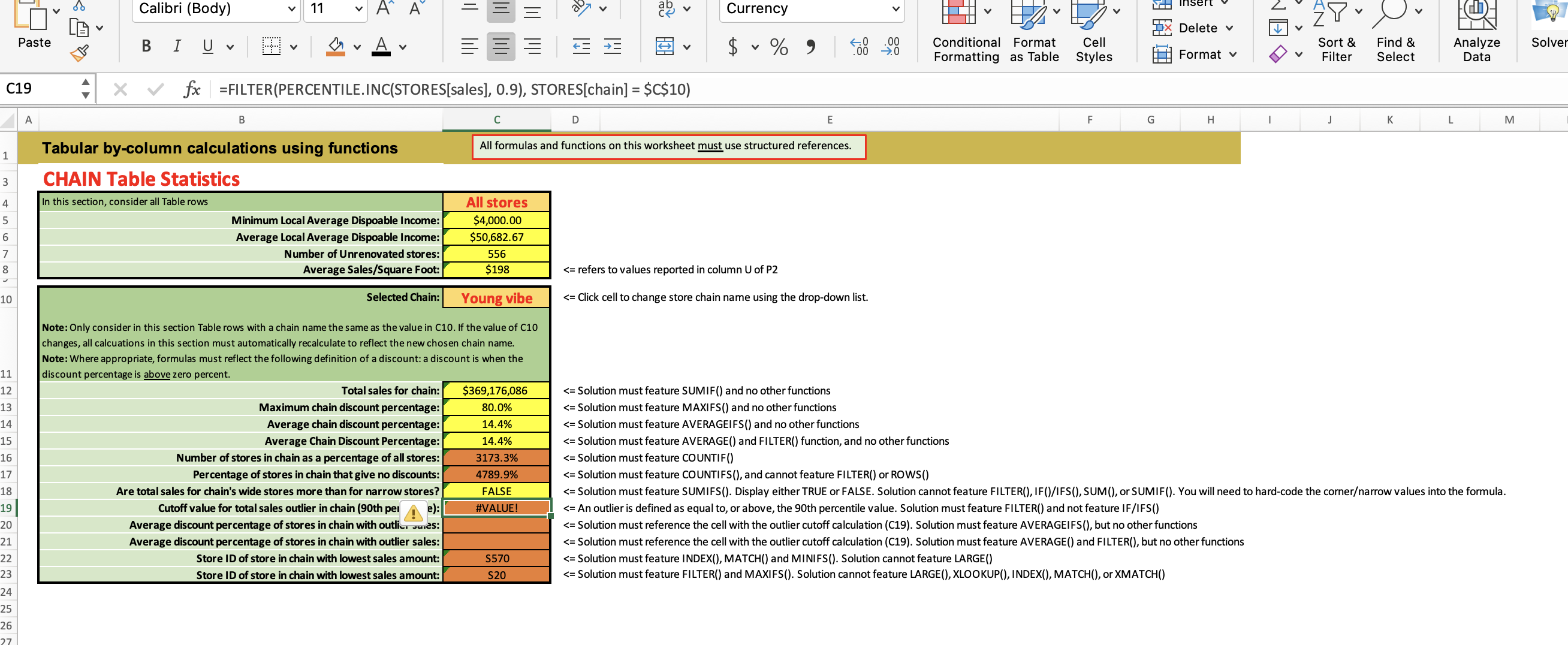
= Solution must feature SUMIF() and no other functions = Solution must feature MAXIFS() and no other functions = Solution must feature AVERAGEIFS() and no other functions = Solution must feature AVERAGE() and FILTER() function, and no other functions = Solution must feature COUNTIF() = Solution must feature COUNTIFS(), and cannot feature FILTER() or ROWS() = Solution must feature SUMIFS(). Display either TRUE or FALSE. Solution cannot feature FILTER(), IF()/IFS(), SUM(), or SUMIF(). You will need to hard-code the cornerarrow values into the formula. = An outlier is defined as equal to, or above, the 90th percentile value. Solution must feature FILTER() and not feature IF/IFS() = Solution must reference the cell with the outlier cutoff calculation (C19). Solution must feature AVERAGEIFS(), but no other functions = Solution must reference the cell with the outlier cutoff calculation (C19). Solution must feature AVERAGE() and FILTER(), but no other functions = Solution must feature INDEX(), MATCH() and MINIFS(). Solution cannot feature LARGE() = Solution must feature FILTER() and MAXIFS(). Solution cannot feature LARGE(), XLOOKUP(), INDEX(), MATCH(), or XMATCH() = Solution must feature SUMIF() and no other functions = Solution must feature MAXIFS() and no other functions
Step by Step Solution
There are 3 Steps involved in it

Get step-by-step solutions from verified subject matter experts
 Study Help