







Question: Please help me with this C function. We are building a custom shell in C and I just need to add one more functionality to
Please help me with this C function.
We are building a custom shell in C and I just need to add one more functionality to it for input and output redirection using "dup2". I have provided the code for the shell below. Leave the existing functions the same, just modify it to add redirection. We are compiling it using gcc. The code for msh.c is given below after the instructions. Please post screenshots of your code and output since it is easier to see the format that way. Thank You!
Instructions/Requirements:
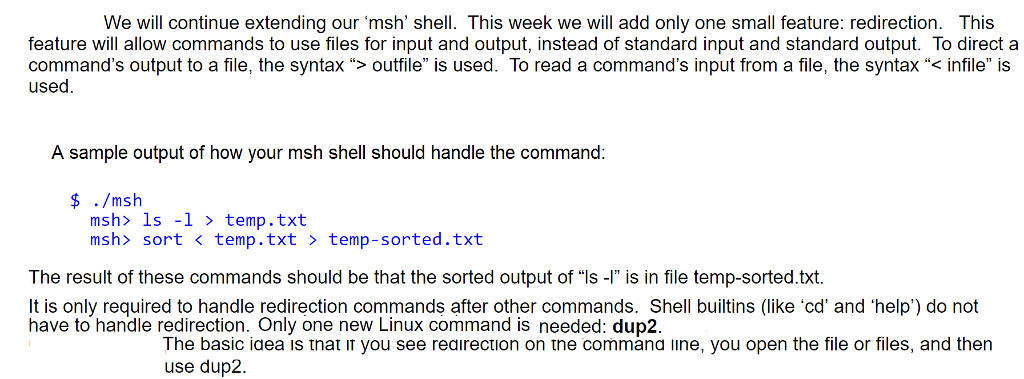
#include#include #include #include #include #include /* * A simple shell */ #define MAX_BUF 160 #define MAX_TOKS 100 int main(int argc, char *argv[]) { char *pos; char *tok; char *path; char s[MAX_BUF]; char *toks[MAX_TOKS]; time_t rawtime; struct tm *timeinfo; static const char prompt[] = "msh> "; FILE *infile; /* * process command line options */ if (argc > 2) { fprintf(stderr, "msh: usage: msh [file] "); exit(EXIT_FAILURE); } if (argc == 2) { /* read from script supplied on the command line */ infile = fopen(argv[1], "r"); if (infile == NULL) { fprintf(stderr, "msh: cannot open script '%s'. ", argv[1]); exit(EXIT_FAILURE); } } else { infile = stdin; } while (1) { // prompt for input, if interactive input if (infile == stdin) { printf(prompt); } /* * read a line of input and break it into tokens */ // read input char *status = fgets(s, MAX_BUF-1, infile); // exit if ^d or "exit" entered if (status == NULL || strcmp(s, "exit ") == 0) { if (status == NULL && infile == stdin) { printf(" "); } exit(EXIT_SUCCESS); } // remove any trailing newline if ((pos = strchr(s, ' ')) != NULL) { *pos = '\0'; } // break input line into tokens char *rest = s; int num_toks = 0; while ((tok = strtok_r(rest, " ", &rest)) != NULL && num_toks We will continue extending our 'msh' shell. This week we will add only one small feature: redirection. This feature will allow commands to use files for input and output, instead of standard input and standard output. To direct a command's output to a file, the syntax ">outfile" is used. To read a command's input from a file, the syntax " infile" is used A sample output of how your msh shell should handle the command: $ ./msh msh ls -1 temp.txt msh> sort temp-sorted.txt The result of these commands should be that the sorted output of "Is- is in file temp-sorted.txt. It is only required to handle redirection commands after other commands. Shell builtins (like 'cd' and 'help') do not have to handle redirection. Only one new Linux command is needed: dup2. The basic iaea is tnat iT you see reairection on tne commana line, you open the file or files, and then use dup2. We will continue extending our 'msh' shell. This week we will add only one small feature: redirection. This feature will allow commands to use files for input and output, instead of standard input and standard output. To direct a command's output to a file, the syntax ">outfile" is used. To read a command's input from a file, the syntax " infile" is used A sample output of how your msh shell should handle the command: $ ./msh msh ls -1 temp.txt msh> sort temp-sorted.txt The result of these commands should be that the sorted output of "Is- is in file temp-sorted.txt. It is only required to handle redirection commands after other commands. Shell builtins (like 'cd' and 'help') do not have to handle redirection. Only one new Linux command is needed: dup2. The basic iaea is tnat iT you see reairection on tne commana line, you open the file or files, and then use dup2
Step by Step Solution
There are 3 Steps involved in it
1 Expert Approved Answer
Step: 1 Unlock

Question Has Been Solved by an Expert!
Get step-by-step solutions from verified subject matter experts
Step: 2 Unlock
Step: 3 Unlock
 Study Help