







Question: please help me with this Do the following: 1 . Creating a new schedule Create a blank schedule with Microsoft Project. and provide the link
please help me with this
Do the following:
Creating a new schedule
Create a blank schedule with Microsoft Project.
and provide the link please for excel
The start date of the project is Oct. Leave the finish date open.
Creating a calendar
Create a new calendar for this assignment and name it as your LastName.FirstName.
Enter the following days as nonworking days.
New Year's Day January
Martin Luther King Day rd Monday of January
Memorial Day last Monday of May dIndependence Day July
e
Labor Day st Monday of September
Thanksgiving th Thursday of November and the day after, and
Christmas December
If a holiday falls on a nonworkday, take the following workday as a holiday.
Enter one rainy day Wednesday every two weeks, beginning the project start day.
Assign the calendar to the project.
Adding activities
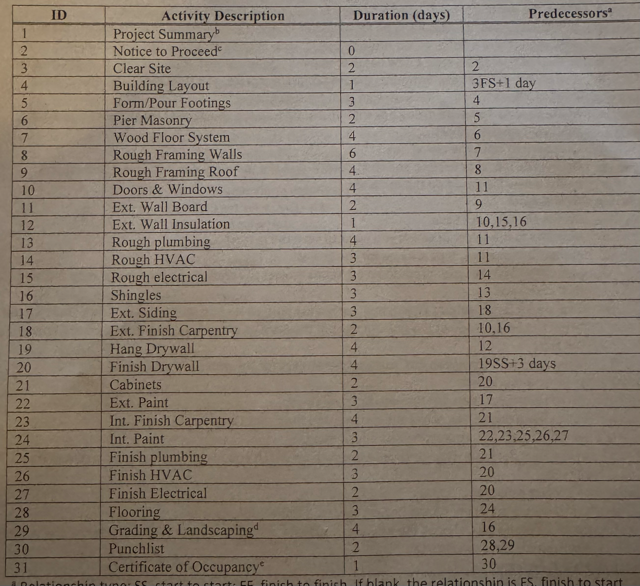
Enter all the activities listed in Table along with their information durations relationships, and lagsSchedule the project. Make sure there are no errors.
Change the first activity as a summary activity of the project.
Step by Step Solution
There are 3 Steps involved in it
1 Expert Approved Answer
Step: 1 Unlock

Question Has Been Solved by an Expert!
Get step-by-step solutions from verified subject matter experts
Step: 2 Unlock
Step: 3 Unlock
 Study Help