







Question: Please help me with this //menutxt.css /* New Perspectives on XML Case Problem 2 Author: Date: Filename: This file contains styles used in the menurecipe.xml
Please help me with this
//menutxt.css /* New Perspectives on XML Case Problem 2 Author: Date: Filename:
This file contains styles used in the menurecipe.xml file. */
menuItem { display: block; width: 680px; font-family: Garamond, "Times New Roman", Times, serif; font-size: 12pt; margin: 5px; padding: 15px; } itemName { display: block; margin-top: 10pt; margin-left: 15pt; font-weight: bold; color: purple; } description { display: block; margin-left: 40px; } icon { display: inline-block; color: green; } price { margin-left: 35pt; display: inline-block; color: blue; }
//menutxt.xml
//recipetxt.css /* New Perspectives on XML Case Problem 2 Author: Date: Filename:
This file contains styles used in the menurecipe.xml file. */
recipe { display: block; margin-left: 20px; margin-top: 20px; border: 1px solid purple; background: ivory; padding: 10px; } itemName { display: none; } ingredient { display: block; color: green; } directions { display: block; color: black; margin-top: 10px; }
//recipetxt.xml
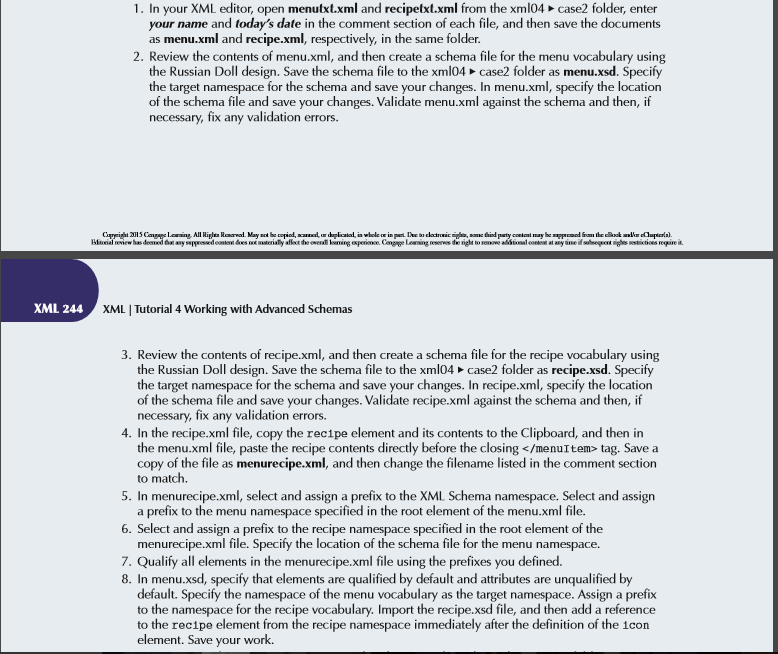
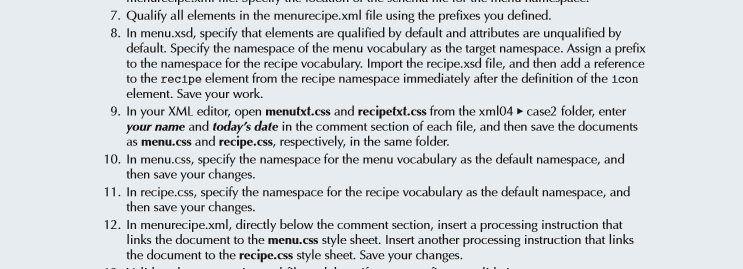
XML 244 1. In your XML editor, open menutxt.xml and recipetxt.xml from the xml04 case2 folder, enter your name and today's date in the comment section of each file, and then save the documents as menu.xml and recipe.xml, respectively, in the same folder. 2. Review the contents of menu.xml, and then create a schema file for the menu vocabulary using the Russian Doll design. Save the schema file to the xmlo4 -case2 folder as menu.xsd. Specify the target namespace for the schema and save your changes. In menu.xml, specify the location of the schema file and save your changes. Validate menu.xml aga nst the schema and then, if necessary, fix any validation errors reserves XML I Tutorial 4 Working with Advanced Schemas 3. Review the contents of recipe.xml, and then create a schema file for the recipe vocabulary using the Russian Doll design. Save the schema file to the xml04 case2 folder as recipe.xsd. Specify the target namespace for the schema and save your changes. In recipe.xml, specify the location of the schema file and save your changes. Validate recipe.xml against the schema and then, if necessary, fix any validation errors 4. In the recipe.xml file, copy the rec1pe element and its contents to the Clipboard, and then in the menu.xml file, paste the recipe contents directly before the closing tag. Save a copy of the file as menurecipe.xml, and then change the filename listed in the comment section to match 5. In menurecipe.xml, select and assign a prefix to the XML Schema namespace. Select and assign a prefix to the menu namespace specified in the root element of the menu.xml file. 6. Select and assign a prefix to the recipe namespace specified in the root element of the menurecipe.xml file. Specify the location of the schema file for the menu namespace. Qualify all elements in the menurecipe.xml file using the prefixes you defined. 8. In menu. specify that elements are qualified by default and attributes are unqualified by default. Specify the namespace of the menu vocabulary as the target namespace. Assign a prefix to the namespace for the recipe vocabulary. Import the recipe.xsd file, and then add a reference to the recipe element from the recipe namespace immediately after the definition of the 1con element. Save your work. XML 244 1. In your XML editor, open menutxt.xml and recipetxt.xml from the xml04 case2 folder, enter your name and today's date in the comment section of each file, and then save the documents as menu.xml and recipe.xml, respectively, in the same folder. 2. Review the contents of menu.xml, and then create a schema file for the menu vocabulary using the Russian Doll design. Save the schema file to the xmlo4 -case2 folder as menu.xsd. Specify the target namespace for the schema and save your changes. In menu.xml, specify the location of the schema file and save your changes. Validate menu.xml aga nst the schema and then, if necessary, fix any validation errors reserves XML I Tutorial 4 Working with Advanced Schemas 3. Review the contents of recipe.xml, and then create a schema file for the recipe vocabulary using the Russian Doll design. Save the schema file to the xml04 case2 folder as recipe.xsd. Specify the target namespace for the schema and save your changes. In recipe.xml, specify the location of the schema file and save your changes. Validate recipe.xml against the schema and then, if necessary, fix any validation errors 4. In the recipe.xml file, copy the rec1pe element and its contents to the Clipboard, and then in the menu.xml file, paste the recipe contents directly before the closing tag. Save a copy of the file as menurecipe.xml, and then change the filename listed in the comment section to match 5. In menurecipe.xml, select and assign a prefix to the XML Schema namespace. Select and assign a prefix to the menu namespace specified in the root element of the menu.xml file. 6. Select and assign a prefix to the recipe namespace specified in the root element of the menurecipe.xml file. Specify the location of the schema file for the menu namespace. Qualify all elements in the menurecipe.xml file using the prefixes you defined. 8. In menu. specify that elements are qualified by default and attributes are unqualified by default. Specify the namespace of the menu vocabulary as the target namespace. Assign a prefix to the namespace for the recipe vocabulary. Import the recipe.xsd file, and then add a reference to the recipe element from the recipe namespace immediately after the definition of the 1con element. Save your work
Step by Step Solution
There are 3 Steps involved in it

Get step-by-step solutions from verified subject matter experts
 Study Help