







Question: please help me write out only the output . Task pwd OUTPUT 1 Section 1:- Linux Basic Commands Description Commands 1) Learning about where you
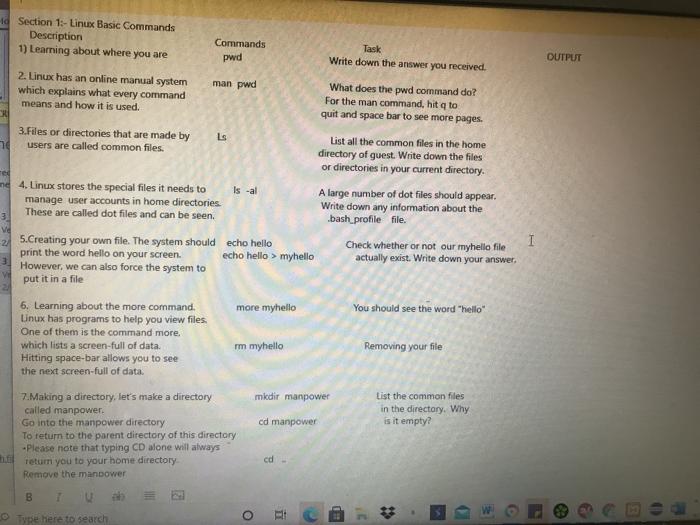
Task pwd OUTPUT 1 Section 1:- Linux Basic Commands Description Commands 1) Learning about where you are Write down the answer you received 2. Linux has an online manual system man pwd What does the pwd command do? which explains what every command For the man command, hit a to means and how it is used. quit and space bar to see more pages 3.Files or directories that are made by Ls List all the common files in the home nd users are called common files. directory of guest. Write down the files or directories in your current directory. 4. Linux stores the special files it needs to Is -al A large number of dot files should appear. manage user accounts in home directories Write down any information about the These are called dot files and can be seen. bash profile file. ve -2/ 5.Creating your own file. The system should echo hello Check whether or not our myhello file print the word hello on your screen. echo hello > myhello actually exist. Write down your answer. However, we can also force the system to put it in a file Ted 1 You should see the word "hello Removing your file 6. Learning about the more command. more myhello Linux has programs to help you view files. One of them is the command more. which lists a screen-full of data. mm myhello Hitting space-bar allows you to see the next screen-full of data. 7. Making a directory, let's make a directory mkdir manpower called manpower Go into the manpower directory od manpower To return to the parent directory of this directory Please note that typing CD alone will always ha return you to your home directory cd Remove the manpower List the common files in the directory. Why is it empty? B Type here to search CE O i EP
Step by Step Solution
There are 3 Steps involved in it

Get step-by-step solutions from verified subject matter experts
 Study Help