







Question: Please help me write this in .NET MAUI APP C# Thank you so much Supplied data files: flights.csv airports.csv Detailed Requirements When the graphical user
Please help me write this in .NET MAUI APP C# Thank you so much
Supplied data files:
flights.csv
airports.csv
Detailed Requirements
When the graphical user interface is launched, the user can choose to either search flights and make a reservation, or search for and modify a reservation.
Find Flights
The findFlights method receives as its input arguments: the originating airport, the destination airport, and the day of week. The method returns an List of any matching Flight objects. If no matches are found, the list control is empty.
Make Reservation
When a travel agent selects a flight from the list, the text fields are populated with the selected flight code, airline, day, time and cost. The travel agent enters the travellers full name and citizenship. The flight code, airline, day, time and cost cannot be edited. An error message is displayed if:
A reservation is to be made but no flight is selected
The name field is empty
The citizenship field is empty
The makeReservation method receives as its input arguments: a Flight object, the travelers name and citizenship. An exception is thrown if the flight is completely booked, or the flight is null, or the name is emptyull, or the citizenship is emptyull. If there are no exceptions thrown a Reservation object is created, saved to the binary file and returned by the method.
Find Reservations
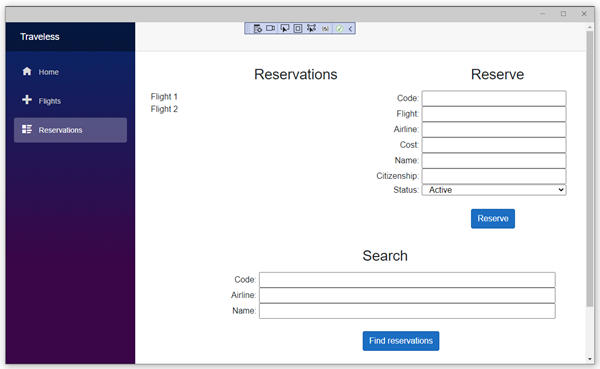
A travel agent can search for an existing reservation that contains the specified reservation code, and/or airline and/or travellers full name. The list is populated with any reservations that are found. Each row in the list displays the code of the corresponding reservation record.
The findReservation method receives as its input arguments: reservation code, airline and/or travelers full name. The method returns a list of matching Reservation objects. If no matches are found, the list control is empty. If the user doesnt enter any input, then all the reservations are displayed in the list.
Update Reservation
When a reservation in the list generated by the findReservation method is selected, the corresponding fields are populated, displaying the following information:
Reservation code
Flight code
Airline name
Cost
Name
Citizenship
Status (active or inactive)
The only fields that can be edited are the name, citizenship and status. None of the other fields can be modified in any way by the user. After the travel agent has made changes to the reservation, they click the Update button. The mutator methods in the Reservation object are called and an error is displayed if an exception occurs.
The persist method in the ReservationManager class saves all Reservation objects to a binary file on the hard drive.
Notes
The ReservationManager class generates the reservation code.
Each reservation is for one seat only.
The name and citizenship do not need to follow any specific format; however, they cannot be empty.
Each problem domain class overrides the toString() method.
Flight codes use the following format: (L meaning letter, D meaning digit)
LL-DDDD (e.g.: GA-1234)
Reservation codes use the following format: (L meaning Letter, D meaning Digit)
LDDDD (e.g., I1234)
Times are in 24-hour format: HH:MM
A reservation that is set to inactive is persisted and retained when the program opens again.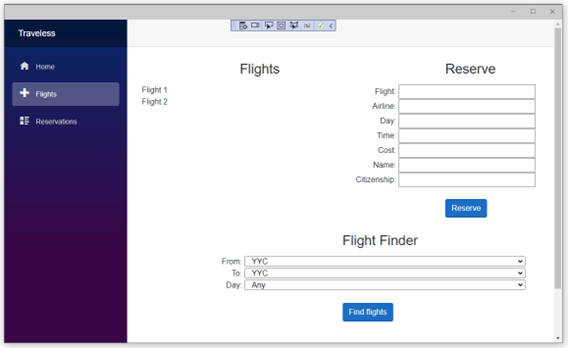
Flight Finder Traveless Reserve Search \begin{tabular}{r|r|r|} & Code: & \\ Airline: & \\ Name: & \\ \hline \end{tabular} Find reservations
Step by Step Solution
There are 3 Steps involved in it

Get step-by-step solutions from verified subject matter experts
 Study Help