







Question: Please help! No Psuedo!! Only basic instructions NO PSUEDO CODE!!! PLEASEEE This assignment is designed to introduce you to the MIPS assembly language, using registers
Please help! No Psuedo!! Only basic instructions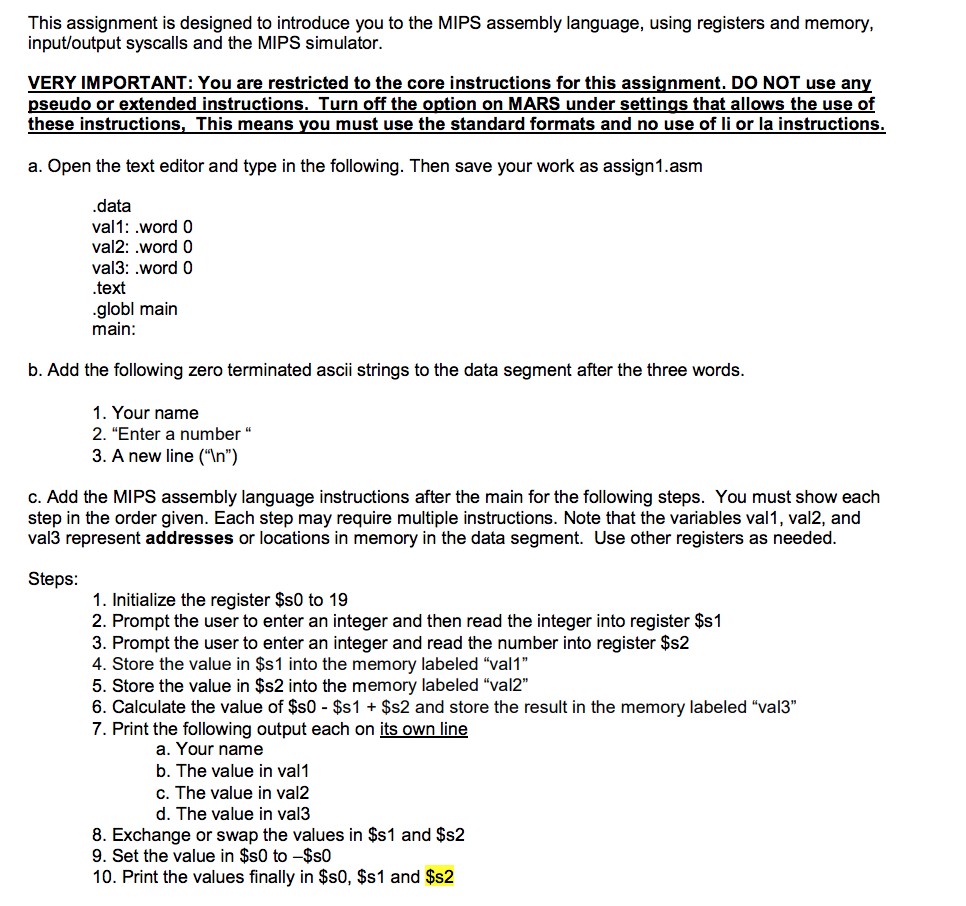
NO PSUEDO CODE!!! PLEASEEE
This assignment is designed to introduce you to the MIPS assembly language, using registers and memory, input/output syscalls and the MIPS simulator. VERY IMPORTANT: You are restricted to the core instructions for this assignment. DO NOT use an pseudo or extended instructions._Turn off the option on MARS under settings that allows the use of these instructions, This means you must use the standard formats and no use of li or la instructions a. Open the text editor and type in the following. Then save your work as assign1.asm data val1: word 0 val2: .word 0 val3: .word 0 .text globl main main: b. Add the following zero terminated ascii strings to the data segment after the three words 1. Your name 2. "Enter a number " 3. A new line ("In") c. Add the MIPS assembly language instructions after the main for the following steps. You must show each step in the order given. Each step may require multiple instructions. Note that the variables val1, val2, and val3 represent addresses or locations in memory in the data segment. Use other registers as needed Steps 1. Initialize the register $s0 to 19 2. Prompt the user to enter an integer and then read the integer into register $s1 3. Prompt the user to enter an integer and read the number into register $s2 4. Store the value in $s1 into the memory labeled "val1" 5. Store the value in $s2 into the memory labeled "val2" 6. Calculate the value of $s0 - $s1 $s2 and store the result in the memory labeled "val3" 7. Print the following output each on its own line a. Your name b. The value in val1 c. The value in val2 d. The value in val3 8. Exchange or swap the values in $s1 and $s2 9. Set the value in $s0 to -$s0 10. Print the values finally in $s0, $s1 and $s2 This assignment is designed to introduce you to the MIPS assembly language, using registers and memory, input/output syscalls and the MIPS simulator. VERY IMPORTANT: You are restricted to the core instructions for this assignment. DO NOT use an pseudo or extended instructions._Turn off the option on MARS under settings that allows the use of these instructions, This means you must use the standard formats and no use of li or la instructions a. Open the text editor and type in the following. Then save your work as assign1.asm data val1: word 0 val2: .word 0 val3: .word 0 .text globl main main: b. Add the following zero terminated ascii strings to the data segment after the three words 1. Your name 2. "Enter a number " 3. A new line ("In") c. Add the MIPS assembly language instructions after the main for the following steps. You must show each step in the order given. Each step may require multiple instructions. Note that the variables val1, val2, and val3 represent addresses or locations in memory in the data segment. Use other registers as needed Steps 1. Initialize the register $s0 to 19 2. Prompt the user to enter an integer and then read the integer into register $s1 3. Prompt the user to enter an integer and read the number into register $s2 4. Store the value in $s1 into the memory labeled "val1" 5. Store the value in $s2 into the memory labeled "val2" 6. Calculate the value of $s0 - $s1 $s2 and store the result in the memory labeled "val3" 7. Print the following output each on its own line a. Your name b. The value in val1 c. The value in val2 d. The value in val3 8. Exchange or swap the values in $s1 and $s2 9. Set the value in $s0 to -$s0 10. Print the values finally in $s0, $s1 and $s2
Step by Step Solution
There are 3 Steps involved in it

Get step-by-step solutions from verified subject matter experts
 Study Help