







Question: Please help on how to do this step by step. Thank you! Synopsis You are a Project Manager for a small system development project. After
Please help on how to do this step by step. Thank you!
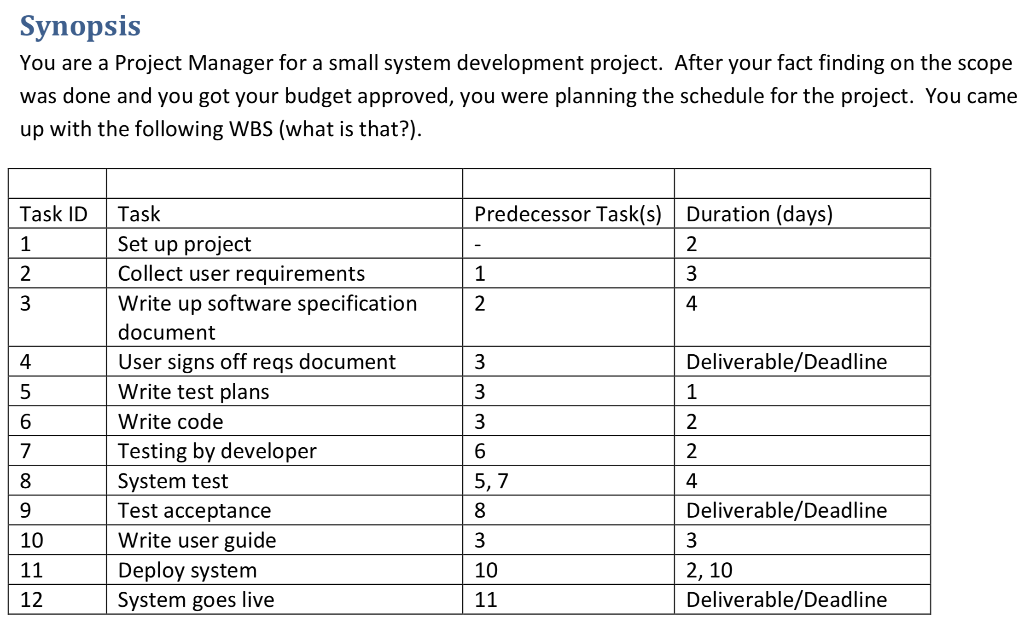
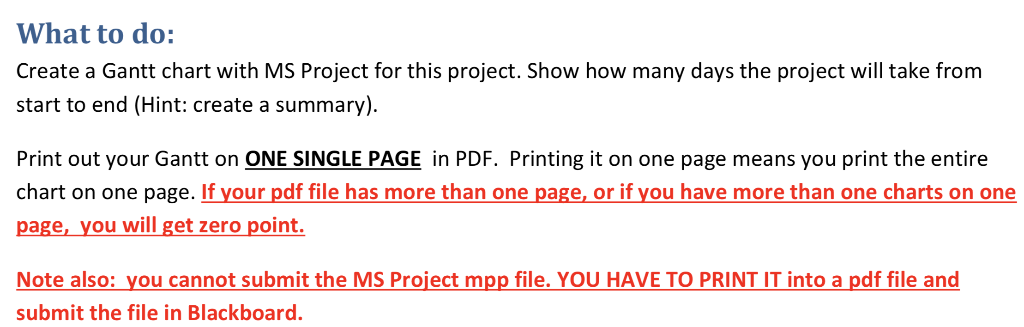
Synopsis You are a Project Manager for a small system development project. After your fact finding on the scope was done and you got your budget approved, you were planning the schedule for the project. You came up with the following WBS (what is that?) Task ID Task Predecessor Task(s) Duration (days) Set up project Collect user requirements Write up software specification document User signs off reqs document Write test plans Write code Testing by developer System test Test acceptance Write user guide Deploy system System goes live 4 Deliverable/Deadline 4 5 6 5, Deliverable/Deadline 10 10 2, 10 Deliverable/Deadline 12 What to do: Create a Gantt chart with MS Project for this project. Show how many days the project will take from start to end (Hint: create a summary) Print out your Gantt on ONE SINGLE PAGE in PDF. Printing it on one page means you print the entire chart on one page. If your pdf file has more than one page, or if you have more than one charts on one page, you will get zero point Note also: you cannot submit the MS Project mpp file. YOU HAVE TO PRINT IT into a pdf file and submit the file in Blackboard. Synopsis You are a Project Manager for a small system development project. After your fact finding on the scope was done and you got your budget approved, you were planning the schedule for the project. You came up with the following WBS (what is that?) Task ID Task Predecessor Task(s) Duration (days) Set up project Collect user requirements Write up software specification document User signs off reqs document Write test plans Write code Testing by developer System test Test acceptance Write user guide Deploy system System goes live 4 Deliverable/Deadline 4 5 6 5, Deliverable/Deadline 10 10 2, 10 Deliverable/Deadline 12 What to do: Create a Gantt chart with MS Project for this project. Show how many days the project will take from start to end (Hint: create a summary) Print out your Gantt on ONE SINGLE PAGE in PDF. Printing it on one page means you print the entire chart on one page. If your pdf file has more than one page, or if you have more than one charts on one page, you will get zero point Note also: you cannot submit the MS Project mpp file. YOU HAVE TO PRINT IT into a pdf file and submit the file in Blackboard
Step by Step Solution
There are 3 Steps involved in it

Get step-by-step solutions from verified subject matter experts
 Study Help