







Question: Please help!!! SOS! This is in MASM Assembly using the Irvine Library Objective: Develop a the game of Connect Three in Assembly. This game will
Please help!!! SOS!
This is in MASM Assembly using the Irvine Library
Objective: Develop a the game of Connect Three in Assembly. This game will be menu
driven, the gameboard will be made of ASCII characters, and it will have options for player
vs player, player vs computer, and computer vs computer.
Connect Three:
Our version of the game will be played on a x gameboard. Players will take turns
dropping a piece into a column. Each dropped piece should fall to the bottommost
vacant spot of the gameboard. When a player has three of their pieces in a roweither
horizontally, vertically, or diagonally they win that match. If the entire x board is filled
without either player obtaining in a row, it is considered a draw. There is ample
information available online for how the game of Connect Four is played. The basic rules
are the same, we are just implementing a simplified version using a smaller gameboard.
Menu:
Your program should begin with a main menu that is returned to after each match. This
menu will have options for selecting player vs player, player vs computer, computer vs
computer, view rules, and exit. Once a selection is made and the game begins, the screen
should be cleared before displaying the gameboard. Do not print the gameboard
underneath the main menu. Additionally, each time a move is made the screen should be
cleared and the updated gameboard redisplayed. The entire program should behave like a
liveupdated game, not multiple menus and gameboards sequentially printed to the
console.
Sample menu
Player vs Player
Player vs Computer
Computer vs Computer
View Stats
View Rules
Exit
Player vs Player:
The first player to go should be randomly selected. The program must then prompt that
player to make a selection of which column to drop their piece into. The correct cell in the
matrix should then change to the color for that playeruse blue for the first player, yellow for
the second Players will take turns dropping pieces, prompted by the program, until a
piece connection is made or the gameboard is filled. At the end of each match the game
should display who wonor if it was a draw then wait for a keypress from the user before
returning back to the main menu.
Player vs Computer:
This mode should play exactly like player vs player, however player will be replaced by a
computer player. The computer does not need any sophisticated AI., it can simply make
random selections for what column to drop each piece in The starting player will again be
randomly selected, and the player and computer will alternate turns until a winner is found
or the game ends in a draw.
Computer vs Computer:
This mode will have no user input to play the game, but will instead display a game played
out by two computer players. There are bonus points available if you implement a small
delay between moves of the computers, so the game can appear to be played rather than
just printing a single final board to the console.
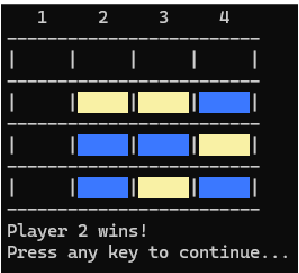
Sample game output of the gameboard
Specifications:
Your program must meet all the requirements outlined above.
The displayed gameboard should be clear and easily understoodsee the example
above
Your program must compile and run on its own. I will not be debugging programs
that do not compile to attempt to get them to run.
You must use PROTO, INVOKE, and PROC. All parameters should be passed in the
INVOKE statement. The stack should not be used except for local variables.
Do not use any dot directives. This includes ifelse, while, repeat, etc.
No global variables. Everything should be passed with INVOKE.
Procedures should cover one simple task. Avoid complicated procedures spanning
hundreds of lines of code.
Input validation is required at all stages of the program. This includes not only
invalid input, but also if a player attempts to drop a piece in a column that is already
full.
Do not use USES.
In all modes, the first player to go must be randomly selectedthis includes
computer players
Documentation is very important for this assignment. All procedures should have a
thorough docstring detailing their inputs, outputs, and basic functionality. All code
should be thoroughly commented to explain what it is achieving.
Extra Credit Opportunities:
Track statistics for player including wins, losses, draws, and total games played.
Include a menu option to display these statistics.
Add a small delay second to computer selections, so they appear to think
through their move rather than immediately update the board.
Animate pieces falling down the game board to their final location.
Allow users to select what color their game pieces arethey cannot be the same
Ask if you have any other ideas that you feel might be worth extra credit.
Step by Step Solution
There are 3 Steps involved in it
1 Expert Approved Answer
Step: 1 Unlock

Question Has Been Solved by an Expert!
Get step-by-step solutions from verified subject matter experts
Step: 2 Unlock
Step: 3 Unlock
 Study Help