







Question: Please help. This is in Java ReflectingPond You will be creating tree fies: ReflectingPondjava (the main Gul controller),PondQuadrants java and Ripples java. As in previous
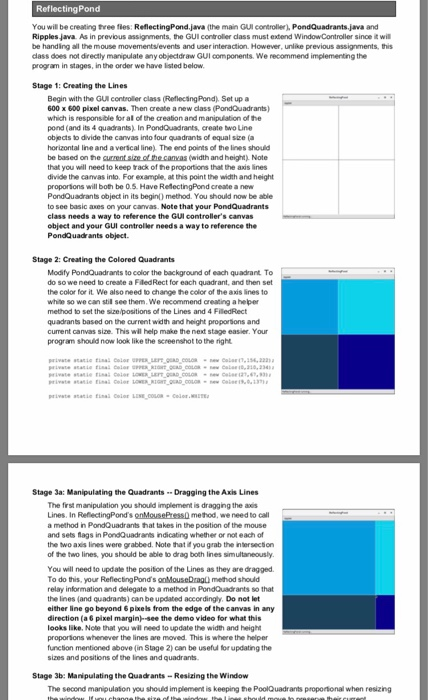
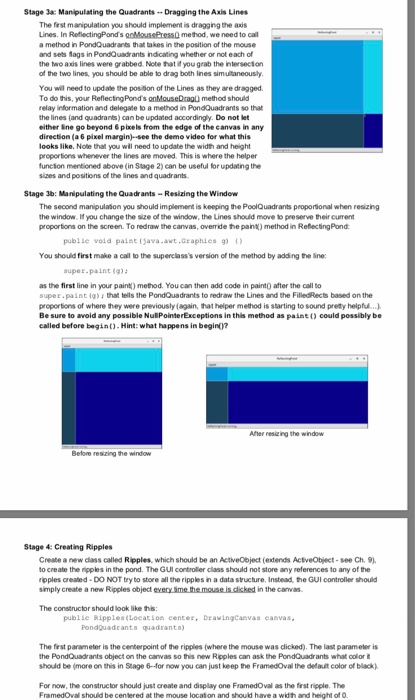
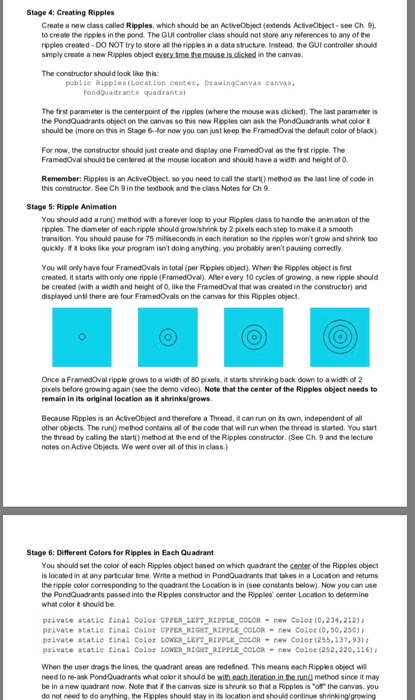
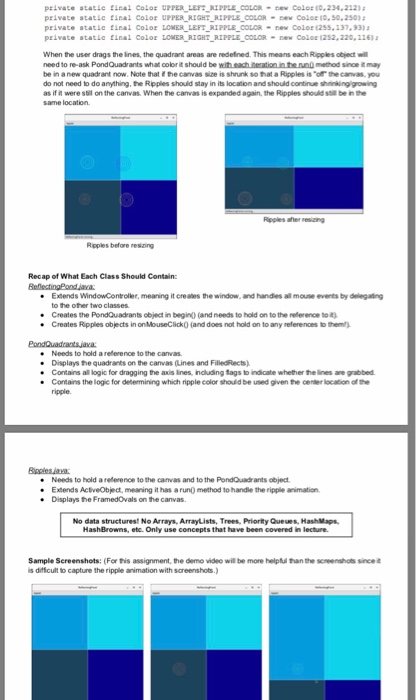
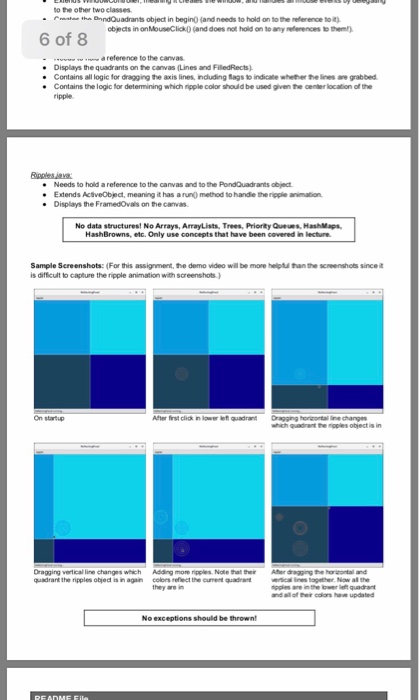
ReflectingPond You will be creating tree fies: ReflectingPondjava (the main Gul controller),PondQuadrants java and Ripples java. As in previous assignments, the GUI controlier dass must extend Window Controller since it wil be handing all the mouse movements/events and user interaction. However, unlike previous assignments, ths cdass does not directly manipulate any objectdraw GUI components. We recommend implementing the program in stages, in the order we have listed below Stage 1: Creating the Lines Begin with the GUl controller class (ReflecngPond) Set up a 600 x 600 pixel canvas. Then areate a new dlass (PondQuadrants) which is responsible for al of the creation and manipulation of the pond (and its 4 quadrants) In PondQuadrants, create two Line objects to dvide the canvas into four quadrants of equal sze (a horizontal Iine and a verscal line). The end points of the lines should width and height) Note that you will need to keep rack of the proportions that the axis lines divide the canvas into. For example, at this point the width and height proporions will both be 0.5. Have RelectingPond create a new PondQuadrants object in its begin) method. You should now be able to see basic axes on your canvas. Note that your PondQuadrants class needs a way to reference the GUl controller's canvas object and your GUI controller needs a way to reference the PondQuadrants object. Stage 2: Creating the Colored Quadrants Modify PondQuadrants to color the background of each quadrant To do soweneed to create a FledRect for each quadrant, and then set the color for it We also need to change the color of the axs lines to white so we can stil see them. We recommend creating a heper method to set the size positions of the Lines and 4 FiledRect quadrants based on the current width and height proporsons and current canvas size. This will help make the next stage easier. Your program should now look like the screenshot to the right 318,234 Stage Ja: Manipulating the Quadrants Dragging the Axis Lines The first manipulation you should implement is dragging the axis Lines. In ReflectingPond's onMousePress0 method, we need to call a method in PondQuadrants that takes in the position of the mouse and sets flags in PondQuadrants indicating whether or not each of the two axis lines were grabbed. Note that iyou grab the intersection of the two lines, you should be able to drag both Iines simultaneously. You will need to update the position of the Lines as they are dragged To do this, your ReflectingPonds onMouseDrag method should relay information and delegate to a method in PondQuadrants so that the ines (and quadrants) can be updated accordingly. Do not let either line go beyond 6pikels from the edge of the canvas in any direction (a 6 pixel margin-see the demo video for what this looks like. Note that you wil need to update the width and height proporions whenever the lines are moved. This is where the helper function mentioned above (in Stage 2) can be useful for updating the sizes and positions of the ines and quadrants Stage 3b: Manipulating the Quadrants- Resizing the Window The second manipulaton you should implement is keeping the PoolQuadrants proportional when resizing ReflectingPond You will be creating tree fies: ReflectingPondjava (the main Gul controller),PondQuadrants java and Ripples java. As in previous assignments, the GUI controlier dass must extend Window Controller since it wil be handing all the mouse movements/events and user interaction. However, unlike previous assignments, ths cdass does not directly manipulate any objectdraw GUI components. We recommend implementing the program in stages, in the order we have listed below Stage 1: Creating the Lines Begin with the GUl controller class (ReflecngPond) Set up a 600 x 600 pixel canvas. Then areate a new dlass (PondQuadrants) which is responsible for al of the creation and manipulation of the pond (and its 4 quadrants) In PondQuadrants, create two Line objects to dvide the canvas into four quadrants of equal sze (a horizontal Iine and a verscal line). The end points of the lines should width and height) Note that you will need to keep rack of the proportions that the axis lines divide the canvas into. For example, at this point the width and height proporions will both be 0.5. Have RelectingPond create a new PondQuadrants object in its begin) method. You should now be able to see basic axes on your canvas. Note that your PondQuadrants class needs a way to reference the GUl controller's canvas object and your GUI controller needs a way to reference the PondQuadrants object. Stage 2: Creating the Colored Quadrants Modify PondQuadrants to color the background of each quadrant To do soweneed to create a FledRect for each quadrant, and then set the color for it We also need to change the color of the axs lines to white so we can stil see them. We recommend creating a heper method to set the size positions of the Lines and 4 FiledRect quadrants based on the current width and height proporsons and current canvas size. This will help make the next stage easier. Your program should now look like the screenshot to the right 318,234 Stage Ja: Manipulating the Quadrants Dragging the Axis Lines The first manipulation you should implement is dragging the axis Lines. In ReflectingPond's onMousePress0 method, we need to call a method in PondQuadrants that takes in the position of the mouse and sets flags in PondQuadrants indicating whether or not each of the two axis lines were grabbed. Note that iyou grab the intersection of the two lines, you should be able to drag both Iines simultaneously. You will need to update the position of the Lines as they are dragged To do this, your ReflectingPonds onMouseDrag method should relay information and delegate to a method in PondQuadrants so that the ines (and quadrants) can be updated accordingly. Do not let either line go beyond 6pikels from the edge of the canvas in any direction (a 6 pixel margin-see the demo video for what this looks like. Note that you wil need to update the width and height proporions whenever the lines are moved. This is where the helper function mentioned above (in Stage 2) can be useful for updating the sizes and positions of the ines and quadrants Stage 3b: Manipulating the Quadrants- Resizing the Window The second manipulaton you should implement is keeping the PoolQuadrants proportional when resizing
Step by Step Solution
There are 3 Steps involved in it

Get step-by-step solutions from verified subject matter experts
 Study Help