







Question: PLEASE HELP!!! This is the assignment in bold: For this assignment you are to write a program in C, that will read in multiple integer
PLEASE HELP!!!
This is the assignment in bold:
For this assignment you are to write a program in C, that will read in multiple integer numbers from a file until you reach the end of the file. The numbers will be between 0 and 65,535 inclusive. Print an error message for any number outside this range. Print out the 16-bit binary representation of the number according to the format:
The binary representation of 3 is 0000 0000 0000 0011.
Have one blank separating each nibble (half-byte) and end the sentence with a period. You are required to print the binary representation using a recursive routine. The data you should test your program with:
0, 1, 2, 3, 16, 17, 1234, 5678, -201, 65534, 65535, 65536, -1
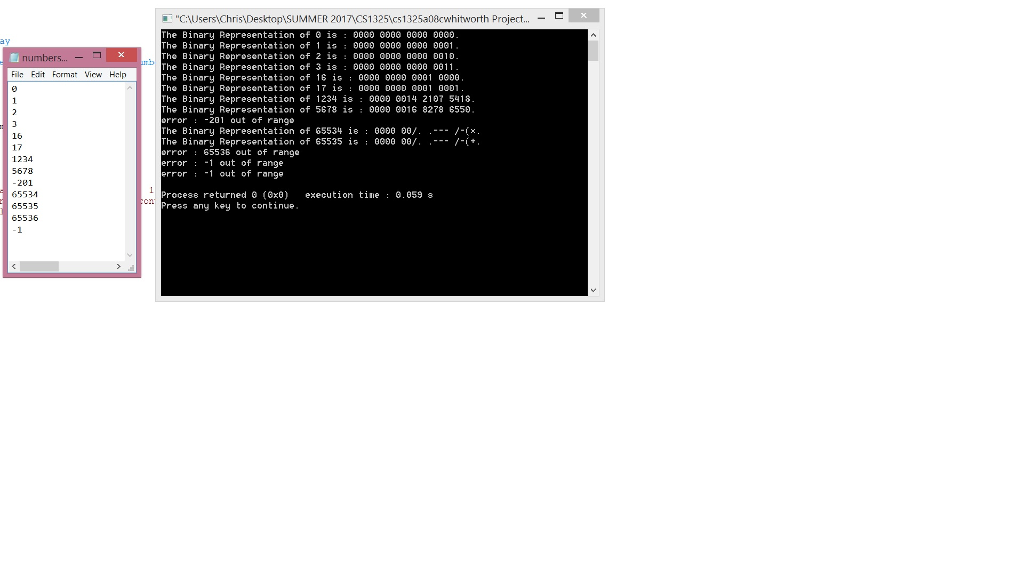
I can't get the right binary representation for 65534 and 65535 to print out correctly. Also, -1 shows up twice at the end, it should only be once.
I have included the code and a screen shot of my numbers file in notepad, as well as what I get when I run the program.
#include i=18; /*the 16-bit binary numbers require 16 char space , 3 nibble space , 1 period(.) so totally 20 char space is reruired so at index 4,9,14 will be nibble space and at 19 index period(.), converted binary number will be seperated digit by digit and place in a char. remaining spaces in char array will be filled with 0. */ while(i>=0) { if(i==4 || i==9 || i==14) { binNum[i] = ' '; } else if(b!=0) { binNum[i] =b%10+'0'; b /= 10; } else { binNum[i]='0'; } i--; } binNum[19]='.'; printf("The Binary Representation of %li is : ",decNum); for(i=0; i
Step by Step Solution
There are 3 Steps involved in it

Get step-by-step solutions from verified subject matter experts
 Study Help