







Question: Please help to make this below Java code work, that it will be animated. When the user places the mouse over a shape, holds down
Please help to make this below Java code work, that it will be animated. When the user places the mouse over a shape, holds down the button and drags the mouse, the shape should move. One solution is to simply move and redraw the figure.
The shapes should react to clicks just when the mouse is over it You must therefore take into account that the circle and the triangle are not rectangular.
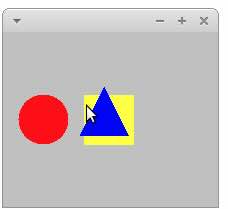
For example, it should be possible to click on the square when it is partially covered by the triangle, like the image and the Java code below : import javax.swing.;
import java.awt.;
import java.awt.event.;
class Shape
int x y; Position of the topleft corner
int width, height;
Color color;
public Shapeint x int y int width, int height, Color color
this.x x;
this.y y;
this.width width;
this.height height;
this.color color;
public void drawGraphics g
gsetColorcolor;
Implement drawing logic for the shape eg gfillRect, gfillOval, etc.
public boolean containsPoint point
Implement logic to check if a point is inside the shape
return false;
public void moveint dx int dy
x dx;
y dy;
abstract class DrawingPanel extends JPanel implements MouseListener, MouseMotionListener
private Shape shapes;
private Shape selectedShape;
private Point lastMousePosition;
public DrawingPanel
shapes new Shape;
Initialize your shapes here
addMouseListenerthis;
addMouseMotionListenerthis;
@Override
protected void paintComponentGraphics g
super.paintComponentg;
for Shape shape : shapes
shape.drawg;
@Override
public void mousePressedMouseEvent e
Point mousePoint egetPoint;
for int i shapes.length ; i ; i
if shapesicontainsmousePoint
selectedShape shapesi;
lastMousePosition mousePoint;
break;
@Override
public void mouseDraggedMouseEvent e
if selectedShape null
int dx egetX lastMousePosition.x;
int dy egetY lastMousePosition.y;
selectedShape.movedx dy;
lastMousePosition egetPoint;
repaint;
Implement other MouseListener and MouseMotionListener methods
public static void mainString args
JFrame frame new JFrameShape Manipulation Program";
frame.setDefaultCloseOperationJFrameEXITONCLOSE;
frame.setSize;
DrawingPanel panel new DrawingPanel
@Override
public void mouseMovedMouseEvent e
@Override
public void mouseClickedMouseEvent e
@Override
public void mouseReleasedMouseEvent e
@Override
public void mouseEnteredMouseEvent e
@Override
public void mouseExitedMouseEvent e
;
frame.addpanel;
frame.setVisibletrue;
Step by Step Solution
There are 3 Steps involved in it
1 Expert Approved Answer
Step: 1 Unlock

Question Has Been Solved by an Expert!
Get step-by-step solutions from verified subject matter experts
Step: 2 Unlock
Step: 3 Unlock
 Study Help