







Question: Please help with MATLAB problem 5. (20 %) A beginner MATLAB programmer wrote the code below to darken a grayscale image by reducing the intensity
Please help with MATLAB problem
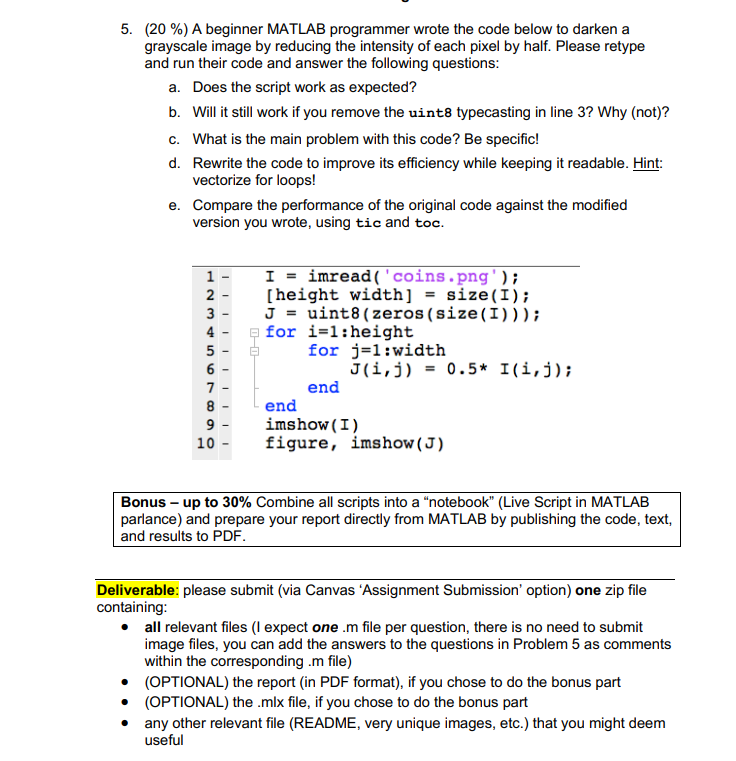
5. (20 %) A beginner MATLAB programmer wrote the code below to darken a grayscale image by reducing the intensity of each pixel by half. Please retype and run their code and answer the following questions: a. Does the script work as expected? b. Will it still work if you remove the uint8 typecasting in line 3? Why (not)? C. What is the main problem with this code? Be specific! d. Rewrite the code to improve its efficiency while keeping it readable. Hint: vectorize for loops! e. Compare the performance of the original code against the modified version you wrote, using tic and toc. 1 2 3 4 5 6 7 8 9 10 I - imread('coins.png'); [height width] = size(I); J = uint8(zeros(size(I))); for i=1:height for j=1:width Jli,j) = 0.5* Ili,j); end end imshow(I) figure, imshow (J) Bonus - up to 30% Combine all scripts into a "notebook" (Live Script in MATLAB parlance) and prepare your report directly from MATLAB by publishing the code, text, and results to PDF Deliverable: please submit (via Canvas 'Assignment Submission' option) one zip file containing: all relevant files (I expect one.m file per question, there is no need to submit image files, you can add the answers to the questions in Problem 5 as comments within the corresponding.m file) (OPTIONAL) the report in PDF format), if you chose to do the bonus part (OPTIONAL) the .mlx file, if you chose to do the bonus part any other relevant file (README, very unique images, etc.) that you might deem useful 5. (20 %) A beginner MATLAB programmer wrote the code below to darken a grayscale image by reducing the intensity of each pixel by half. Please retype and run their code and answer the following questions: a. Does the script work as expected? b. Will it still work if you remove the uint8 typecasting in line 3? Why (not)? C. What is the main problem with this code? Be specific! d. Rewrite the code to improve its efficiency while keeping it readable. Hint: vectorize for loops! e. Compare the performance of the original code against the modified version you wrote, using tic and toc. 1 2 3 4 5 6 7 8 9 10 I - imread('coins.png'); [height width] = size(I); J = uint8(zeros(size(I))); for i=1:height for j=1:width Jli,j) = 0.5* Ili,j); end end imshow(I) figure, imshow (J) Bonus - up to 30% Combine all scripts into a "notebook" (Live Script in MATLAB parlance) and prepare your report directly from MATLAB by publishing the code, text, and results to PDF Deliverable: please submit (via Canvas 'Assignment Submission' option) one zip file containing: all relevant files (I expect one.m file per question, there is no need to submit image files, you can add the answers to the questions in Problem 5 as comments within the corresponding.m file) (OPTIONAL) the report in PDF format), if you chose to do the bonus part (OPTIONAL) the .mlx file, if you chose to do the bonus part any other relevant file (README, very unique images, etc.) that you might deem useful
Step by Step Solution
There are 3 Steps involved in it

Get step-by-step solutions from verified subject matter experts
 Study Help