







Question: Please help with the code behind the covert to asc and chr aswell as the compare button for this visual basic assignment My Form C
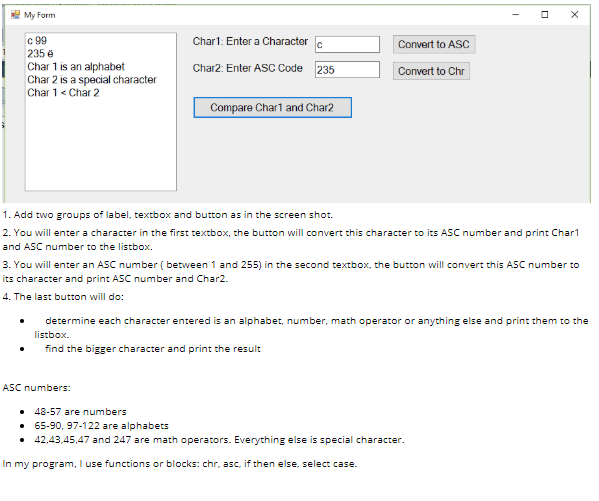
Please help with the code behind the covert to asc and chr aswell as the compare button for this visual basic assignment
My Form C 99 235e Char 1 is an alphabet Char 2 is a special character Cha 1 Char 2 Char1: Enter a Character Convert to ASC Char2: Enter ASC Code 235 Convert to Chr Compare Char1 and Char2 1. Add two groups of label, textbox and button as in the screen shot 2. You will enter a character in the first textbox, the button will convert this character to its ASC number and print Char1 and ASC number to the listbox. 3. You will enter an ASC number (between 1 and 255) in the second textbox, the button will convert this ASC number to its character and print ASC number and Char2. 4. The last button will do: determine each character entered is an alphabet, number, math operatoror anything else and print them to the listbox. find the bigger character and print the result ASC numbers: 48-57 are numbers 65-90, 97-122 are alphabets 42,43,45,47 and 247 are math operators. Everything else is special character. In my program, I use functions or blocks: chr, asc, if then else, select case
Step by Step Solution
There are 3 Steps involved in it

Get step-by-step solutions from verified subject matter experts
 Study Help