







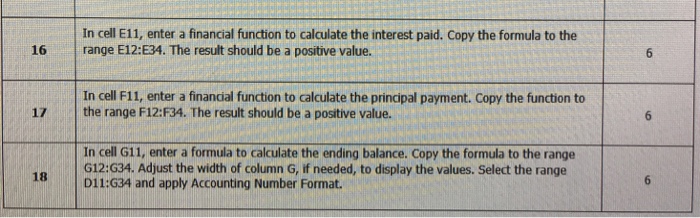
Question: Please help with the correction Step Instruction Earned Possible In cell E11, enter a financial function to calculate the interest paid. Copy the formula to
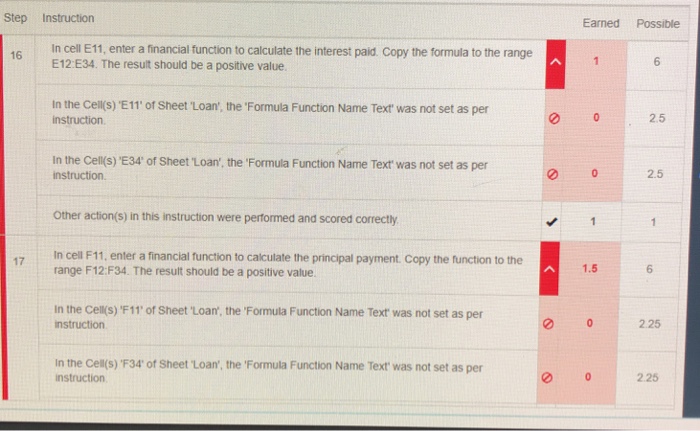
Step Instruction Earned Possible In cell E11, enter a financial function to calculate the interest paid. Copy the formula to the range E12 E34. The result should be a positive value. 16 In the Cell(s) 'E11' of Sheet Loan, the 'Formula Function Name Text was not set as per instruction 2.5 In the Cell(s) 'E34' of Sheet Loan', the 'Formula Function Name Text was not set as per instruction. 2.5 Other action(s) in this instruction were performed and scored correctly In cell F11, enter a financial function to calculate the principal payment. Copy the function to the range F12:F34. The result should be a positive value 1.5 6 in the cell(s)'F 11, of Sheet-Loan, theFormula Function Name Text was not set as per nstruction 2.25 In the Cell(s) F34' of Sheet 'Loan, the 'Formula Function Name Text was not set as per instruction 2.25
Step by Step Solution
There are 3 Steps involved in it

Get step-by-step solutions from verified subject matter experts
 Study Help