







Question: Please help with the following code: import java.util.Scanner; public class StringTokenizer { public static void main(String[] args) { Scanner scnr = new Scanner(System.in); String message
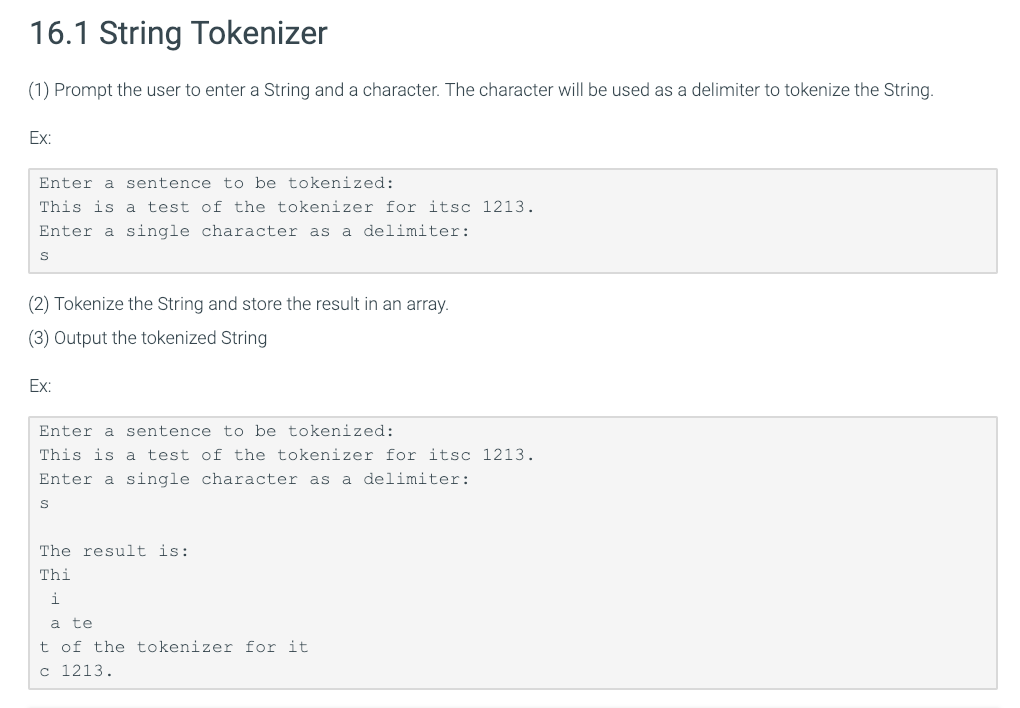
Please help with the following code:
import java.util.Scanner;
public class StringTokenizer { public static void main(String[] args) { Scanner scnr = new Scanner(System.in); String message = ""; char delimiter; String[] myTokens = {}; // this array is used to store the tokenized words System.out.println("Enter a sentence to be tokenized: "); message = scnr.nextLine(); System.out.println("Enter a single character as a delimiter: "); delimiter = scnr.nextLine().charAt(0); /*FIX: Tokenize the user entered sentence with the user entered character and store the words in myTokens */
//print out each individual tokenized word System.out.println(" The result is:"); for (int i = 0; i 16.1 String Tokenizer (1) Prompt the user to enter a String and a character. The character will be used as a delimiter to tokenize the String. Ex: Enter a sentence to be tokenized: This is a test of the tokenizer for itsc 1213 Enter a single character as a delimiter: (2) Tokenize the String and store the result in an array. 3) Output the tokenized String Ex: Enter a sentence to be tokenized: This is a test of the tokenizer for itsc 1213. Enter a single character as a delimiter: The result is Thi a te t of the tokenizer for it 1213
Step by Step Solution
There are 3 Steps involved in it

Get step-by-step solutions from verified subject matter experts
 Study Help