



Question: please help with these journal entries Part One Instructions Record the Janvary 2023 transoctions, journol entries, in an Excel Spreadsheet. An example of an Excel
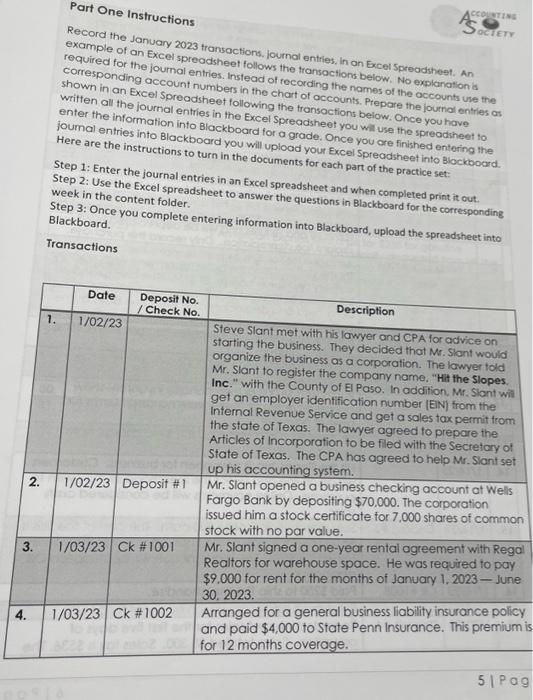
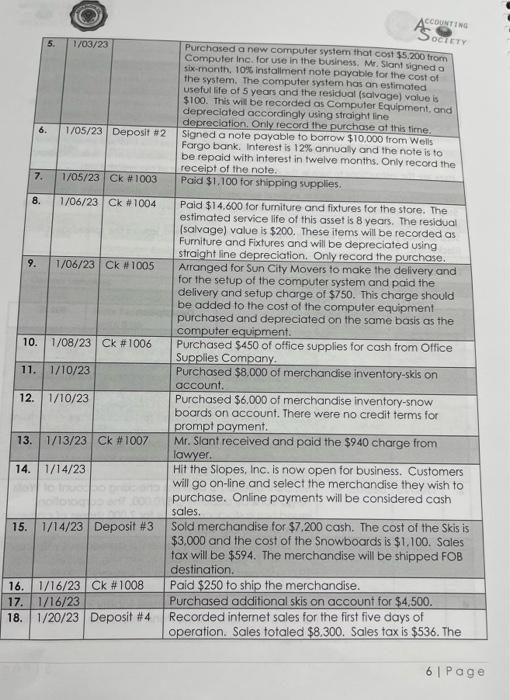
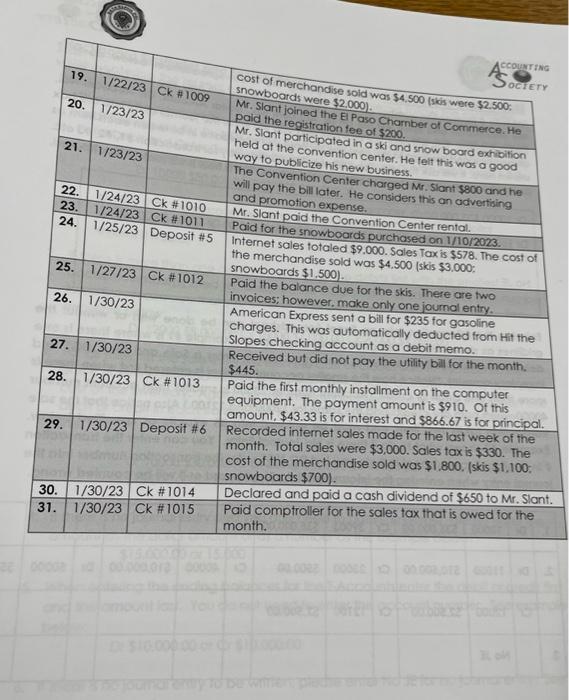
Part One Instructions Record the Janvary 2023 transoctions, journol entries, in an Excel Spreadsheet. An example of an Excel spreadsheet follows the fransoctions below. No explanation id required for the joumal entries. Instead of recording the names of the accounts use the shown in an Excel Spreadsheet following the tronsocounts. Prepare the journd entries as written all the journal entries in the Excel Spreadshections below. Once you have enter the information into Blackboard for a gradsheet you will use the spreadsheet to joumal entries into Blackboard you will up a grade. Once you ore finished entering the Here are the instructions to turn in the documen your Excel Spreadsheet into Blockboard. ocuments for each part of the practice set: Step 2: Use the Excel spreadsh in an Excel spreadsheet and when completed print it out. week in the content folder. Step 3: Once you complete entering information into Blackboard, upload the spreadsheet into Blackboard. Transactions Part One Instructions Record the Janvary 2023 transoctions, journol entries, in an Excel Spreadsheet. An example of an Excel spreadsheet follows the fransoctions below. No explanation id required for the joumal entries. Instead of recording the names of the accounts use the shown in an Excel Spreadsheet following the tronsocounts. Prepare the journd entries as written all the journal entries in the Excel Spreadshections below. Once you have enter the information into Blackboard for a gradsheet you will use the spreadsheet to joumal entries into Blackboard you will up a grade. Once you ore finished entering the Here are the instructions to turn in the documen your Excel Spreadsheet into Blockboard. ocuments for each part of the practice set: Step 2: Use the Excel spreadsh in an Excel spreadsheet and when completed print it out. week in the content folder. Step 3: Once you complete entering information into Blackboard, upload the spreadsheet into Blackboard. Transactions
Step by Step Solution
There are 3 Steps involved in it

Get step-by-step solutions from verified subject matter experts