







Question: Please help with this Java Assignment: Extra credit: In this assignment you will create a JAVA PROGRAM with simple menu driven application that would be
Please help with this Java Assignment: 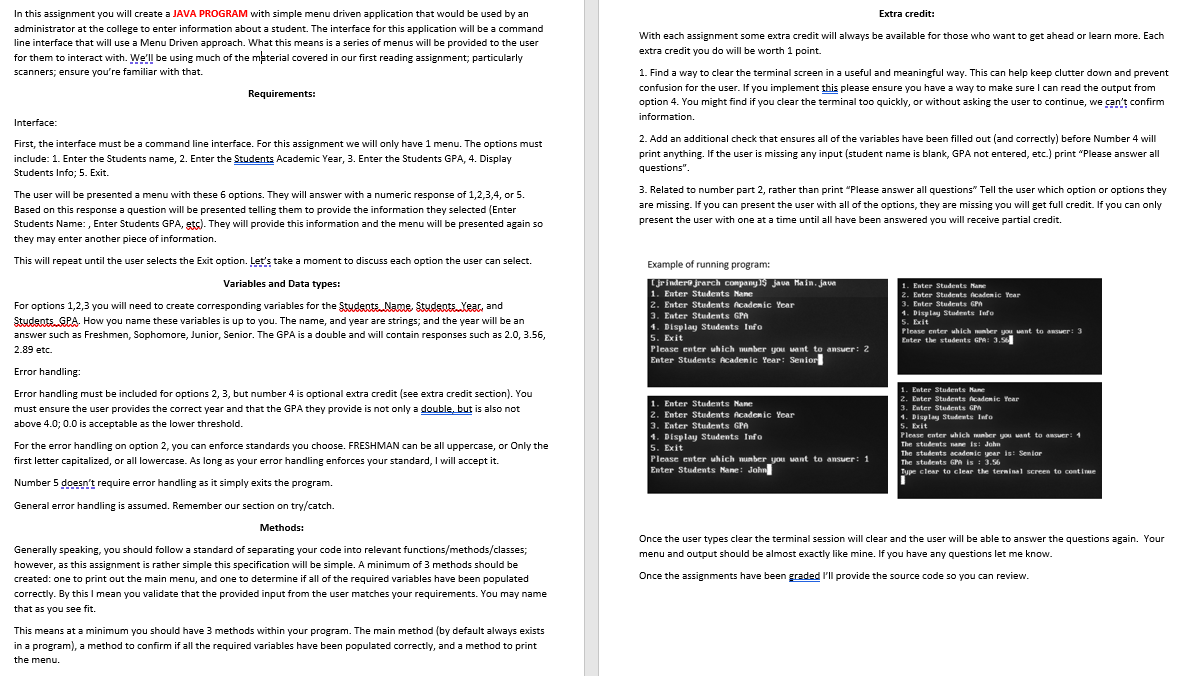
Extra credit: In this assignment you will create a JAVA PROGRAM with simple menu driven application that would be used by an administrator at the college to enter information about a student. The interface for this application will be a command line interface that will use a Menu Driven approach. What this means is a series of menus will be provided to the user for them to interact with. We'll be using much of the mterial covered in our first reading assignment, particularly scanners; ensure you're familiar with that. Requirements: With each assignment some extra credit will always be available for those who want to get ahead or learn more. Each extra credit you do will be worth 1 point. Interface 1. Find a way to clear the terminal screen in a useful and meaningful way. This can help keep clutter down and prevent confusion for the user. If you implement this please ensure you have a way to make sure I can read the output from option 4. You might find if you clear the terminal too quickly, or without asking the user to continue, we can't confirm information. 2. Add an additional check that ensures all of the variables have been filled out and correctly) before Number 4 will print anything. If the user is missing any input (student name is blank, GPA not entered, etc.) print "Please answer all questions". First, the interface must be a command line interface. For this assignment we will only have 1 menu. The options must include: Enter the Students name, 2. Enter the Students Academic Year, 3. Enter the Students GPA, 4. Display Students Info: 5. Exit. 3. Related to number part 2, rather than print "Please answer all questions" Tell the user which option or options they are missing. If you can present the user with all of the options, they are missing you will get full credit. If you can only present the user with one at a time until all have been answered you will receive partial credit. The user will be presented a menu with these 6 options. They will answer with a numeric response of 1,2,3,4, or 5. Based on this response a question will be presented telling them to provide the information they selected (Enter Students Name:, Enter Students GPA, Sts). They will provide this information and the menu will be presented again so they may enter another piece of information. This will repeat until the user selects the Exit option. Let's take a moment to discuss each option the user can select. Variables and Data types: For options 1,2,3 you will need to create corresponding variables for the Students. Name Students lear, and Students. GPA. How you name these variables is up to you. The name, and year are strings; and the year will be an answer such as Freshmen, Sophomore, Junior, Senior. The GPA is a double and will contain responses such as 2.0, 3.56, 2.89 etc. Example of running program: CjFindere jrarch company s java Hain.jave 1. Enter Students Mane 2. Enter Students Academic Year 3. Enter Students GP 4. Display Students Info 5. Exit Please enter which wunber you want to answer: 2 Enter Students Academic Year: Senior Enter Students Mare 2. Enter Students Academic Year 3. Enter Students GP 1. Display Students tufo 5. Exit Please enter which ber you want to answer: 3 Duter the students Gr 3.5 Error handling: Error handling must be included for options 2, 3, but number 4 is optional extra credit (see extra credit section). You must ensure the user provides the correct year and that the GPA they provide is not only a double, but is also not above 4.0; 0.0 is acceptable as the lower threshold. For the error handling on option 2, you can enforce standards you choose. FRESHMAN can be all uppercase, or Only the first letter capitalized, or all lowercase. As long as your error handling enforces your standard, I will accept it. Number 5 doesn't require error handling as it simply exits the program. General error handling is assumed. Remember our section on try/catch. 1. Enter Students Mane 2. Enter Students Academic Year 3. Enter Students GPA 1. Display Students Info 5. Exit Please enter which number you want to ansuer: 1 Enter Students Mane: John 1. Enter Students Mane 2. Enter Students Academic Year 3. Enter Students GP 1. Display Students lufo 5. Exit Please enter which ber you want to answer: 1 The students name is John The students academic year ist Senior The students Gris 13.56 Type clear to clear the terminal screen to continue Methods: Generally speaking, you should follow a standard of separating your code into relevant functions/methods/classes; however, as this assignment is rather simple this specification will be simple. A minimum of 3 methods should be created: one to print out the main menu, and one to determine if all of the required variables have been populated correctly. By this I mean you validate that the provided input from the user matches your requirements. You may name that as you see fit. Once the user types clear the terminal session will clear and the user will be able to answer the questions again. Your menu and output should be almost exactly like mine. If you have any questions let me know. . Once the assignments have been graded I'll provide the source code so you can review. This means at a minimum you should have 3 methods within your program. The main method (by default always exists in a program), a method to confirm if all the required variables have been populated correctly, and a method to print the menu
Step by Step Solution
There are 3 Steps involved in it

Get step-by-step solutions from verified subject matter experts
 Study Help