







Question: Please help with this SQL Code Refer to the address, store, staff, and customer tables of the Sakila database. In this lab, these tables initially
Please help with this SQL Code
Refer to the address, store, staff, and customer tables of the Sakila database. In this lab, these tables initially have the same
columns as in Sakila, however some constraints are different.
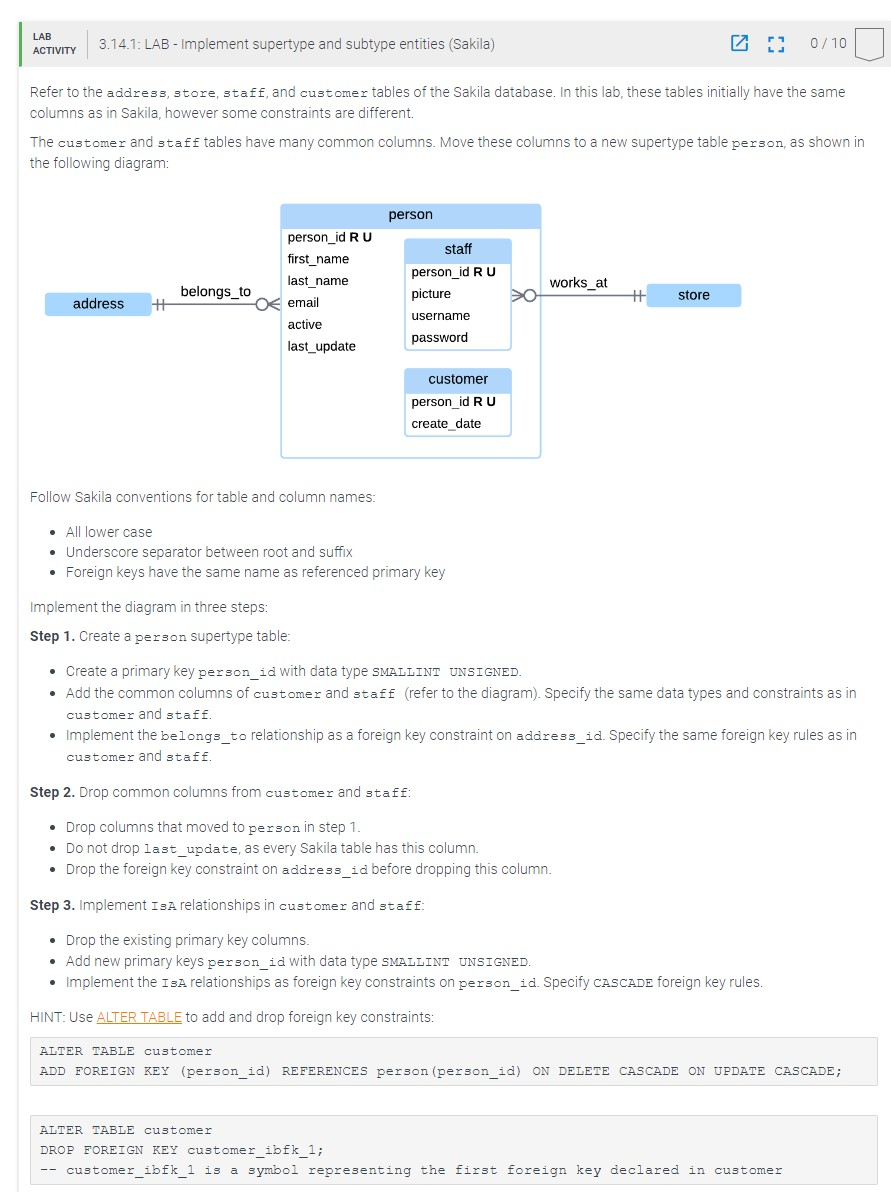
The customer and staff tables have many common columns. Move these columns to a new supertype table person, as shown in
the following diagram:
addr
Follow Sakila conventions for table and column names:
All lower case
Underscore separator between root and suffix
Foreign keys have the same name as referenced primary key
Implement the diagram in three steps:
Step Create a person supertype table:
Create a primary key personid with data type SMALIINT uNSIGNED.
Add the common columns of customer and staff refer to the diagram Specify the same data types and constraints as in
customer and staff.
Implement the belongsto relationship as a foreign key constraint on addressid Specify the same foreign key rules as in
customer and staff.
Step Drop common columns from customer and staff:
Drop columns that moved to person in step
Do not drop lastupdate, as every Sakila table has this column.
Drop the foreign key constraint on addressid before dropping this column.
Step Implement IsA relationships in customer and staff:
Drop the existing primary key columns.
Add new primary keys personid with data type SMALLINT UNSIGNED.
Implement the IsA relationships as foreign key constraints on personid Specify CASCADE foreign key rules.
HINT: Use ALTER TABLE to add and drop foreign key constraints:
ALTER TABLE customer
ADD FOREIGN KEY personid REFERENCES person personid ON DELETE CASCADE ON UPDATE CASCADE;
ALTER TABLE customer
DROP FOREIGN KEY customeribfk;
customeribfk is a symbol representing the first foreign key declared in customer
Step by Step Solution
There are 3 Steps involved in it
1 Expert Approved Answer
Step: 1 Unlock

Question Has Been Solved by an Expert!
Get step-by-step solutions from verified subject matter experts
Step: 2 Unlock
Step: 3 Unlock
 Study Help