







Question: PLease help write Arduino code thank you (Include the following libraries; reference chapter 2 lecture slide #2) Include the Servo.h library Include the IRremote.h library.
PLease help write Arduino code thank you
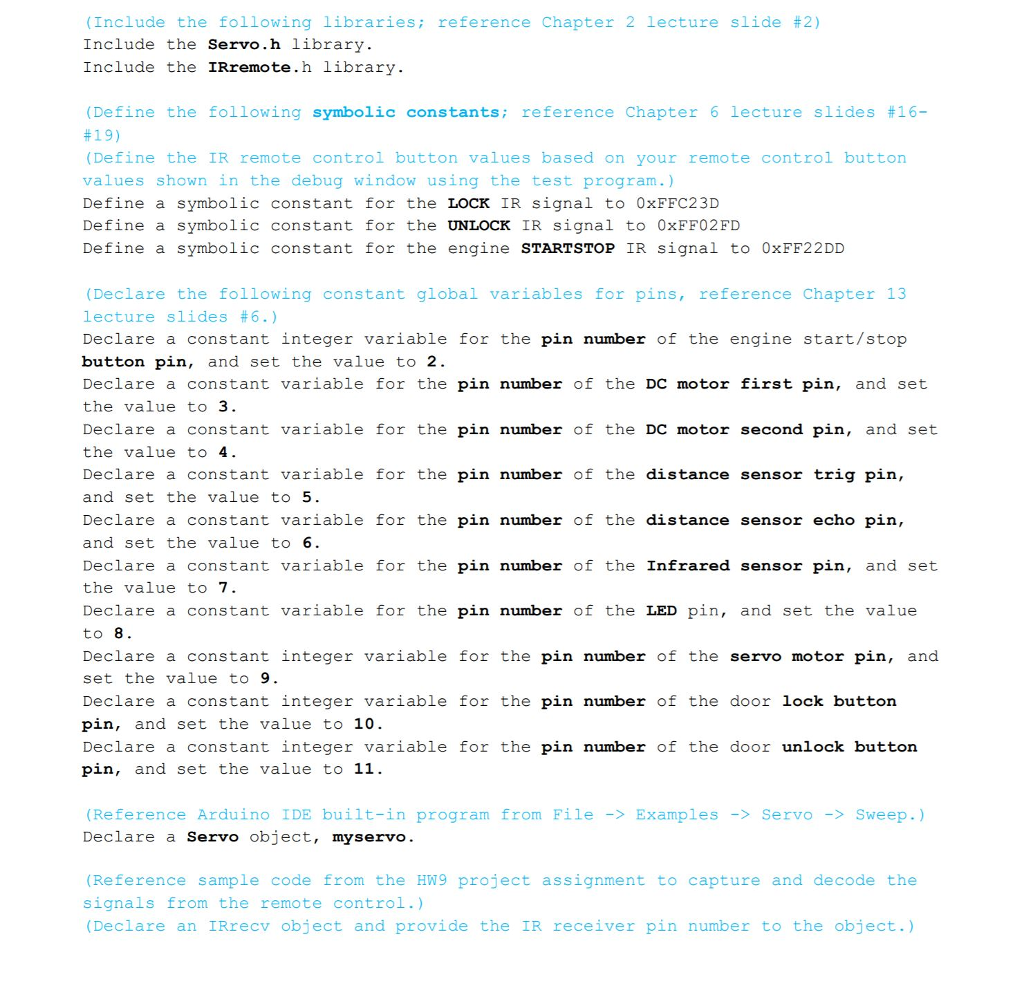
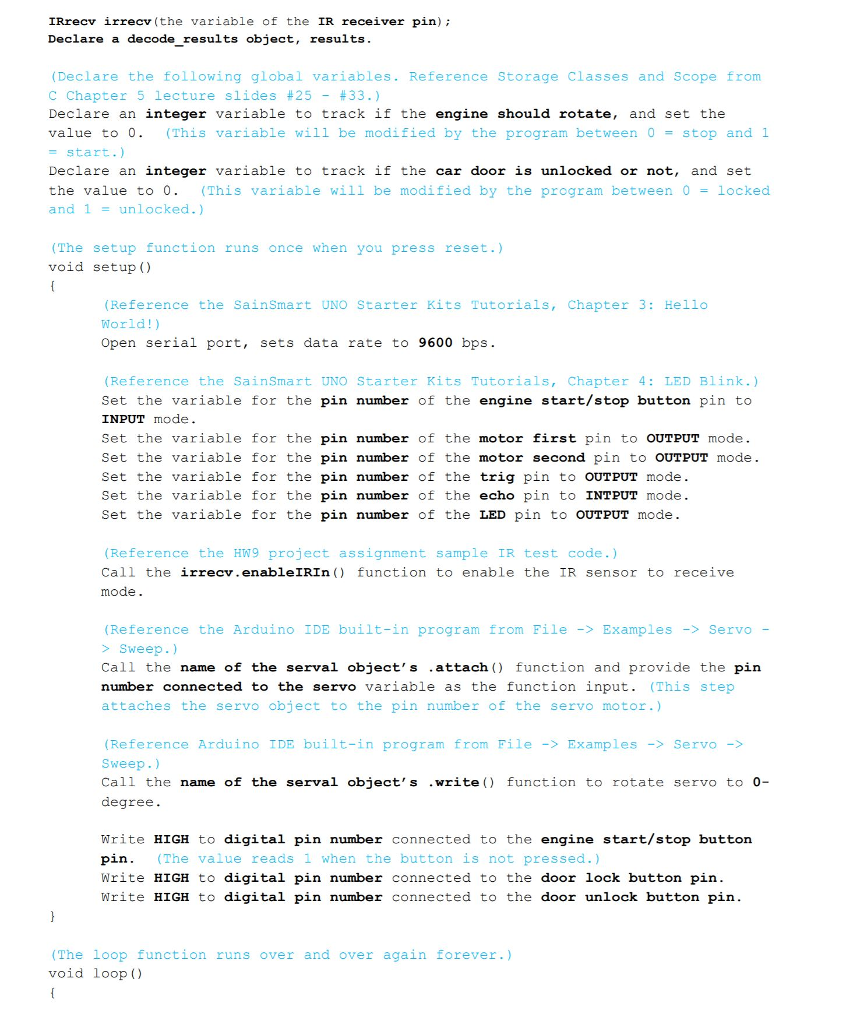
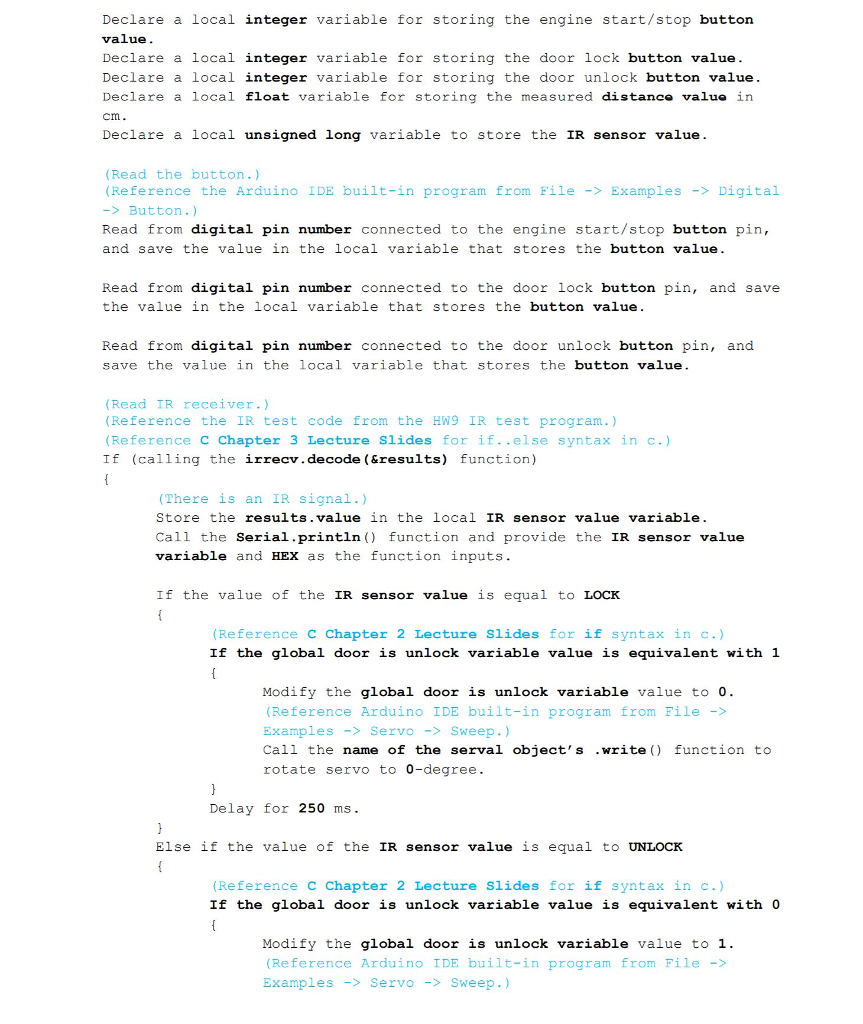
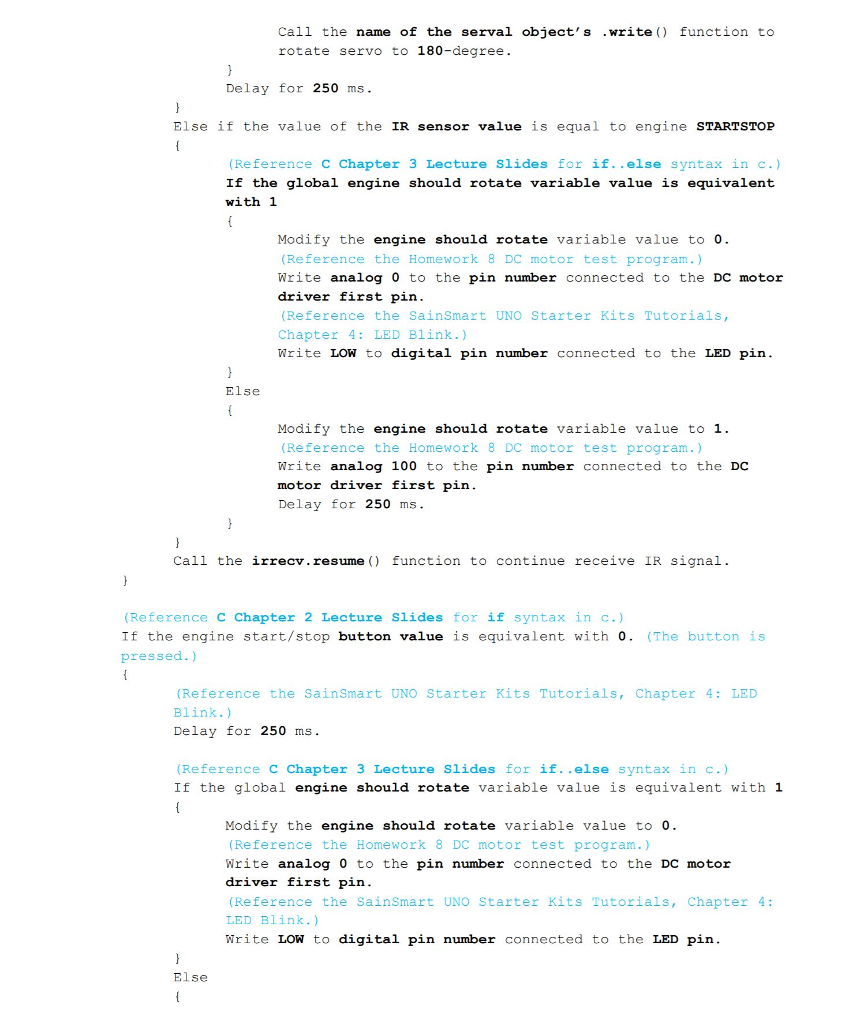
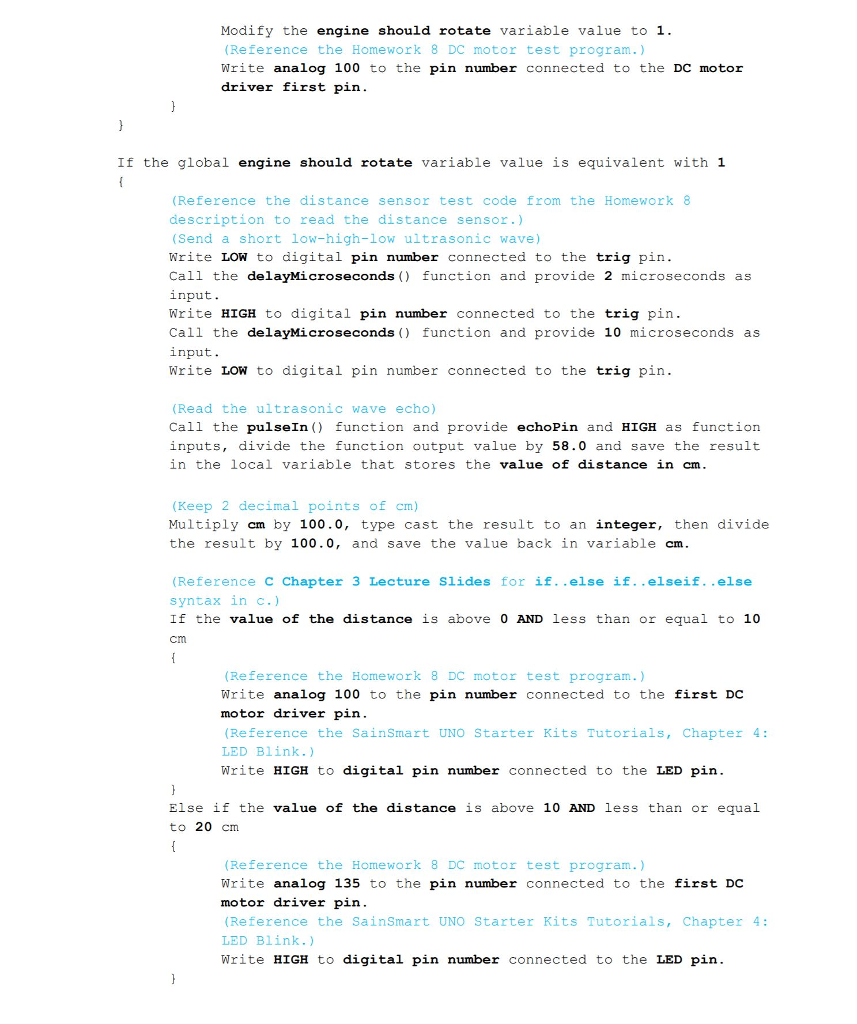
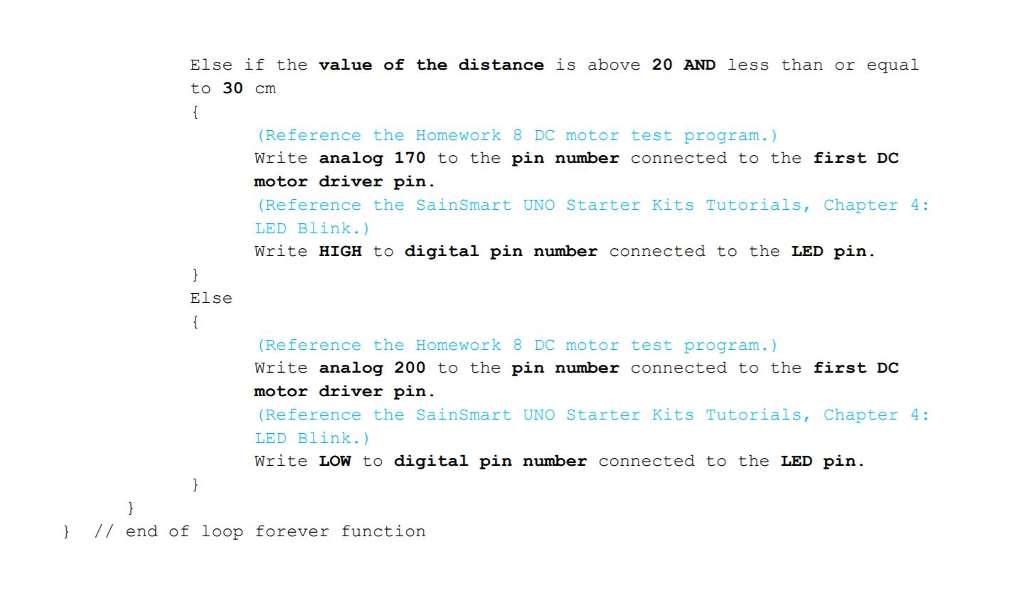
(Include the following libraries; reference chapter 2 lecture slide #2) Include the Servo.h library Include the IRremote.h library. (Define the following symbolic constants ; reference Chapter 6 lecture slides #16- #19) (Define the IR remote control button values based on your remote control button values shown in the debug window using the test program.) Define a symbolic constant for the LOCK IR signal to 0xFFC23D Define a symbolic constant for the UNLoCK IR signal to 0xFF02FD Define a symbolic constant for the engine STARTSTOP IR signal to 0xFF22DD (Declare the following constant global variables for pins, reference Chapter 13 lecture slides #6.) Declare a constant integer variable for the pin number of the engine start/stop button pin, and set the value to 2 Declare a constant variable for the pin number of the DC motor first pin, and set the value to 3. Declare a constant variable for the pin number of the DC motor second pin, and set the value to 4 Declare a constant variable for the pin number of the distance sensor trig pin and set the value to 5 Declare a constant variable for the pin number of the distance sensor echo pin, and set the value to6 Declare a constant variable for the pin number of the Infrared sensor pin, and set the value to 7. Declare a constant variable for the pin number of the LED pin, and set the value to 8 Declare a constant integer variable for the pin number of the servo motor pin, and set the value to 9. Declare a constant integer variable f?r the pin number of the door lock button pin, and set the value to 10 Declare a constant integer variable for the pin number of the door unlock button pin, and set the value to 11. (Reference Arduino IDE built-in program from File ->Examples -> Servo -> Sweep.) Declare a Servo object, myservo (Reference sample code from the HW9 project assignment to capture and decode the signals from the remote control.) (Declare an IRrecv object and provide the IR receiver pin number to the object.) (Include the following libraries; reference chapter 2 lecture slide #2) Include the Servo.h library Include the IRremote.h library. (Define the following symbolic constants ; reference Chapter 6 lecture slides #16- #19) (Define the IR remote control button values based on your remote control button values shown in the debug window using the test program.) Define a symbolic constant for the LOCK IR signal to 0xFFC23D Define a symbolic constant for the UNLoCK IR signal to 0xFF02FD Define a symbolic constant for the engine STARTSTOP IR signal to 0xFF22DD (Declare the following constant global variables for pins, reference Chapter 13 lecture slides #6.) Declare a constant integer variable for the pin number of the engine start/stop button pin, and set the value to 2 Declare a constant variable for the pin number of the DC motor first pin, and set the value to 3. Declare a constant variable for the pin number of the DC motor second pin, and set the value to 4 Declare a constant variable for the pin number of the distance sensor trig pin and set the value to 5 Declare a constant variable for the pin number of the distance sensor echo pin, and set the value to6 Declare a constant variable for the pin number of the Infrared sensor pin, and set the value to 7. Declare a constant variable for the pin number of the LED pin, and set the value to 8 Declare a constant integer variable for the pin number of the servo motor pin, and set the value to 9. Declare a constant integer variable f?r the pin number of the door lock button pin, and set the value to 10 Declare a constant integer variable for the pin number of the door unlock button pin, and set the value to 11. (Reference Arduino IDE built-in program from File ->Examples -> Servo -> Sweep.) Declare a Servo object, myservo (Reference sample code from the HW9 project assignment to capture and decode the signals from the remote control.) (Declare an IRrecv object and provide the IR receiver pin number to the object.)
Step by Step Solution
There are 3 Steps involved in it

Get step-by-step solutions from verified subject matter experts
 Study Help