







Question: please i need help 3 . Justin received a request from another employee who wants to take a training course and wants to delete any
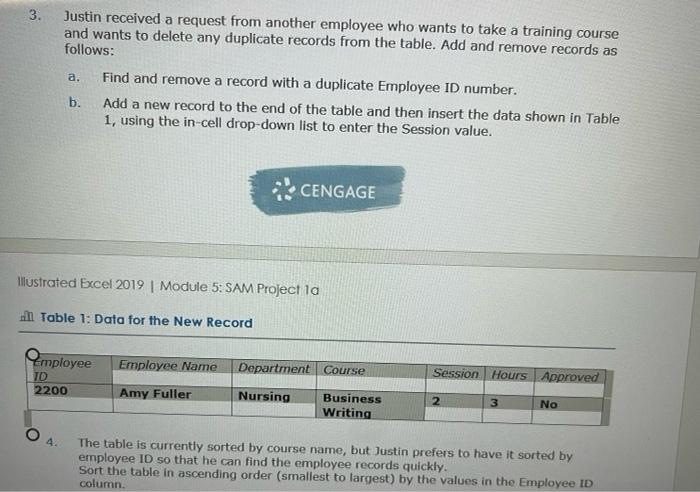
3 . Justin received a request from another employee who wants to take a training course and wants to delete any duplicate records from the table. Add and remove records as follows: Find and remove a record with a duplicate Employee ID number. b. Add a new record to the end of the table and then insert the data shown in Table 1, using the in-cell drop-down list to enter the Session value. a. CENGAGE Illustrated Excel 2019 | Module 5: SAM Project la . Table 1: Data for the New Record Employee Employee Name Department Course Session Hours Approved TD 2200 Amy Fuller Nursing Business Writing 2 3 No 4. The table is currently sorted by course name, but Justin prefers to have it sorted by employee ID so that he can find the employee records quickly. Sort the table in ascending order (smallest to largest) by the values in the Employee ID column. 3 . Justin received a request from another employee who wants to take a training course and wants to delete any duplicate records from the table. Add and remove records as follows: Find and remove a record with a duplicate Employee ID number. b. Add a new record to the end of the table and then insert the data shown in Table 1, using the in-cell drop-down list to enter the Session value. a. CENGAGE Illustrated Excel 2019 | Module 5: SAM Project la . Table 1: Data for the New Record Employee Employee Name Department Course Session Hours Approved TD 2200 Amy Fuller Nursing Business Writing 2 3 No 4. The table is currently sorted by course name, but Justin prefers to have it sorted by employee ID so that he can find the employee records quickly. Sort the table in ascending order (smallest to largest) by the values in the Employee ID column
Step by Step Solution
There are 3 Steps involved in it

Get step-by-step solutions from verified subject matter experts
 Study Help