







Question: please I need you to do the example in excel please do not write it to me PLEASE I NEED YOU TO DO THE EXAMPLE
please I need you to do the example in excel please do not write it to me
PLEASE I NEED YOU TO DO THE EXAMPLE IN "EXCEL" DO NOT WRITE IT TO ME. EXPLAIN EACH STEP WITH EXCEL SHEET. THANK YOU
Part 2
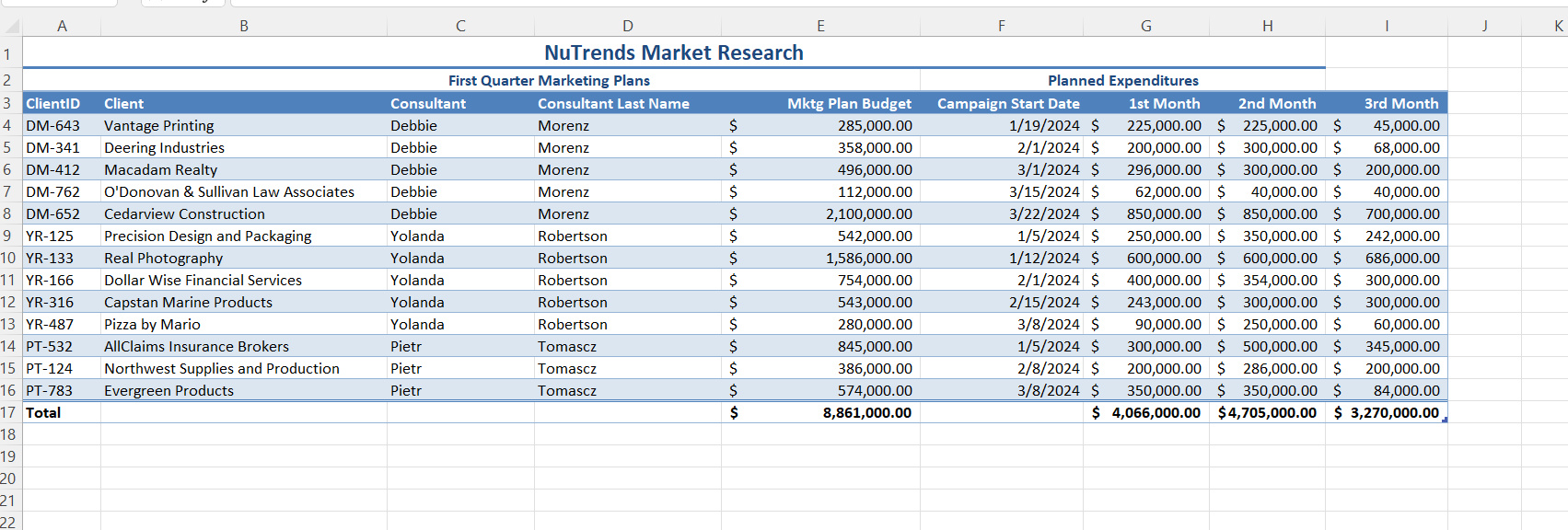
Rajiv would like statistics for each consultant added to 3-NuTrendsMktPlans.xlsx. Save the workbook with the name 3-NuTrendsMktPlans-2. Specifically, Rajiv would like to see the following information:
The total marketing plan budget values being managed by each consultant, as well as the total planned expenditures by month
The average marketing plan budget being managed by each consultant, as well as the average planned expenditures by month
Rajiv would like only the total and average values for each consultant, as well as the grand average and grand total. Save the workbook. Preview and then close the worksheet.
Part 3
Rajiv has asked you to modify the report from the file named NuTrendsMktPlans-2.xlsx. Save the workbook with the name 3-NuTrendsMktPlans-3. Specifically, Rajiv would like the following changes:
Apply bold formatting to the average and total amounts and currency formatting with no digits after the decimal point.
Use the group function to hide data in the ClientID, Client, Consultant, and First Name columns.
Use the group function to hide data in the Campaign Start Date column.
Expand the data in the Morenz and Tomascz columns.
Part 4
Rajiv is looking for information on current salary ranges for market researchers in the United States. Use the internet to find this information. If possible, find salary information that is specific to your state for a minimum of three cities or regions. Find a low salary and a high salary for a market researcher in each city or region. Input this information in a new workbook and save it with the name 3-NuTrendsSalaryAnalysis. Include in the workbook the website addresses as hyperlinked cells next to the items about salary ranges. Organize the data in the workbook as a table. Apply table formatting so the data is attractively presented and easy to read. Add a Total row and include an Average function to find the average salary from the three cities. Find a minimum of three and a maximum of five resources. Save the workbook. Preview the worksheet and then close the workbook.
Step by Step Solution
There are 3 Steps involved in it

Get step-by-step solutions from verified subject matter experts
 Study Help