







Question: Please include cell reference Always use cell references and formulas where approprlate to recelve full credit. If you copy/paste from the Instructions tab you will
Please include cell reference
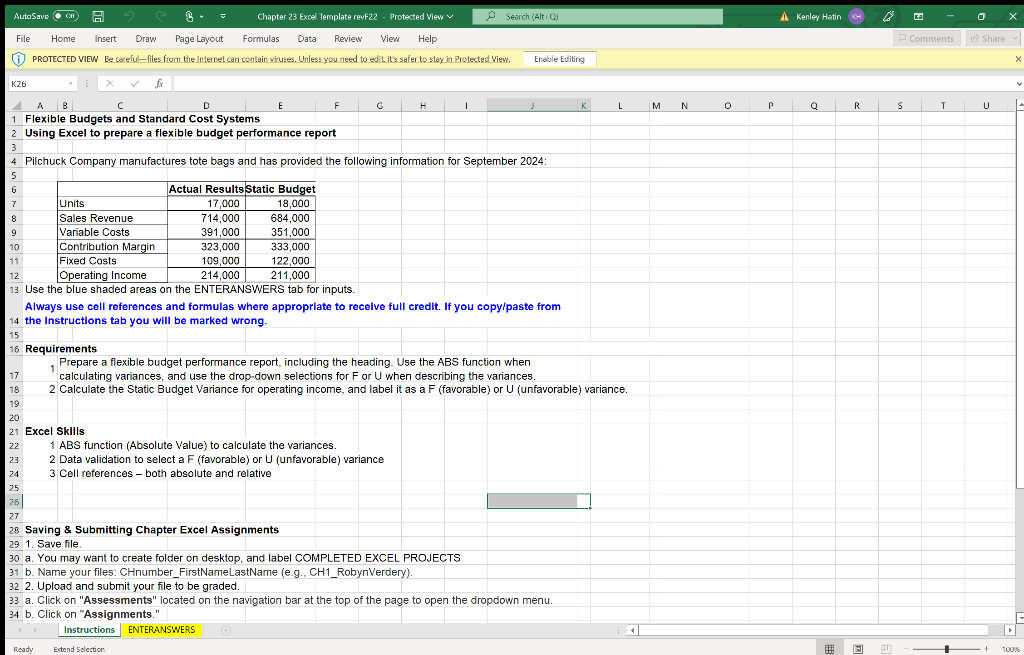
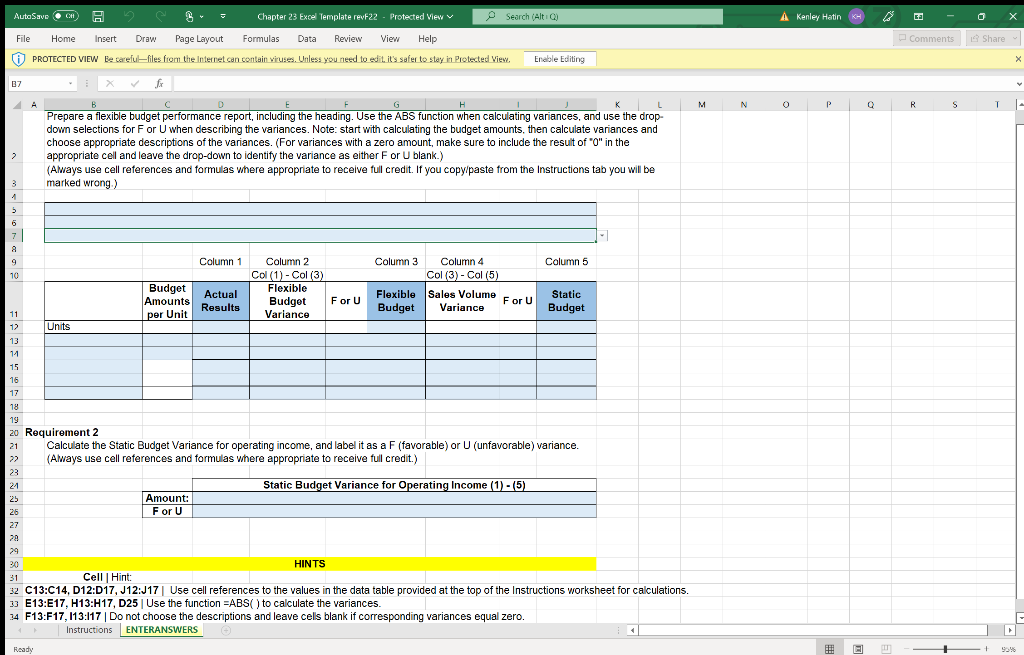
Always use cell references and formulas where approprlate to recelve full credit. If you copy/paste from the Instructions tab you will be marked wrong. Requirements 1 Prepare a flexible budget performance report, including the heading. Use the ABS function when calculating variances, and use the drop-down selections for F or U when describing the variances. 2 Calculate the Static Budget Variance for operating income, and label it as a F (favorable) or U (unfavorable) variance. Excel Skills 1 ABS function (Absolute Value) to calculate the variances. 2 Data validation to select a F (favorable) or U (unfavorable) variance 3 Cell references - both absolute and relative Saving \& Submitting Chapter Excel Assignments 1. Save file. a. You may want to create folder on desktop, and label COMPLETED EXCEL PROJECTS b. Name your files: CHnumber_FirstNameLastName (e.g., CH1_RobynVerdery). 2. Upload and submit your file to be graded. a. Click on "Assessments" located on the navigation bar at the top of the page to open the dropdown menu. b. Click on "Assignments." Requirement 2 Calculate the Static Budget Variance for operating income, and label it as a F (favorable) or U (unfavorable) variance. (Always use cell references and formulas where appropriate to receive full credit.) \begin{tabular}{|c|c|c|} \cline { 3 - 4 } 23 & (Always use cell references and formulas where appropriate to receive full credit.) \\ \hline 24 & Amount: \\ \hline 23 & F or U & \\ \hline 26 & & \\ \hline \end{tabular} Cell |Hint: HINTS C13:C14, D12:D17, J12:J17 Use cell references to the values in the data table provided at the top of the Instructions worksheet for calculations. E13:E17, H13:H17, D25 | Use the function =ABS ( ) to calculate the variances. 74. F13:F17, I13:117 | Do not choose the descriptions and leave cels blank if corresponding variances equal zero. \begin{tabular}{l|l} Instructions & ENTERANSWERS \\ \cline { 2 - 3 } & \end{tabular} Always use cell references and formulas where approprlate to recelve full credit. If you copy/paste from the Instructions tab you will be marked wrong. Requirements 1 Prepare a flexible budget performance report, including the heading. Use the ABS function when calculating variances, and use the drop-down selections for F or U when describing the variances. 2 Calculate the Static Budget Variance for operating income, and label it as a F (favorable) or U (unfavorable) variance. Excel Skills 1 ABS function (Absolute Value) to calculate the variances. 2 Data validation to select a F (favorable) or U (unfavorable) variance 3 Cell references - both absolute and relative Saving \& Submitting Chapter Excel Assignments 1. Save file. a. You may want to create folder on desktop, and label COMPLETED EXCEL PROJECTS b. Name your files: CHnumber_FirstNameLastName (e.g., CH1_RobynVerdery). 2. Upload and submit your file to be graded. a. Click on "Assessments" located on the navigation bar at the top of the page to open the dropdown menu. b. Click on "Assignments." Requirement 2 Calculate the Static Budget Variance for operating income, and label it as a F (favorable) or U (unfavorable) variance. (Always use cell references and formulas where appropriate to receive full credit.) \begin{tabular}{|c|c|c|} \cline { 3 - 4 } 23 & (Always use cell references and formulas where appropriate to receive full credit.) \\ \hline 24 & Amount: \\ \hline 23 & F or U & \\ \hline 26 & & \\ \hline \end{tabular} Cell |Hint: HINTS C13:C14, D12:D17, J12:J17 Use cell references to the values in the data table provided at the top of the Instructions worksheet for calculations. E13:E17, H13:H17, D25 | Use the function =ABS ( ) to calculate the variances. 74. F13:F17, I13:117 | Do not choose the descriptions and leave cels blank if corresponding variances equal zero. \begin{tabular}{l|l} Instructions & ENTERANSWERS \\ \cline { 2 - 3 } & \end{tabular}
Step by Step Solution
There are 3 Steps involved in it

Get step-by-step solutions from verified subject matter experts
 Study Help