







Question: Please include create the table, I just want to check the full status. Thank you very much. Table 1: EMP Table Emp No. Emp_name Salary
Please include create the table, I just want to check the full status. Thank you very much.
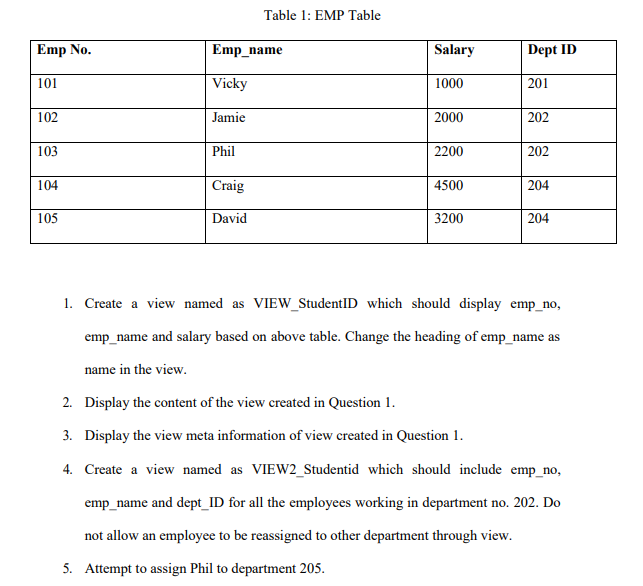
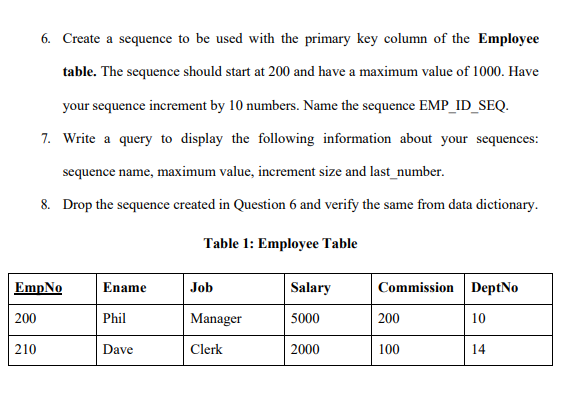
Table 1: EMP Table Emp No. Emp_name Salary Dept ID 101 Vicky 1000 201 102 Jamie 2000 202 103 Phil 2200 202 104 Craig 4500 204 105 David 3200 204 1. Create a view named as VIEW_StudentID which should display emp_no, emp_name and salary based on above table. Change the heading of emp_name as name in the view. 2. Display the content of the view created in Question 1. 3. Display the view meta information of view created in Question 1. 4. Create a view named as VIEW2_Studentid which should include emp_no, emp_name and dept_ID for all the employees working in department no. 202. Do not allow an employee to be reassigned to other department through view. 5. Attempt to assign Phil to department 205. 6. Create a sequence to be used with the primary key column of the Employee table. The sequence should start at 200 and have a maximum value of 1000. Have your sequence increment by 10 numbers. Name the sequence EMP_ID_SEQ. 7. Write a query to display the following information about your sequences: sequence name, maximum value, increment size and last_number. 8. Drop the sequence created in Question 6 and verify the same from data dictionary. Table 1: Employee Table EmpNo Ename Job Salary Commission DeptNo 200 Phil Manager 5000 200 10 210 Dave Clerk 2000 100 14
Step by Step Solution
There are 3 Steps involved in it

Get step-by-step solutions from verified subject matter experts
 Study Help