







Question: please include formulas A B D E F G H . - J K New Membership Sales 1 JAN FEB MAR TOTAL 4 2 3
 please include formulas
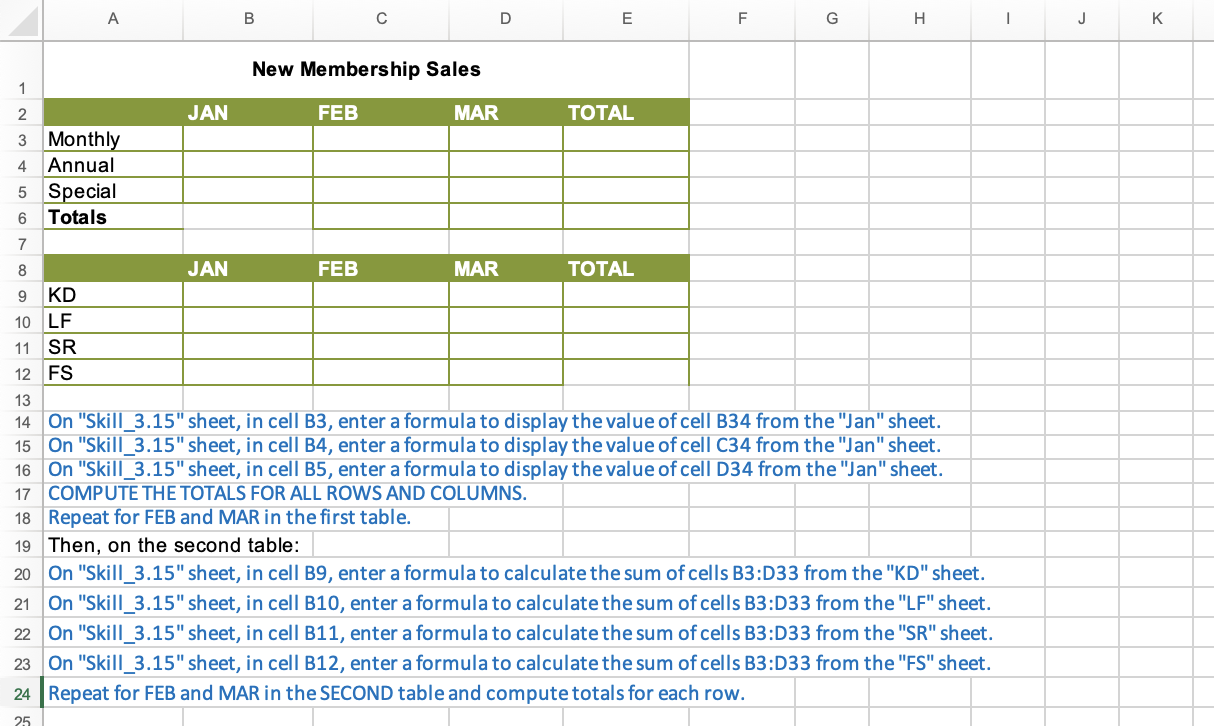
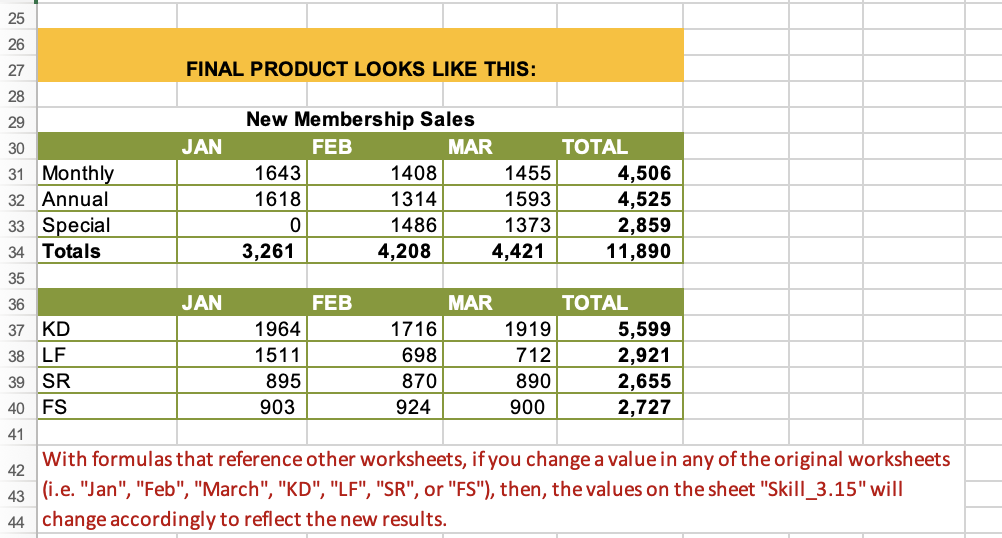
A B D E F G H . - J K New Membership Sales 1 JAN FEB MAR TOTAL 4 2 3 Monthly Annual 5 Special Totals 6 7 8 JAN FEB MAR TOTAL 9 KD 10 LF 11 SR 12 FS 13 14 On "Skill_3.15" sheet, in cell B3, enter a formula to display the value of cell B34 from the "Jan" sheet. 15 On "Skill_3.15" sheet, in cell B4, enter a formula to display the value of cell C34 from the "Jan" sheet. 16 On "Skill 3.15" sheet, in cell B5, enter a formula to display the value of cell D34 from the "Jan" sheet. 17 COMPUTE THE TOTALS FOR ALL ROWS AND COLUMNS. 18 Repeat for FEB and MAR in the first table. 19 Then, on the second table: 20 On "Skill_3.15" sheet, in cell B9, enter a formula to calculate the sum of cells B3:D33 from the "KD" sheet. 21 On "Skill_3.15" sheet, in cell B10, enter a formula to calculate the sum of cells B3:D33 from the "LF" sheet. 22 On "Skill_3.15" sheet, in cell B11, enter a formula to calculate the sum of cells B3:033 from the "SR" sheet. 23 On "Skill_3.15" sheet, in cell B12, enter a formula to calculate the sum of cells B3:D33 from the "ES" sheet. 24 Repeat for FEB and MAR in the SECOND table and compute totals for each row. 25 25 26 27 FINAL PRODUCT LOOKS LIKE THIS: 28 29 New Membership Sales 30 JAN FEB MAR TOTAL 31 Monthly 1643 1408 1455 4,506 32 Annual 1618 1314 1593 4,525 33 Special 0 1486 1373 2,859 34 Totals 3,261 4,208 4,421 11,890 35 36 JAN FEB MAR TOTAL 37 KD 1964 1716 1919 5,599 38 LF 1511 698 712 2,921 39 SR 895 870 890 2,655 40 FS 903 924 900 2,727 41 With formulas that reference other worksheets, if you change a value in any of the original worksheets 42 43 (i.e. "Jan", "Feb", "March", "KD", "LF", "SR", or "FS"), then, the values on the sheet "Skill_3.15" will 44 change accordingly to reflect the new results. A B D E F G H . - J K New Membership Sales 1 JAN FEB MAR TOTAL 4 2 3 Monthly Annual 5 Special Totals 6 7 8 JAN FEB MAR TOTAL 9 KD 10 LF 11 SR 12 FS 13 14 On "Skill_3.15" sheet, in cell B3, enter a formula to display the value of cell B34 from the "Jan" sheet. 15 On "Skill_3.15" sheet, in cell B4, enter a formula to display the value of cell C34 from the "Jan" sheet. 16 On "Skill 3.15" sheet, in cell B5, enter a formula to display the value of cell D34 from the "Jan" sheet. 17 COMPUTE THE TOTALS FOR ALL ROWS AND COLUMNS. 18 Repeat for FEB and MAR in the first table. 19 Then, on the second table: 20 On "Skill_3.15" sheet, in cell B9, enter a formula to calculate the sum of cells B3:D33 from the "KD" sheet. 21 On "Skill_3.15" sheet, in cell B10, enter a formula to calculate the sum of cells B3:D33 from the "LF" sheet. 22 On "Skill_3.15" sheet, in cell B11, enter a formula to calculate the sum of cells B3:033 from the "SR" sheet. 23 On "Skill_3.15" sheet, in cell B12, enter a formula to calculate the sum of cells B3:D33 from the "ES" sheet. 24 Repeat for FEB and MAR in the SECOND table and compute totals for each row. 25 25 26 27 FINAL PRODUCT LOOKS LIKE THIS: 28 29 New Membership Sales 30 JAN FEB MAR TOTAL 31 Monthly 1643 1408 1455 4,506 32 Annual 1618 1314 1593 4,525 33 Special 0 1486 1373 2,859 34 Totals 3,261 4,208 4,421 11,890 35 36 JAN FEB MAR TOTAL 37 KD 1964 1716 1919 5,599 38 LF 1511 698 712 2,921 39 SR 895 870 890 2,655 40 FS 903 924 900 2,727 41 With formulas that reference other worksheets, if you change a value in any of the original worksheets 42 43 (i.e. "Jan", "Feb", "March", "KD", "LF", "SR", or "FS"), then, the values on the sheet "Skill_3.15" will 44 change accordingly to reflect the new results
Step by Step Solution
There are 3 Steps involved in it

Get step-by-step solutions from verified subject matter experts
 Study Help