







Question: Please include step by step instructions for Excel. Fast is moving some employees into a newly renovated floor in one of their buildings. There are
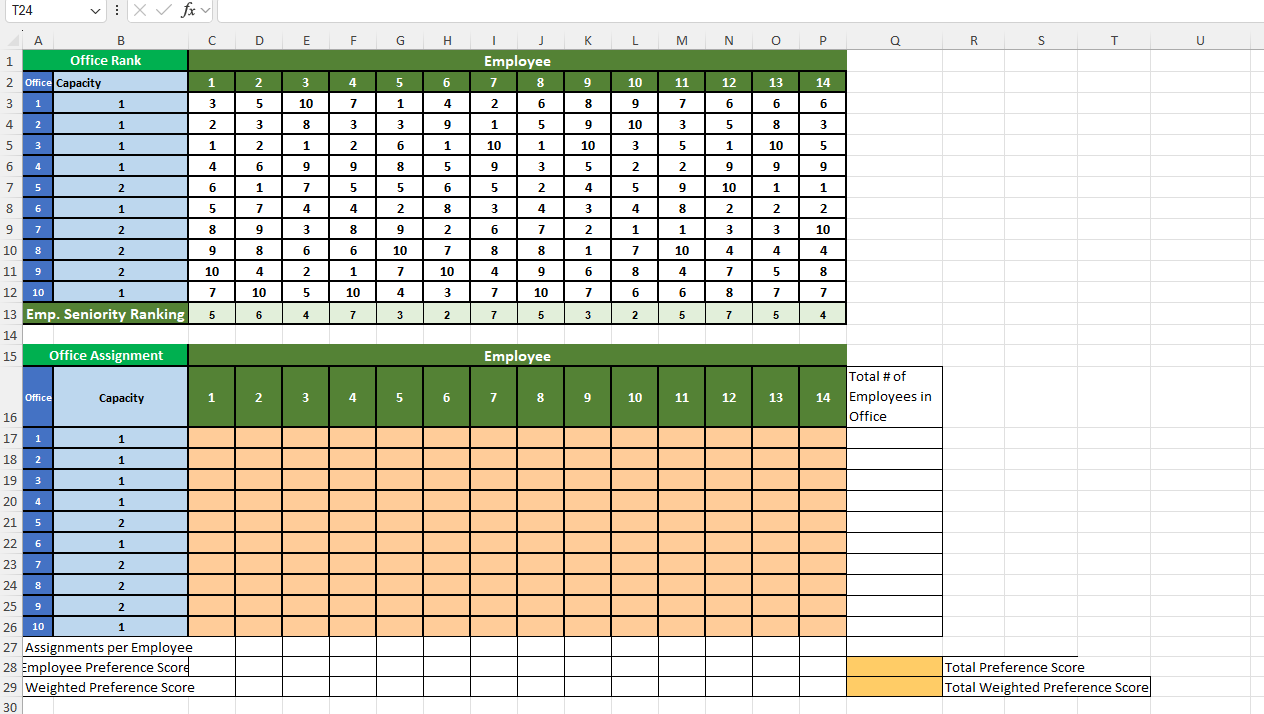
Please include step by step instructions for Excel. Fast is moving some employees into a newly renovated floor in one of their buildings. There are employees involved and there are offices on the renovated floor, four of which seat two people. The Fast HR Human Resources director knows happy employees are productive employees and let the staff members visit the new space and give their preference by a rank of first choice to last choice How should the HR manager assign the offices to maximize the preference of all employees?
Hints:
The decision variables are the employee office assignments.
The objective function would be to maximize the sum of preferences the employees get, eg if employee gets office and employee gets office the sum of their preferences would be
Assignments must be binary.
Employees and rankings are integers.
No employee can have more than office assignment.
Every employee must have an assignment.
Every office must be used to capacity, ie a person office must have employees assigned and person offices can only have employee assigned.
Some of the hints are constraints. Task a: State the objective function as a mathematical formula.
Task a: Identify all constraints.
Task a: Build an appropriate decision model in Excel.
Task a: Set up constraints with "left side" and "right side".
Task a: Binary constraints connected to model?
Task a: Solver dialog set up properly?
Task a: objective cell
Task a: constraints
Task a: correct engine
Task a: Solution stated or clearly identified. Problem b: Office Allocation with Seniority
The HR manager has decided to include consideration of the employees' seniority in the decision. Revise your decision model to include using the Employee Seniority Ranking to weight their preference scores. An employee's Preference Score with a higher Seniority Rank is worth more than an employee's Preference Score with a lower Seniority Rank. Rerun Solver to find a new solution.
Task b: State the objective function as a mathematical formula.
Task b: Identify all constraints.
Task b: Build an appropriate decision model in Excel.
Task b: Set up constraints with "left side" and "right side".
Task b: Binary constraints connected to model?
Task b: Solver dialog set up properly?
Task b: objective cell
Task b: constraints
Task b: correct engine
Task b: Solution stated or clearly identified.
Step by Step Solution
There are 3 Steps involved in it
1 Expert Approved Answer
Step: 1 Unlock

Question Has Been Solved by an Expert!
Get step-by-step solutions from verified subject matter experts
Step: 2 Unlock
Step: 3 Unlock
 Study Help