







Question: Please include the complete step-by-step solution. I shall be very grateful :| (http://wisenet.fau.edu/class/cop4331/book-code/Ch6/scene3/) Please include the complete step-by-step solution. I shall be very grateful :|
Please include the complete step-by-step solution. I shall be very grateful :|
(http://wisenet.fau.edu/class/cop4331/book-code/Ch6/scene3/)
Please include the complete step-by-step solution. I shall be very grateful :|
(http://wisenet.fau.edu/class/cop4331/book-code/Ch6/scene3/)
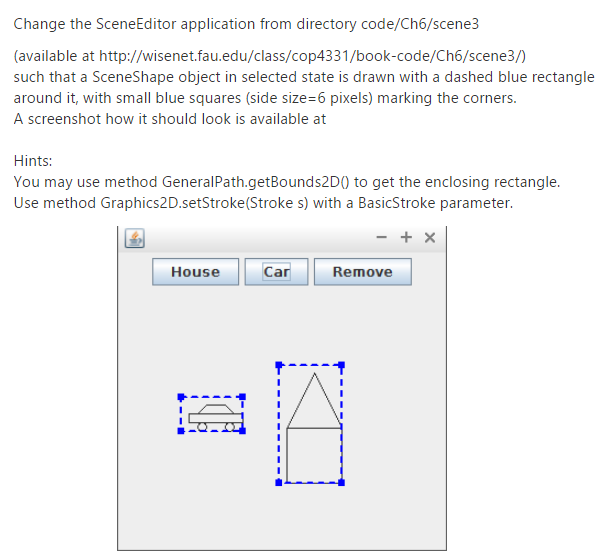
Change the SceneEditor application from directory code/Ch6/scene3 (available at http://wisenet.fau.edu/class/cop4331/book-code/Ch6/scene3/ such that a SceneShape object in selected state is drawn with a dashed blue rectangle around it, with small blue squares (side size 6 pixels) marking the corners A screenshot how it should look is available at Hints You may use method GeneralPath.getBounds2DO to get the enclosing rectangle Use method Graphics2D.setStroke(Stroke s) with a BasicStroke parameter. House Car Remove Change the SceneEditor application from directory code/Ch6/scene3 (available at http://wisenet.fau.edu/class/cop4331/book-code/Ch6/scene3/ such that a SceneShape object in selected state is drawn with a dashed blue rectangle around it, with small blue squares (side size 6 pixels) marking the corners A screenshot how it should look is available at Hints You may use method GeneralPath.getBounds2DO to get the enclosing rectangle Use method Graphics2D.setStroke(Stroke s) with a BasicStroke parameter. House Car Remove
Step by Step Solution
There are 3 Steps involved in it
To modify the SceneEditor application to draw a dashed blue rectangle around a selected SceneShape object follow these steps Stepbystep Solution Locat... View full answer

Get step-by-step solutions from verified subject matter experts
 Study Help