







Question: Please include the formats for the cells to type in the formula bar. Thank you B A D E F H G 26 27 if
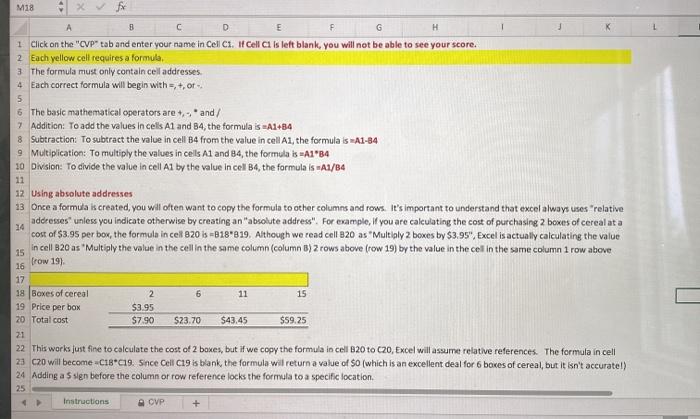
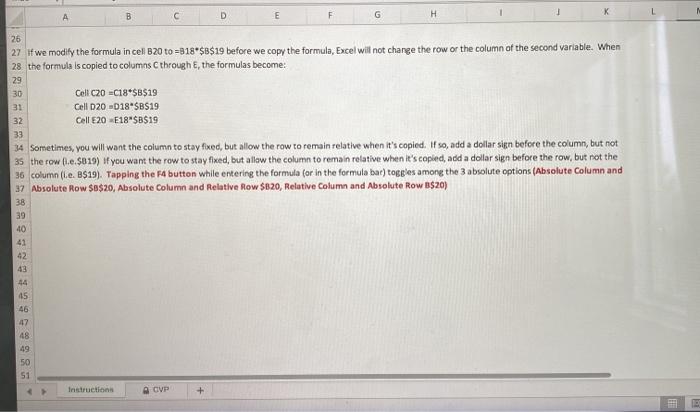
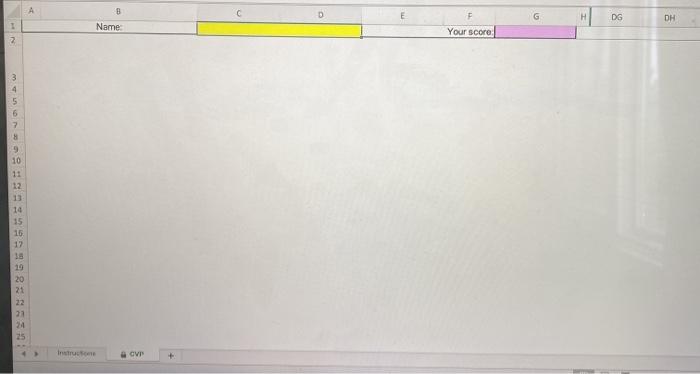
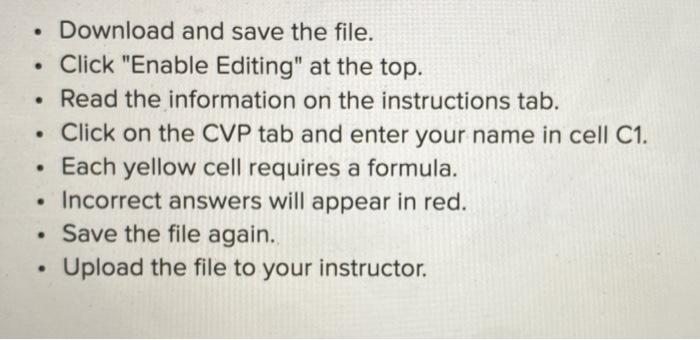
B A D E F H G 26 27 if we modify the formula in cell B20 to =B18*$B$19 before we copy the formula, Excel will not change the row or the column of the second variable. When 28 the formula is copied to columns through the formulas become: 29 30 Cell C20-C18*$B$19 31 Cell D20 -D18-SB$19 32 Cell E20E18"$B$19 33 34 Sometimes, you will want the column to stay fixed, but allow the row to remain relative when it's copied. If so, add a dollar sign before the column, but not 35 the row (..$819) If you want the row to stay fixed, but allow the column to remain relative when it's copied, add a dollar sign before the row, but not the 36 column (le. 8$19). Tapping the F4 button while entering the formula (or in the formula bar) toggles among the 3 absolute options (Absolute Column and 37 Absolute Row $0$20, Absolute Column and Relative Row $820, Relative Column and Absolute Row B$20) 38 39 40 42 45 46 47 48 49 50 51 Instructions CVP 8 D F DS DH Name Your score 2 3 4 5 6 7 8 9 10 11 12 13 14 15 15 19 20 21 22 23 24 25 avr . Download and save the file. Click "Enable Editing" at the top. Read the information on the instructions tab. Click on the CVP tab and enter your name in cell C1. Each yellow cell requires a formula. Incorrect answers will appear in red. Save the file again. Upload the file to your instructor. . B A D E F H G 26 27 if we modify the formula in cell B20 to =B18*$B$19 before we copy the formula, Excel will not change the row or the column of the second variable. When 28 the formula is copied to columns through the formulas become: 29 30 Cell C20-C18*$B$19 31 Cell D20 -D18-SB$19 32 Cell E20E18"$B$19 33 34 Sometimes, you will want the column to stay fixed, but allow the row to remain relative when it's copied. If so, add a dollar sign before the column, but not 35 the row (..$819) If you want the row to stay fixed, but allow the column to remain relative when it's copied, add a dollar sign before the row, but not the 36 column (le. 8$19). Tapping the F4 button while entering the formula (or in the formula bar) toggles among the 3 absolute options (Absolute Column and 37 Absolute Row $0$20, Absolute Column and Relative Row $820, Relative Column and Absolute Row B$20) 38 39 40 42 45 46 47 48 49 50 51 Instructions CVP 8 D F DS DH Name Your score 2 3 4 5 6 7 8 9 10 11 12 13 14 15 15 19 20 21 22 23 24 25 avr . Download and save the file. Click "Enable Editing" at the top. Read the information on the instructions tab. Click on the CVP tab and enter your name in cell C1. Each yellow cell requires a formula. Incorrect answers will appear in red. Save the file again. Upload the file to your instructor
Step by Step Solution
There are 3 Steps involved in it

Get step-by-step solutions from verified subject matter experts
 Study Help