







Question: please keep the note in mind when solving . thanks EXPERIMENT/EXERCISE NO: 3 TITLE OF EXPERIMENT/EXERCISE: Geometric Drawing Primitives Goal AIM/OBJECTIVE (similar to the manual):
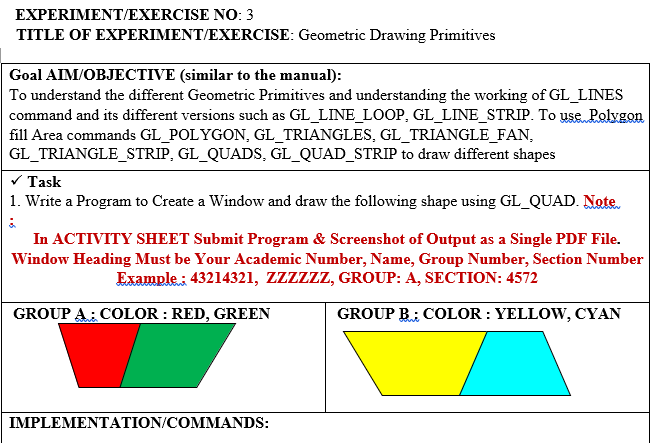 please keep the note in mind when solving . thanks
EXPERIMENT/EXERCISE NO: 3 TITLE OF EXPERIMENT/EXERCISE: Geometric Drawing Primitives Goal AIM/OBJECTIVE (similar to the manual): To understand the different Geometric Primitives and understanding the working of GL_LINES command and its different versions such as GL_LINE_LOOP, GL_LINE_STRIP. To use Polygon fill Area commands GL_POLYGON, GL_TRIANGLES, GL_TRIANGLE_FAN, GL_TRIANGLE_STRIP, GL_QUADS, GL_QUAD_STRIP to draw different shapes Task 1. Write a Program to Create a Window and draw the following shape using GL_QUAD. Note. 8 In ACTIVITY SHEET Submit Program & Screenshot of Output as a Single PDF File. Window Heading Must be Your Academic Number, Name, Group Number, Section Number Example: 43214321, ZzzzzZ, GROUP: A, SECTION: 4572 GROUP A; COLOR: RED, GREEN GROUP B.; COLOR: YELLOW, CYAN IMPLEMENTATION/COMMANDS: EXPERIMENT/EXERCISE NO: 3 TITLE OF EXPERIMENT/EXERCISE: Geometric Drawing Primitives Goal AIM/OBJECTIVE (similar to the manual): To understand the different Geometric Primitives and understanding the working of GL_LINES command and its different versions such as GL_LINE_LOOP, GL_LINE_STRIP. To use Polygon fill Area commands GL_POLYGON, GL_TRIANGLES, GL_TRIANGLE_FAN, GL_TRIANGLE_STRIP, GL_QUADS, GL_QUAD_STRIP to draw different shapes Task 1. Write a Program to Create a Window and draw the following shape using GL_QUAD. Note. 8 In ACTIVITY SHEET Submit Program & Screenshot of Output as a Single PDF File. Window Heading Must be Your Academic Number, Name, Group Number, Section Number Example: 43214321, ZzzzzZ, GROUP: A, SECTION: 4572 GROUP A; COLOR: RED, GREEN GROUP B.; COLOR: YELLOW, CYAN IMPLEMENTATION/COMMANDS
Step by Step Solution
There are 3 Steps involved in it

Get step-by-step solutions from verified subject matter experts
 Study Help